
Most churches don't run on a calendar. They run on memory and momentum. Somebody remembers that VBS registration usually opens "sometime in April," the finance person knows year-end statements are "due in January-ish," and the volunteer coordinator scrambles in early December because Christmas services snuck up again. It works — until it doesn't. Until the treasurer leaves, or attendance doubles, or two ministries book competing events on the same weekend and nobody caught it until it was too late.
The problem isn't effort. It's that the operating rhythm lives inside a few people's heads instead of on paper. A church annual operating calendar isn't just a wall planner with holidays marked — it's a decision system. One that tells you when to look at something, who owns the call, and what you're actually deciding: keep going, pause, or scale up.
This is the version I wish more churches had before things got tense. Not a list of dates. A rhythm with gates.
Why "we just know when things happen" breaks down
The informal calendar works fine at one scale and quietly collapses at another. A church of 120 people can survive on tribal knowledge because the same six people run everything and talk constantly. Coordination happens in the hallway.
Push that to 300 or 500 people across multiple services and ministries, and hallway conversations stop covering the gaps. Now you've got a children's director who doesn't know the finance team froze the equipment budget, a communications volunteer who missed that Easter moved earlier this year, and a board that finds out about a staffing shortfall three weeks too late to do anything about it.
The pattern worth noticing: these failures aren't dramatic. They're timing failures. The right decision made two months late. The audit that happened after the money was already spent. Volunteer surge planning that started when the surge was already underway.
A real operating calendar fixes timing failures by front-loading decisions. On this date, this named person looks at these numbers and makes a call. That's it. The magic isn't complexity — it's that the decision happens instead of getting deferred until it's an emergency.
The three moving parts of an operating rhythm
Before the month-by-month layout, you need three ingredients that make the calendar actually function instead of just look organized.
Simplify your church’s day-to-day operations.
Parshly helps you organize events, track donations, and engage your congregation—all in one place.
- Centralized member management
- Donation tracking & reporting
- Volunteer scheduling & notifications
No credit card required
Decision gates. Every recurring item gets one of three outcomes: approve (proceed as planned), pause (hold and reassess), or scale (add resources, expand, or accelerate). This forces a real decision instead of a passive "yeah, keep doing it." A gate without these three options is just a reminder, and reminders get ignored.
Named owners. Not "the finance team." A person. When something is owned by a team, it's owned by no one. Every calendar item needs a single name attached, even if that person delegates the work. They own the decision, not necessarily the labor.
Audit windows. Fixed points where you check that what's supposed to be happening is actually happening — money reconciled, background checks current, records accurate. These are scheduled, not triggered by suspicion. The whole point is catching drift before it becomes a problem.
Here's how those three interact in practice:
| Element | What it answers | Failure mode if missing |
|---|---|---|
| Decision gate | Do we approve, pause, or scale? | Programs run on autopilot past their usefulness |
| Named owner | Who makes the call? | Decisions stall, no accountability |
| Audit window | Is reality matching the plan? | Problems surface too late to fix cheaply |
| Capacity rule | What gives when resources are tight? | Overcommitment, volunteer burnout, dropped balls |
That last row — capacity trade-off rules — is the one most churches skip. It's where good calendars separate from decorative ones.
The 12-month operating calendar
This is built around a common church year: fall program launch, Advent/Christmas, spring/Easter, summer slowdown. Shift the months if your rhythm differs, but keep the sequence of gates intact.
January — Reset and reconcile
-
Owner Treasurer / finance lead
-
Gate Approve prior-year close; approve or revise current-year budget assumptions
-
Audit window Full reconciliation of restricted funds, designated gifts, and year-end contributions
-
Watch for The January giving cliff. December is often 15–20% of annual giving, and January routinely runs lean. Don't read a slow January as a crisis unless it's still slow in February.
If your finance roles and approval thresholds aren't clearly assigned, this is the month it shows. A non-accountant finance governance playbook is worth having in place before year-end close, not during it.
February — Volunteer health check
Post-holiday is when volunteer fatigue is real but quiet. People served hard through Advent and now they're running on fumes.
-
Owner Volunteer / ministry coordinator
-
Gate For each ministry team — approve (healthy), pause (rest and rebuild), or scale (recruit)
-
Audit window Background check expirations for the next 6 months; flag anything lapsing
-
Watch for Teams that look "fine" because one or two people are quietly covering three roles. That's a scale-or-pause decision, not an approve.
March — Spring surge preparation
Easter is the biggest attendance spike of the year for most churches — often 1.5–2x a normal Sunday. Preparation that starts in March works. Preparation that starts in April doesn't.
-
Owner Executive pastor / operations lead
-
Gate Approve Easter staffing and volunteer plan; decide on scaling front-of-house and children's capacity
-
Surge prep Lock volunteer schedules, confirm children's check-in capacity, plan parking and seating overflow
-
Watch for Children's ministry ratios. A doubled crowd with the same check-in staffing creates safety gaps, not just long lines.
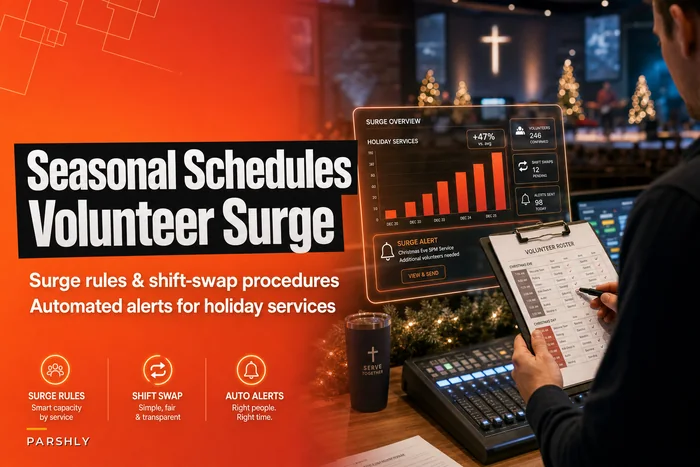
Your surge scheduling shouldn't be improvised each time. If you've built season-aware volunteer schedules with surge rules and shift-swap procedures, Easter becomes a known process instead of an annual panic.
April — Execute and observe
-
Owner Executive pastor / operations lead
-
Gate N/A — this is an execution month
-
Audit window Track first-time visitor volume and follow-up completion. The whole point of a surge is what happens after.
-
Watch for Visitor follow-up falling apart under volume. If you got 80 visitor cards and followed up on 25, that's the real story of your Easter.
May — Ministry prioritization for next program year
-
Owner Senior leadership / ministry council
-
Gate For each proposed or existing program — approve, pause, or scale
-
Watch for Program creep. Churches accumulate ministries the way garages accumulate stuff — everything got added, nothing ever got removed.
A structured intake and scorecard keeps this from becoming a popularity contest. A seasonal ministry prioritization framework gives you the form and scoring to make these calls defensibly, rather than by whoever argues hardest in the meeting.
June — Mid-year financial gate
-
Owner Treasurer + board finance chair
-
Gate Approve continued spending plan, pause discretionary categories, or reforecast
-
Audit window Actuals vs. budget across all major categories; restricted fund usage review
-
Watch for Summer giving softness colliding with a full spending pace. If income is tracking 8% under budget and spending is at 100%, that gap doesn't fix itself.
July — Summer capacity and screening catch-up
-
Owner Operations lead
-
Gate Approve fall staffing plan; decide on any new hires or role changes
-
Audit window Bulk background check renewals for fall volunteers; data cleanup in member records
-
Watch for Waiting until August to screen fall volunteers. Screening takes time you won't have once programs launch.
August — Fall launch preparation and reforecast
-
Owner Executive pastor / operations lead
-
Gate Approve fall program launch plans; scale volunteer recruitment
-
Audit window Reforecast giving and staff costs against actual summer performance
-
Watch for Late summer often brings softer giving and hiring uncertainty. Budget assumptions from six months ago may need adjusting before you commit to fall spending.
September — Program launch and board reset
-
Owner Senior pastor + board chair
-
Gate Approve annual ministry plan and Q4 priorities
-
Audit window Volunteer role coverage across all launched programs
-
Watch for Launching six programs with volunteers for four. Coverage gaps at launch don't self-correct — they turn into a couple of exhausted people quietly quitting by November.
October — Stewardship and budget build
-
Owner Senior pastor + treasurer
-
Gate Approve stewardship approach; approve draft budget framework for next year
-
Watch for Building next year's budget on optimistic pledge numbers. Pledge fulfillment typically runs 80–90% of what's committed. Budget the realistic number.
November — Christmas surge preparation
-
Owner Operations lead + ministry coordinator
-
Gate Approve Christmas services plan; scale volunteer and hospitality capacity
-
Surge prep Multi-service scheduling, extra children's coverage, communications calendar, facility logistics
-
Watch for Volunteer double-booking across services. When someone's slotted for the 4pm and 6pm Christmas Eve service, you find out at 5:45pm if you didn't catch it in November.
December — Execute, close, and capture
-
Owner Full leadership team
-
Gate N/A — execution and capture
-
Audit window Year-end contribution tracking; visitor and attendance capture from Christmas services
-
Watch for Losing Christmas visitors entirely because everyone's exhausted. The follow-up system has to run on structure, not energy — because there's no energy left in late December.
December — Execute, close, and capture
Christmas happens. Year-end giving peaks. And the handoff into next year's close begins.
Capacity trade-off rules: the part everyone skips
This is the section that turns a calendar from a decoration into a decision tool. When two things compete for the same volunteers, staff hours, or budget — and they will — you need rules decided in advance, not in the heat of the conflict.
Without pre-set rules, capacity conflicts get resolved by whoever has the most political weight or complains loudest. That's not a system.
Write down your trade-off rules before you need them:
-
Safety-critical roles (children's check-in, security, medical) get staffed first, always, before anything else scales
-
When volunteer capacity is short, existing core services take priority over new initiatives
-
Discretionary spending pauses before restricted or committed funds get touched — never the reverse
-
Any volunteer flagged for two roles in the same time block triggers an automatic reassignment review
-
If a program can't hit minimum safe staffing two weeks out, it pauses rather than launches understaffed
These aren't universal rules — yours will differ. The point is that they exist on paper, agreed to when nobody's under pressure. The month you actually need them is the month you can't calmly write them.
The rolling 90-day playbook
The annual calendar sets the rhythm. The 90-day playbook is how you actually run it week to week. Every quarter, you roll the window forward — always looking at the next three months in detail while the rest of the year stays in broad strokes.
Here's the quarterly roll-forward process:
-
Review the closing quarter. What did each decision gate actually decide? Which audit windows found problems? Write down what drifted.
-
Confirm owners for the next 90 days. People change roles, take leave, burn out. Re-confirm that every upcoming item still has a living, willing name attached.
-
Detail the next quarter's gates. Turn the calendar's high-level items into specific dates, specific numbers to review, and specific decisions to make.
-
Pre-stage surge prep. If a surge falls in the next 90 days, preparation starts now, not in the surge month.
-
Update capacity trade-off assumptions. If volunteer numbers or budget realities have shifted, adjust the trade-off rules before the next conflict tests them.
The reason for a rolling window: annual plans go stale by March. A church that reforecasts every quarter catches the giving dip, the volunteer shortfall, or the budget overrun while there's still time to steer. A church that set a plan in January and didn't revisit it finds out in October that reality stopped matching the plan somewhere around May.
What changes when the rhythm gets written down
A church of around 350 people ran everything through their office administrator's memory and a shared spreadsheet nobody fully trusted. Two things kept happening: volunteer surges caught them flat every Easter and Christmas, and the board consistently learned about budget problems a full quarter after they'd started.
The breaking point was a fall where they launched five new ministry initiatives with volunteers realistically covering three of them. By late October, two of their most reliable people had quietly stepped back — not dramatically, just "I need a break." Christmas prep started from a depleted bench.
They built a version of this calendar: decision gates, named owners, quarterly roll-forward. Nothing sophisticated. The first real test was the following Easter. Because surge prep started in March with locked schedules and confirmed children's coverage, the day ran without the usual scramble. Visitor follow-up jumped from roughly a quarter of cards actioned to well over half, because the process didn't depend on anyone having leftover energy.
The bigger shift came at the mid-year financial gate. In June, the treasurer flagged that giving was tracking about 9% under budget while spending was at full pace. Because that surfaced in June instead of October, they paused two discretionary spending categories and closed the year roughly break-even instead of drawing down reserves. The gate didn't do anything clever. It just made the decision happen on time.
Wiring the calendar into your existing systems
A calendar full of gates and owners generates a steady flow of decisions, audits, and reminders. Managing that in a spreadsheet works for a while, but it starts to strain the same way the informal calendar did — because now you've got dozens of scheduled checkpoints, ownership assignments, and audit windows that all need to fire at the right time and land in front of the right person.
This is where an operational platform earns its place. When member records, volunteer scheduling, finances, and reporting live in a connected system, the calendar stops being a document you have to remember to open. Audit windows can surface the right data automatically, ownership assignments carry through to the people responsible, and the quarterly reforecast pulls from actuals instead of someone rebuilding numbers by hand.
Here's a simple flow to visualize how the calendar connects systems and people.
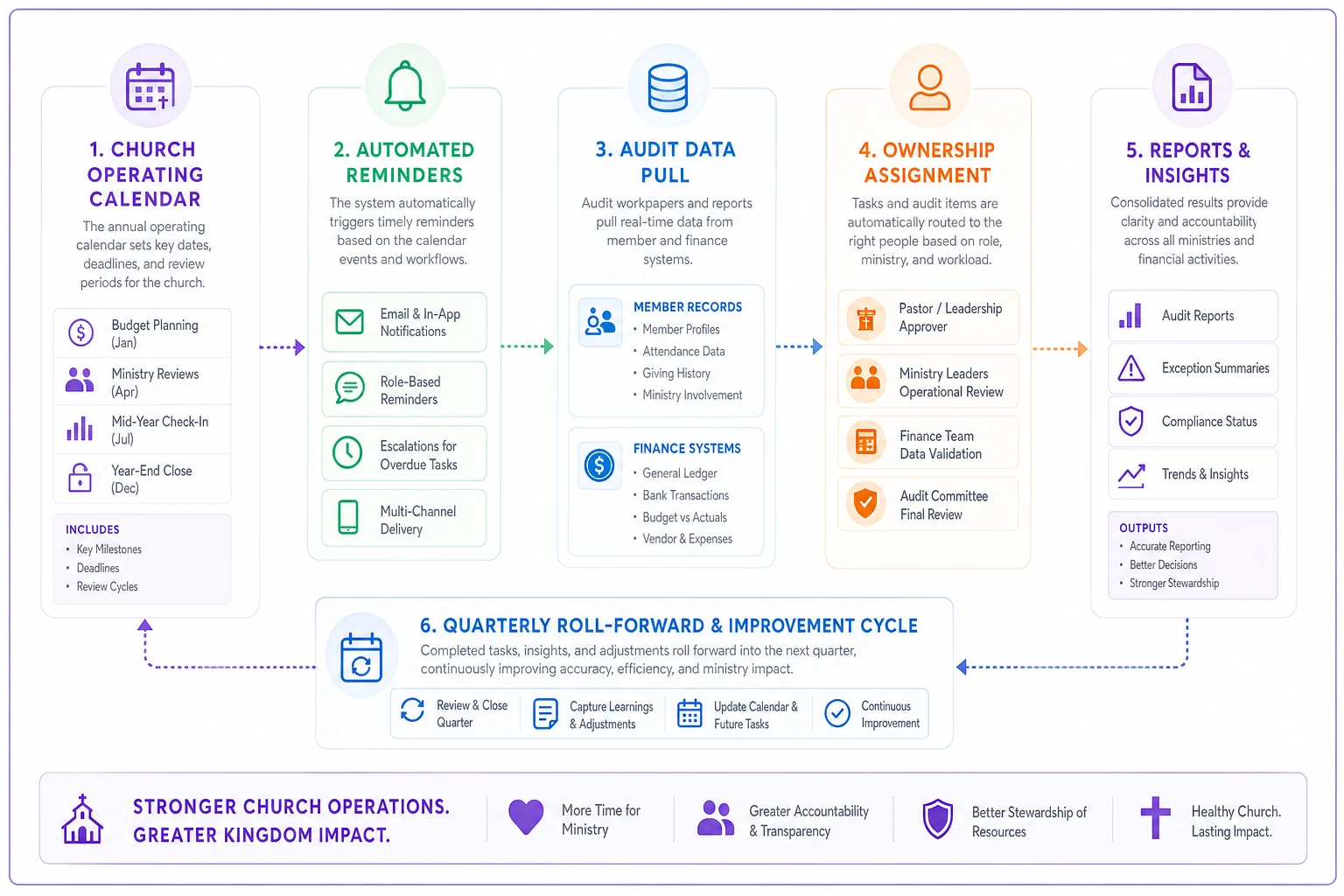
AI-assisted automation handles the tedious parts well — flagging background checks about to expire, surfacing budget variance before a gate, catching a volunteer double-booked across two services. The timing failures that no busy human catches reliably. The system watches so your leaders can decide.
But the tooling is secondary. The rhythm comes first. A church with a clear operating calendar in a spreadsheet is in far better shape than a church with sophisticated software and no decisions actually being made.
Making the calendar stick
The most common failure isn't a bad calendar — it's a calendar nobody adopts. It gets built at a leadership offsite, everyone nods, and by month three it's forgotten because the old memory-based habits are comfortable and the new rhythm requires discipline.
Rolling out a new operating rhythm is a change-management problem and deserves to be treated like one. Assign the calendar itself an owner. Review it at every leadership meeting. Make the decision gates a standing agenda item, not an afterthought. If you're introducing this alongside other operational changes, the same principles from a solid change-management approach with pilots and adoption tracking apply here — start with one quarter, prove it works, then expand.
Keep the board looped in through whatever reporting rhythm you've already established. The decision gates feed naturally into leadership updates. A mid-year financial gate is exactly the kind of moment your board-ready dashboards should reflect, so the people governing the church see the decision at the same time it's being made, not a quarter later.
The point of all this
A church annual operating calendar isn't about control or corporate rigidity. It's about protecting the mission from the mundane failures that quietly erode it — the late decision, the missed audit, the surge nobody prepared for, the exhausted volunteers nobody saw fading.
Those aren't spiritual failures. They're timing failures, and timing is something you can actually plan for.
Build the rhythm once. Assign the owners. Set the gates to approve, pause, or scale. Roll it forward every 90 days. Then let it do what it's supposed to do — put the right person in front of the right decision at the right moment, so your leaders spend their energy on ministry instead of firefighting the same predictable problems year after year.
Ready to transform your church management?
Join 500+ churches using Parshly to enhance community engagement, streamline administration, and grow their ministries.