


Every church administrator knows that feeling when October hits. You're staring at the calendar, realizing Christmas Eve falls on a Tuesday this year, which means triple the usual volunteer coverage across four services instead of two. Your regular Sunday morning greeter team of 12 won't cut it when you're expecting 2,800 people instead of your usual 900.
The real operational headache isn't just the numbers. It's that your standard scheduling system completely breaks down when seasonal patterns kick in. The spreadsheet that works fine for regular Sundays becomes a nightmare when you're juggling Christmas Eve services, Christmas morning, New Year's Eve, and then the dramatic January drop-off where half your volunteers disappear on vacation.
The Christmas Eve scheduling meltdown that happens every December
Churches handle seasonal volunteer scheduling in wildly different ways. Some throw everything at the wall and hope enough people show up. Others build elaborate manual systems that take weeks to coordinate. The ones that actually nail it have figured out something most haven't: seasonal surges aren't random chaos — they follow predictable patterns you can operationalize.
The ones that actually nail it have figured out something most haven't: seasonal surges aren't random chaos — they follow predictable patterns you can operationalize.
Why traditional volunteer scheduling breaks during church seasons
The core problem with most church scheduling approaches is they treat every week like it's basically the same. Maybe you add a few extra spots for Easter, but the underlying system stays static. This falls apart because church attendance patterns are anything but linear.
Simplify your church’s day-to-day operations.
Parshly helps you organize events, track donations, and engage your congregation—all in one place.
- Centralized member management
- Donation tracking & reporting
- Volunteer scheduling & notifications
No credit card required
-
8 parking volunteers
-
6 greeters
-
4 children's ministry workers per service
-
3 tech team members
-
2 coffee station volunteers
Come Easter Sunday, those numbers explode to roughly:
-
24 parking volunteers (tripled, plus traffic management)
-
18 greeters (tripled across multiple entrances)
-
12 children's ministry workers (parents bring kids who usually stay home)
-
5 tech team members (livestream coordination plus overflow rooms)
-
8 coffee station volunteers (quadrupled consumption)
What makes it complicated is that it's not just multiplication. Different ministries surge at different rates. Parking might need 3x coverage while children's ministry needs 4x. Some roles can't scale linearly at all — you can't just triple your worship team because the stage only fits so many people.
The scheduling complexity compounds when you factor in volunteer availability patterns. Your most reliable Tuesday night youth group volunteers might be traveling for Christmas. The retirees who cover weekday events are visiting grandkids. College students who help with tech are home for break. Meanwhile, you've got seasonal attendees who only volunteer during Christmas and Easter but don't know your systems.
Most churches manage this with increasingly complex spreadsheets, group texts, and frantic last-minute recruiting. What starts as a simple volunteer schedule becomes a multi-tab monster that only one person fully understands — usually whoever built it three years ago and now guards it like their personal kingdom.
The hidden costs of manual surge planning
When churches rely on manual seasonal scheduling, the problems cascade in ways that aren't immediately obvious. Here's what typically plays out at a church preparing for Christmas services.
November planning chaos
Around early November, someone realizes Christmas Eve is approaching and starts the scheduling scramble. They send out a mass email asking for availability. About 40% respond within a week. Another 30% need two or three reminders. The remaining 30% either never respond or reply the week before Christmas saying they forgot.
The volunteer coordinator then spends hours trying to slot people into roles while juggling multiple constraints: Jim can only serve at the 5 PM service, the Johnsons will do any service except 11 PM, Sarah needs to be in children's ministry if her husband Tom is parking cars. By the time they've built a draft schedule, three people have changed their availability and the whole puzzle needs reworking.
December execution breakdown
Once December hits, the real chaos begins. People who confirmed availability suddenly can't make it. Family plans changed. Someone got sick. A volunteer's relatives decided to visit last-minute. Each change triggers a cascade of adjustments.
The shift-swapping becomes its own full-time job. Volunteers text the coordinator asking to switch. The coordinator checks if the swap works, updates the master schedule, notifies team leaders, and hopes everyone got the message. One church had their volunteer coordinator's phone blow up with 200+ texts the week before Christmas, all scheduling-related.
Service day surprises
Despite all the planning, Christmas Eve arrives and you're still short-handed. The 3 PM service has too many greeters and not enough parking attendants. The 7 PM service is the opposite. Volunteers who signed up months ago forgot they committed and don't show. Others arrive at the wrong service time.
Behind the scenes things feel chaotic. Team leaders are pulling people from one area to cover another. Someone's teenage kid gets recruited on the spot to help with parking. The coffee runs out because nobody adjusted the supply order for 3x normal attendance. The children's check-in system crashes under the load and they switch to paper tags, which takes three times as long.
January volunteer burnout
After the Christmas marathon, January hits hard. Volunteers are exhausted. Some are bitter about the chaos. Others feel guilty about missing shifts. The coordinator who managed everything is burnt out — maybe even considering stepping down. They've got a folder full of lessons learned they swear they'll implement next year, but when November rolls around again, they'll probably repeat the same painful cycle because there's no system to actually capture and build on those improvements.
Building surge rules that actually match church rhythms
The churches that handle seasonal surges well don't wing it. They've built specific operational rules based on how their congregation actually behaves — not generic multipliers, but precise patterns from their own data.
Start by mapping your actual surge patterns, not theoretical ones. Pull three years of attendance data and look at what's really happening. A church in Florida might see Easter as their biggest surge (snowbirds plus regulars), while a church in Colorado might peak at Christmas Eve (ski town visitors). Don't assume your patterns match the church down the street.
| Role | Regular Sunday (425 attendees) | Easter Sunday (1,250 attendees) | Multiplier |
|---|---|---|---|
| Parking | 6 volunteers | 20 volunteers | 3.3x |
| Greeters | 8 volunteers | 20 volunteers | 2.5x |
| Children's | 12 volunteers | 40 volunteers | 3.3x |
| Tech | 3 volunteers | 5 volunteers | 1.7x |
| Coffee | 4 volunteers | 8 volunteers | 2.0x |
Pulling three years of data and computing role-specific multipliers avoids one-size-fits-all assumptions.
Christmas Eve aggregate (2,800 across 4 services):
-
Service distribution
25% / 35% / 30% / 10% (3 PM / 5 PM / 7 PM / 11 PM)
-
Total volunteer needs are higher but spread across services
-
Float team of 8 volunteers who can shift between services
-
Parking peaks at 5 PM service, minimal at 11 PM
The key insight is that different roles surge at different rates, and those rates change depending on the type of holiday and service time.
Once you have real surge patterns, you can build automated triggers. When someone schedules a Christmas Eve service in your system, it automatically calculates volunteer needs based on your specific surge rules — not generic estimates. The system knows your 5 PM Christmas Eve service needs 2.8x parking coverage but only 1.5x tech coverage.
How surge coordination actually flows
When a seasonal event gets scheduled, the coordination process should follow a clear sequence rather than relying on whoever remembers to send the email first. Here's how a well-structured surge workflow moves from event creation to service day:
Event Scheduled | v Surge Protocol Selected (Christmas Eve / Easter / Moderate / Monitor-only) | v Role-Specific Volunteer Needs Auto-Calculated | v Availability Requests Sent (multi-channel, role-specific messaging) | v Schedule Draft Built | v Swap Pool Opens (30+ days out) | v Reminder Sequences Triggered (4 weeks → 2 weeks → 48 hours → day-of) | v Coverage Gaps Flagged | v Escalation Protocol Activates if Needed | v Service Day — Team Leaders Get Real-Time Roster
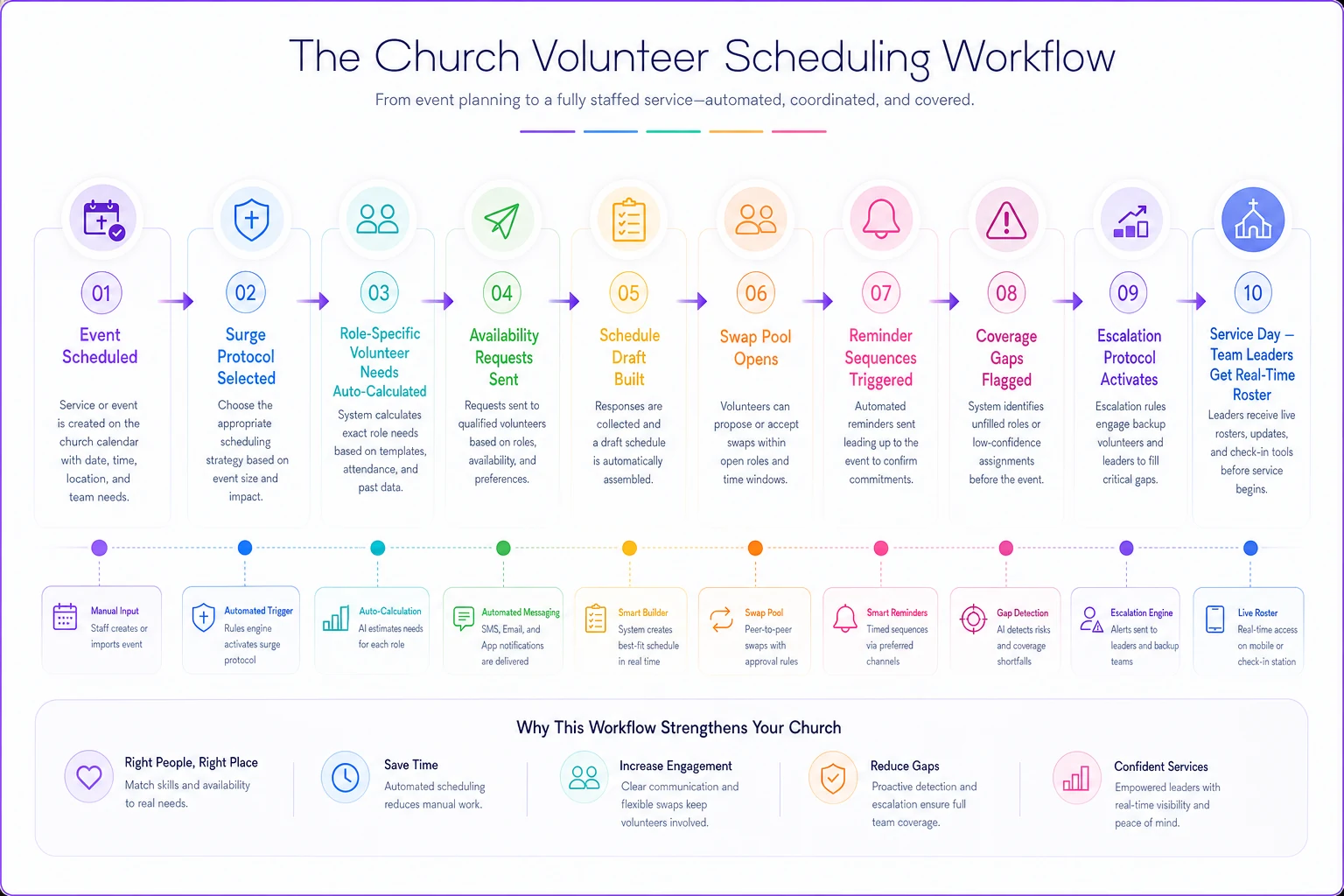
A simple visual of this flow helps teams understand the sequence and handoffs.
The reason this matters is that manual coordination rarely follows any consistent sequence. Someone forgets a step, a reminder doesn't go out, a gap doesn't get flagged until two days before the service. Having a defined flow — even before you automate any of it — dramatically reduces the number of things that fall through.
Creating shift-swap procedures that don't require 200 texts
The traditional shift-swap process is a communication nightmare. Volunteer texts coordinator. Coordinator checks schedule. Coordinator texts potential replacement. Replacement maybe responds. Coordinator updates schedule. Coordinator notifies team leader. Half the time, someone misses a message and confusion follows.
Pre-approved swap pools
Instead of managing every swap individually, create pre-approved swap pools for each role. Parking volunteers can swap with other parking volunteers without approval. Children's ministry requires approval only if swapping between age groups. Tech team always requires approval due to specialized skills.
Build these pools before the season starts. In October, have volunteers indicate which roles they're qualified to cover. Jim might primarily be a parking volunteer but can also greet. Sarah usually does children's ministry but can help with coffee in a pinch. You're creating flexibility before you need it.
Structured swap windows
-
30+ days out
Open swapping within pools
-
14–30 days out
Swaps require buddy system (must find your own replacement)
-
7–14 days out
Swaps go to team leader for resolution
-
Less than 7 days
Swaps only for genuine emergencies, coordinator handles
This prevents last-minute chaos while still giving volunteers reasonable flexibility. They know the rules upfront and plan accordingly.
Digital swap board
Move swaps out of text messages and into a central location. This doesn't need to be fancy — even a shared spreadsheet beats texts. List available shifts that need coverage and let qualified volunteers claim them.
One church set up a simple three-column board:
-
Available shift (date, time, role, original volunteer)
-
Qualified volunteers (who can cover this role)
-
Claimed by (who took the shift, when they claimed it)
Making this visible to everyone is what makes it work. Volunteers can see what needs coverage and self-organize. Team leaders spot gaps before they become critical. The coordinator handles exceptions, not routine swaps.
Automatic swap confirmation
-
Original volunteer gets confirmation their shift is covered
-
New volunteer gets shift details and any special instructions
-
Team leader gets an updated roster
This eliminates the "I thought someone else was covering it" confusion that plagues manual systems.
Surge notification systems that volunteers actually see
The biggest challenge with seasonal volunteer coordination isn't getting people to sign up — it's making sure they actually show up when they said they would. Generic reminder emails get ignored. Text blasts feel spammy. What works is targeted, contextual communication that matches how your volunteers actually consume information.
Multi-channel confirmation sequences
Different volunteers respond to different communication methods. Retirees might prefer phone calls. Young families live in text messages. College students only check Instagram. Instead of forcing everyone into one channel, build sequences that meet people where they are.
-
Initial confirmation (4 weeks out)
Email with calendar attachment; Text message with quick confirm link; Physical card for those who request it
-
Reminder sequence (starting 2 weeks out)
Team group message with full roster; Individual text with specific arrival time and parking location; Final 48-hour confirmation request
-
Day-of coordination
Morning text with weather-appropriate reminders; 2-hour before "heading out soon?" check-in; 30-minute arrival confirmation for team leaders
The goal is making these feel personal even when they're automated. Something like: "Hey Mike — you're on parking team for the 5 PM Christmas Eve service. It's looking like rain, so grab your umbrella. Park in the back lot — we've reserved spots for volunteers. See you at 4:30 PM for the quick team huddle." That's a very different message than a generic calendar reminder.
Surge-specific messaging
Regular Sunday reminders don't work for Christmas Eve. The context is completely different. Volunteers need different information, face different challenges, and have different concerns.
Regular Sunday reminder: "Don't forget you're greeting tomorrow at 9 AM service!" Christmas Eve reminder: "You're greeting at 5 PM Christmas Eve service (our busiest!). Arrive by 4:15 PM — traffic will be heavy. Park in volunteer section behind building. We'll have 12 greeters instead of the usual 4, so we'll do a quick coordination meeting at 4:30 PM. Dress code is Christmas casual. Hot chocolate provided for volunteers!"
The surge reminder acknowledges the unique situation, provides specific logistics, and addresses likely concerns before volunteers have to ask.
Emergency coverage escalation
Level 1: Auto-fill from bench (T-minus 48 hours) System automatically notifies pre-identified backup volunteers for the specific role
Level 2: Team leader discretion (T-minus 24 hours) Team leader can pull from adjacent roles or simplify certain service elements
Level 3: All-hands request (T-minus 12 hours) Broader appeal to the qualified volunteer pool with specific needs listed
Level 4: Service modification (T-minus 2 hours) Adjust the service plan to match available volunteers
Each level needs clear triggers and pre-written communications. The goal is quick response without creating panic in your volunteer base.
When to trigger surge protocols (and when not to)
Not every holiday needs surge protocols. Applying full Christmas-level procedures to a minor holiday creates more confusion than it solves. Plenty of churches have activated maximum protocols for Father's Day, overwhelmed their volunteers with preparation, and then had completely normal attendance Sundays that left everyone wondering why they scrambled.
Build clear triggers based on your actual patterns:
Automatic surge triggers
-
Christmas Eve/Day (always surge, level determined by day of week)
-
Easter Sunday (always surge, adjust for weather)
-
Mother's Day (moderate surge for morning services only)
Conditional surge triggers
-
Good Friday (surge only if you run special services)
-
Palm Sunday (surge if you do processionals or special children's programs)
-
New Year's Eve (surge only for special watch night services)
Monitor-only events
-
Father's Day (usually normal attendance)
-
Memorial/Labor Day weekends (often lower attendance)
-
Thanksgiving week (skeleton crew protocols, not surge)
The trigger should initiate specific protocols, not vague "all hands" alerts. When Easter Sunday falls within spring break week, that triggers Protocol B (reduced children's volunteers, increased parking support). When Christmas Eve falls on Sunday, that triggers Protocol C (combined service schedule with extended volunteer shifts).
Common surge scheduling mistakes that create January burnout
Well-intentioned surge scheduling decisions often seem logical in the moment but create problems that show up weeks later. A few patterns consistently backfire.
The "everyone helps with everything" approach
When you're desperate for Christmas Eve coverage, it's tempting to throw everyone into every role. Your sound tech is now also parking cars between services. Your children's ministry teacher is also greeting. This creates three problems:
-
Volunteers feel incompetent in unfamiliar roles
-
Quality drops across all areas
-
People burn out from constant context-switching
Maintain role integrity and expand teams instead. Better to have Jim only do parking for all four services than have him attempt parking, greeting, and coffee across different services.
The "veteran carry" strategy
Another common mistake: relying on your most experienced volunteers to cover multiple services or extended shifts. Yes, they know the systems best, but burning out your core team in December means January operations suffer.
One church learned this the hard way when five of their seven core children's ministry volunteers took January off after covering every Christmas service. They had to cancel programming for three weeks while rebuilding capacity.
Over-scheduling to ensure coverage
Some churches schedule 150% of needed volunteers, assuming 30% won't show. This creates its own problems. When everyone does show up, you have volunteers standing around feeling useless. Word spreads that they weren't really needed, and next year participation drops.
Better approach: Schedule to your actual needs, maintain a clearly communicated backup bench, and have specific contingency plans for gaps.
Building your seasonal scheduling automation
The shift from manual seasonal volunteer coordination to automated surge management doesn't happen overnight. Start with foundational elements and build complexity as your team adapts.
Phase 1: Document your patterns (October–November)
-
Pull three years of attendance data
-
Map volunteer coverage against attendance
-
Identify your true surge ratios
-
Document role-specific requirements
This becomes your operational baseline. No automation works without accurate underlying data.
Phase 2: Create digital foundations (December–January)
-
Central volunteer database with skills and availability
-
Digital schedule visible to all volunteers
-
Basic swap request system
-
Simple notification system
Even free tools like Google Sheets dramatically improve coordination compared to pure manual methods.
Phase 3: Implement surge protocols (February–March)
-
Define automatic triggers
-
Create role-specific surge multipliers
-
Build pre-approved swap pools
-
Design notification sequences
Test these with smaller surges like Mother's Day before deploying them for Christmas.
Phase 4: Automate the workflows (April forward)
Once protocols are proven, automation starts to make real sense. AI-powered operational platforms handle the heavy lifting here — automatically adjusting volunteer needs when you schedule special services, sending contextual notifications based on volunteer preferences and role requirements, flagging coverage gaps before they become emergencies.
The automation handles routine coordination while your team focuses on relationships and exception handling. Your December looks less like crisis management and more like execution of well-designed systems.
Real-world impact: Grace Community's surge transformation
Grace Community Church, a congregation of around 650 regular attendees in suburban Minneapolis, was drowning in seasonal scheduling chaos. Their volunteer coordinator was spending 30+ hours per week on Christmas scheduling alone.
Their previous approach:
-
Massive email chains starting in October
-
A 15-tab Excel spreadsheet that crashed regularly
-
WhatsApp groups for each ministry area
-
Sticky notes covering the coordinator's office wall
-
Last-minute Sunday announcements begging for help
After implementing structured surge protocols and basic automation:
Measurable improvements:
-
Coordinator time dropped from 30 hours to around 8 hours for Christmas planning
-
Volunteer show-up rate increased from roughly 75% to 92%
-
Last-minute scrambles decreased significantly
-
Zero services understaffed (the previous year had three critically short)
Operational changes:
-
Volunteers could see all opportunities and self-select
-
Swaps happened automatically within approved pools
-
Notifications went out based on individual preferences
-
Team leaders got real-time roster updates
Volunteer satisfaction:
-
Post-season survey showed 85% felt "well-coordinated" (up from 45%)
-
Volunteer retention for January increased noticeably
-
New volunteer sign-ups increased as word spread about better organization
The transformation wasn't purely about technology. It was about building operational systems that actually reflected how their church functioned during surge periods.
Making surge scheduling sustainable beyond the holidays
The real test of seasonal volunteer scheduling systems isn't whether they work for Christmas — it's whether they improve operations year-round. The best surge protocols become foundational improvements that benefit regular operations too.
Churches that successfully implement surge scheduling often find unexpected benefits along the way:
-
Better volunteer engagement When volunteers experience professional coordination during busy seasons, they trust the system more during regular periods. They're more willing to take on additional roles because they know they won't be abandoned or overwhelmed.
-
Improved capacity planning Understanding surge patterns helps with facility and resource planning across the board. If you know Mother's Day brings 40% more attendance to first service but not second, you can adjust everything from parking logistics to coffee supplies accordingly.
-
Leadership development Clear surge protocols create real opportunities for emerging leaders. Team members can step into coordination roles with documented processes guiding them. You're no longer dependent on one person's institutional knowledge.
-
Enhanced visitor experience Properly staffed surge services create better first impressions for seasonal visitors. Instead of visible chaos and confusion, they see smooth operations that reflect well on your overall ministry.
The churches handling seasonal surges well aren't necessarily the ones with the most volunteers or biggest budgets. They're the ones with operational systems that actually scale. When your seasonal scheduling processes are built on clear patterns, documented procedures, and the right automation, December becomes a month with predictable adjustments rather than annual chaos.
The goal isn't perfection — it's moving from scrambling to structured, from reactive to proactive, from manual to managed. Start by understanding your patterns, build clear procedures around them, then add automation where it multiplies your effectiveness. Your volunteers will notice, your staff will notice, and you might actually enjoy the Christmas season instead of just surviving it.
Ready to transform your church management?
Join 500+ churches using Parshly to enhance community engagement, streamline administration, and grow their ministries.