



Most churches don't fail at picking software. They fail at the messy middle: the eight weeks after purchase when nobody quite knows who owns the new system, the volunteer coordinator is still texting people manually, and the office admin quietly keeps her old spreadsheet "just in case." The tool is fine. The rollout is what broke.
A church change management system isn't a document you write once. It's the actual sequence of decisions — who tests first, how training spreads, when you pull the plug, and what you measure — that determines whether a new process actually takes hold or becomes shelfware. And for churches running on two or three paid staff plus a rotating cast of volunteers, the stakes are higher than in a company. You can't force adoption with a mandate. People volunteer their time. If the new way feels harder than the old way for even a week, they'll drift back, and you'll never get them again.
This article walks through the pieces that actually hold a rollout together: pilot selection, the trainer-of-trainers cascade, rollback triggers, and an adoption dashboard that mixes hard and soft signals. Not theory — the operational scaffolding that keeps a small team from losing momentum.
The real reason rollouts fail: no one defined "done"
A church buys a new check-in system or a member database, does one Sunday of chaotic launch, and then just… hopes. There's no pilot. There's no definition of what success looks like. There's no plan for when it goes sideways. Everyone assumed launch day was the plan.
What tends to happen in small organizations is that adoption doesn't fail dramatically. It fails quietly. The children's ministry lead uses the new system for two weeks, hits a confusing screen during a busy Sunday, reverts to paper, and nobody notices until three months later when the data is a mess. There was no trigger to catch it, no owner watching, no number that would have blinked red.
The fix isn't more training up front. It's building a system with checkpoints — small, staged decisions where someone actually looks at whether this is working before the whole church depends on it.
Start with a pilot, and pick it deliberately
The instinct is to roll out to everyone at once so "it's fair" or so you only have to explain it once. That's usually a mistake. A pilot lets you find the broken parts of your workflow while the blast radius is still small.
Simplify your church’s day-to-day operations.
Parshly helps you organize events, track donations, and engage your congregation—all in one place.
- Centralized member management
- Donation tracking & reporting
- Volunteer scheduling & notifications
No credit card required
Good pilot criteria for a church:
-
A contained workflow. Pick one ministry or one process end-to-end — say, Sunday check-in for the 9am service only, not all three services and every classroom at once.
-
A willing but honest owner. You want someone open to the change who will also tell you when it's clunky, not someone who'll grin and nod and quietly hate it.
-
Enough volume to stress it. A pilot with four data points teaches you nothing. If your kids' check-in normally handles around 40–60 kids on a Sunday, that's a real test. A once-a-month prayer group of six is not.
-
Reversibility. If the pilot breaks, you need to fall back to the old way without harming anyone. Never pilot on something like guardian release controls or restricted-fund handling without a safe fallback in place.
-
A clear time box. Three to four weeks. Long enough to hit a normal cycle, short enough that people don't burn out on "temporary."
One note on data-heavy rollouts: if your change involves moving member records, the pilot should include a real look at whether context survives the move — notes, history, relationships. That's a different beast, and we've covered the field-level detail in a field-by-field migration plan to move member data from spreadsheets to a CRM. Don't pilot a CRM without deciding how the soft, human context travels with the hard fields.
The trainer-of-trainers cascade: how knowledge actually spreads in a volunteer org
A church has maybe two staff who understand the new system deeply. It has fifty volunteers who need to use it. If those two staff try to personally train fifty people, they become a permanent bottleneck — every question, every "how do I do this again," every new volunteer six months later routes back through them. They'll burn out, and adoption will cap at whatever they can personally sustain.
How the cascade works in practice:
-
Core team learns first (staff + 1–2 super-users). These are the people who'll answer the hard questions. They need to know the system cold, including the failure cases.
-
Trainers are selected per ministry. Pick one trainer for each area — kids, ushers, hospitality, worship tech. Ideally the person already respected as the go-to in that group.
-
Trainers learn in context, not in the abstract. Train the kids' check-in trainer on the kids' check-in workflow, at the actual desk, during a real setup. Generic training doesn't transfer.
-
Trainers build a tiny cheat sheet in their own words. Half a page. This is the artifact that survives after you're gone.
-
Trainers train their teams and stay the first point of contact. Questions go to the trainer, not to staff. Staff only get escalations.
A simple visual of this cascade:
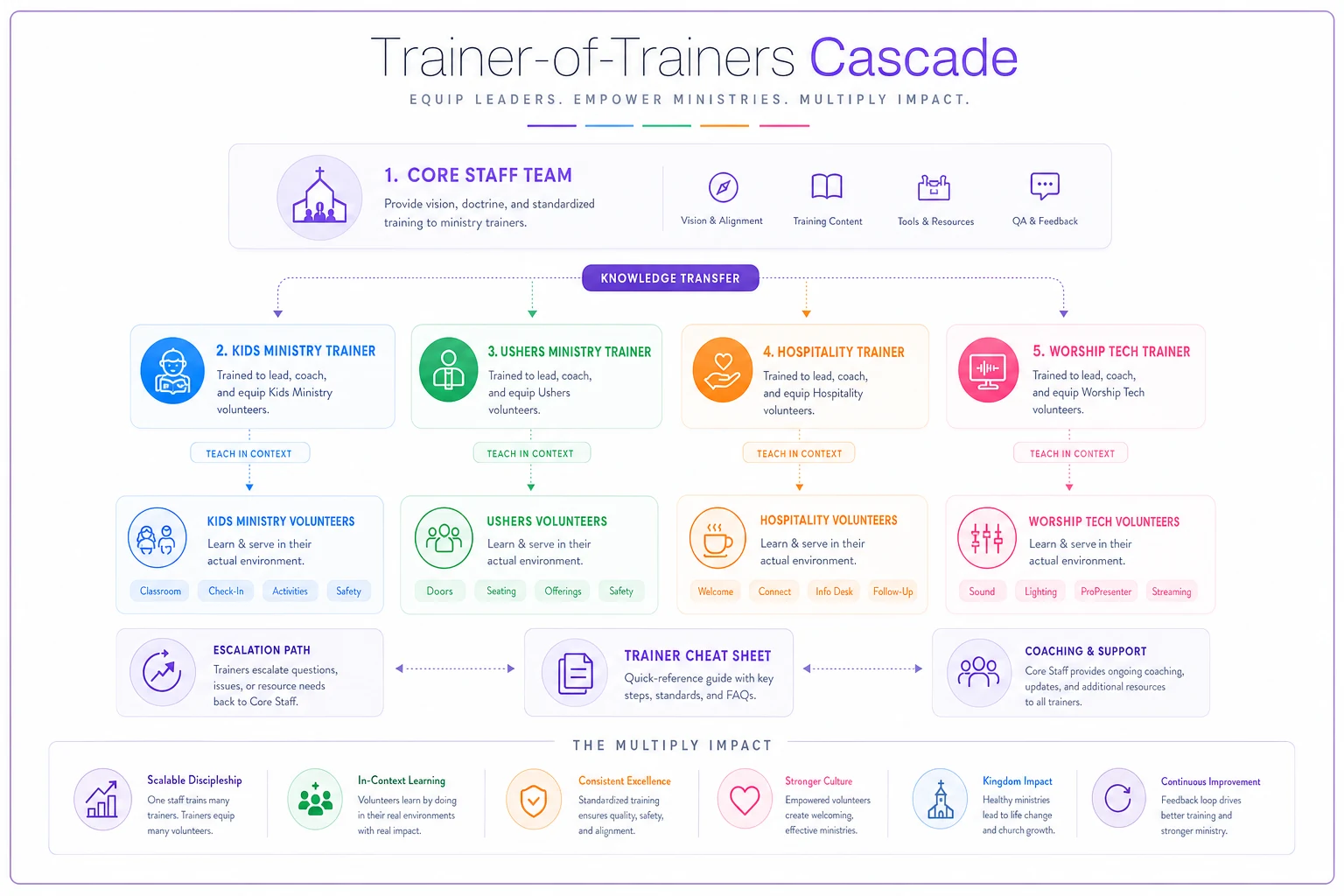
The mistake churches make here is skipping step two — assuming everyone can learn from one central session. What actually happens is that the message degrades. The kids' team applies the ushers' instructions to their own workflow, gets confused, and reverts. Distributed trainers keep the instructions relevant to each context.
One more thing: name a backup trainer for each ministry. Volunteers move, get sick, take a season off. If your entire kids' check-in knowledge lives in one person's head and they go on a mission trip for three weeks, you've just re-created the bottleneck you were trying to avoid.
Rollback triggers: decide the "abort" rules before you launch
This is the part almost every church skips, and it's the most important. A rollback trigger is a pre-agreed condition where you stop and revert to the old process — decided in advance, so it's a rational call, not a panicked one during a chaotic Sunday.
Without triggers, one of two bad things happens. Either you white-knuckle through a broken rollout because "we already committed," causing real harm — a kid released to the wrong adult, a donation logged to the wrong fund. Or you abandon the whole thing at the first hiccup because there was no threshold telling you what's normal turbulence versus an actual failure.
Good triggers are specific and observable. Vague ones ("if it's not going well") are useless because nobody agrees on what that means at 9:47am with a line of parents.
| Area | Example rollback trigger | Fallback action |
|---|---|---|
| Kids' check-in | Check-in takes over ~3 min per family, two Sundays running | Revert to paper tags for that service, keep piloting off-peak |
| Member data / CRM | Records show missing or garbled context after import | Freeze new entries, restore from backup, re-map fields |
| Giving / donations | Any fund mis-post that reaches reconciliation | Pause digital entry, revert to manual log, audit before restart |
| Volunteer scheduling | More than ~20% of a shift no-shows tied to notification failures | Revert to prior comms method, investigate delivery |
| General adoption | Trainer reports team actively working around the system | Pause, re-train, or roll back that ministry only |
Notice the fallback actions are almost always partial — roll back one service, one ministry, one process. You rarely need to nuke the entire rollout. The point of triggers is precision: contain the failure without abandoning progress made elsewhere.
Share the rollback triggers with your trainers ahead of launch so they can make rational calls under pressure.
Write these down. Share them with your trainers. When a trainer knows the exact condition that justifies falling back, they stop feeling like they'll get in trouble for the system not working, and they start reporting problems honestly. That honesty is what keeps small problems from becoming three-month messes.
The adoption dashboard: hard KPIs and soft KPIs
You can't manage a rollout you can't see. But churches often measure the wrong thing — or nothing. "Did we launch?" is not a metric. "Are people actually using it, and does it feel better than before?" is.
Hard KPIs — the countable stuff:
-
Active usage rate. What percentage of the pilot group logged in or used the system this week? If you have eight trained volunteers and three used it, that's a 37% adoption rate, and it's a warning.
-
Task completion time. Is check-in faster or slower than the old way after week two? Slower-forever is a rollback conversation.
-
Error rate. Mis-posts, missing records, failed notifications. Trending down means it's sticking; flat or rising means something's structurally wrong.
-
Fallback frequency. How often did people revert to the old method? A little is normal early. A lot means it's not really adopted.
Soft KPIs — the human stuff that predicts whether adoption survives:
-
Trainer confidence. Ask your trainers weekly, plainly
"Does your team get this, or are they faking it?" Trainers know before the numbers do.
-
Volunteer sentiment. A one-question pulse
"Is the new way easier, the same, or harder?" If most say harder, you have a churn problem coming.
-
Question volume and type. Lots of the same question means the training or the workflow has a gap. Falling question volume usually means real fluency.
-
Willingness to recommend. Would this trainer want the new system used in another ministry they care about? That's a strong belief signal.
The thing most churches miss: soft KPIs move first. Sentiment sours before the usage numbers drop. By the time your hard adoption rate falls, people already checked out weeks ago. If you only watch the countable metrics, you're always reacting late. Watch trainer confidence and volunteer sentiment as your early-warning system, and use the hard numbers to confirm.
A real scenario: staggered rollout at a two-staff church
A church running about 400 in weekend attendance, with two paid staff and a strong volunteer base, wanted to move check-in, scheduling, and member records onto one platform. Their first instinct was a single all-church launch on a Sunday.
Instead they staggered it. Pilot one: 9am kids' check-in only, three weeks, run by the existing children's lead as trainer. First two Sundays were rough — check-in ran close to four minutes per family because guardians weren't pre-loaded. That tripped their pre-set trigger. They didn't panic or quit; they fell back to paper for the busy first hour, kept piloting off-peak, fixed the pre-load step, and by week three check-in was down to well under two minutes per family. Under the old paper system it had been roughly two and a half.
Then the cascade kicked in. The kids' lead trained the second check-in volunteer using a half-page cheat sheet in her own words. Ushers and hospitality came online over the following month, each with their own trainer. Staff stopped being the help desk — questions routed to trainers, and only genuine edge cases reached the office.
The wins were modest and real: active usage in the piloted teams held above 80% by week four, repeat "how do I do this" questions to staff dropped to nearly nothing, and the office admin finally stopped keeping her shadow spreadsheet — probably the clearest sign the change had actually landed. Nothing dramatic. Just a rollout that stuck instead of quietly dying.
When a staged rollout makes sense — and when it doesn't
Staged rollouts with pilots and cascades aren't free. They take coordination and patience. So be honest about fit.
When this approach makes sense:
-
The change touches multiple ministries or many volunteers.
-
The process carries risk if it breaks — children's release, giving, member data.
-
You're minimal-staff and can't afford to be the permanent help desk.
-
Adoption depends on volunteer goodwill, not a mandate.
When it's overkill:
-
A tiny, low-risk change affecting two or three staff. Just do it and watch.
-
A pure back-office tool no volunteer touches.
-
Something genuinely reversible with zero consequence if it flops.
Who should slow down before starting:
If you don't have a single person willing to own a pilot, or you can't name your rollback triggers in one sentence each, you're not ready to roll out — you're ready to plan. Launching without an owner and without abort conditions is how you end up with the shadow-spreadsheet problem all over again.
Tying it into your broader operations
A rollout doesn't live in isolation. The new system usually plugs into how you already move people through your church — from first-time guest to committed volunteer. If your engagement flow has clear owners and handoffs, adoption is far easier because everyone already knows their lane. If it doesn't, the new tool just adds confusion on top of confusion. It's worth aligning your rollout with how you build a stage-based member engagement system with owners, KPIs and handoffs that scale, so the change reinforces an existing structure rather than fighting one.
The broader point: pilots, cascades, triggers, and dashboards aren't four separate tactics. They're one connected system. The pilot generates the data your dashboard tracks. The dashboard tells you whether a trigger is about to fire. The cascade determines how fast the change spreads once the pilot proves out. Pull one piece out and the others weaken.
Bringing it together
The churches that roll out new systems successfully aren't the ones with the biggest budgets or the fanciest tools. They're the ones who treated adoption as an operational process with checkpoints, not a single launch-day event they hoped would stick.
Pick a contained pilot with a real owner and a safe fallback. Spread knowledge through trainers who teach in context, not through one central session that degrades on the way down. Decide your rollback triggers before launch, so failure becomes a rational, contained decision instead of a panic. Watch both the hard numbers and the soft human signals — because sentiment tells you the truth weeks before the usage rate does.
Do that, and a new system stops being a gamble. It becomes just another well-run process — which, for a church running lean on staff and long on volunteers, is exactly the point.
Ready to transform your church management?
Join 500+ churches using Parshly to enhance community engagement, streamline administration, and grow their ministries.