



Most church vendor problems don't start when the church buys something. They start about eleven months later, when a notice window closes and nobody was watching it.
Take a copier lease, a background-check subscription, a livestream encoder service, or the pest control company that's been spraying the fellowship hall since 2016. Each was a reasonable decision when it was made. The trouble is the gap between signing and the next decision point. The person who championed the vendor moves on, or just forgets. The contract is a PDF in someone's personal Gmail. The renewal happens on the vendor's terms, because that's the default.
This is why church procurement contract governance matters more for small congregations than big ones. A 3,000-person church has a facilities director, a finance office and probably a lawyer on speed dial. A 200-person church has a part-time administrator, a volunteer treasurer, and a pastor who signs whatever lands on his desk Tuesday afternoon. Any system has to fit that reality. If it needs a procurement department to run, it won't get run.
Below is the whole lifecycle in the order it happens to you, where each stage tends to break, and what a lightweight version of each control looks like. Clauses and templates are included so you can copy them.
(Quick note: this is operational guidance, not legal advice. For anything over a few thousand dollars a year, or anything involving property or kids, have someone with legal training look at the final paper.)
The lifecycle, and the one failure point in each stage
Here are all eight stages up front, then we'll go through them one at a time:
-
1. Need appears. Breaks when the person who wants it becomes the buyer by default.
-
2. Intake and routing. Breaks when there is no intake, so nobody knows the purchase is happening.
-
3. Vendor vetting. Breaks when a $40/month app gets the same scrutiny as a $30k HVAC contract. Usually that means neither gets real scrutiny.
-
4. Contracting. Breaks when the church signs the vendor's paper as-is, especially clickwrap.
-
5. Onboarding and registration. Breaks when the vendor never makes it into any list anyone looks at.
-
6. Ongoing review. Breaks when reviews are planned as one big annual event that never happens.
-
7. Renewal. Breaks when nobody knows the notice deadline, so the renewal decision is made by inaction.
-
8. Exit. Breaks when the contract ends but logins, data and auto-pay don't.
Each break hands a problem to the next stage. Skip intake and vetting never happens. Sign sloppy paper and renewal becomes a trap. Keep an incomplete register and exit leaves data behind. You can't fix renewals by getting better at renewals alone. The fix starts at intake.
Stage 1–2: The need shows up, and somebody has to catch it
Purchases enter a church through the side door. The worship leader texts the admin: "Hey can we sign up for that planning app, it's like $29 a month?" The youth pastor puts a camp deposit on his own card and asks for reimbursement. A trustee gets a quote for parking lot resealing from a guy he knows. None of these feel like "procurement." Each one is a vendor relationship starting with no record, no owner beyond the excited person, and no idea when it ends.
Simplify your church’s day-to-day operations.
Parshly helps you organize events, track donations, and engage your congregation—all in one place.
- Centralized member management
- Donation tracking & reporting
- Volunteer scheduling & notifications
No credit card required
Churches of almost every size do the same thing: whoever wanted the item becomes its owner by accident. That holds until they leave, burn out, or switch ministries. Then the vendor is orphaned and keeps billing.
So the intake form's real job isn't approval. It's capturing, while everyone's still enthusiastic, the stuff nobody will want to dig up later. Who owns this after launch? When does it end? What data does it touch?
A minimal intake form (copy and adapt)
-
What are you trying to buy or sign up for? (vendor name, plus a one-line description)
-
What problem does it solve? (one or two sentences, no essays)
-
Estimated cost one-time, monthly, annual, and total over the full term
-
Contract length and renewal is it month-to-month, annual, multi-year? Does it auto-renew?
-
Who will own this relationship after it's set up? (a named person, not "the youth ministry")
-
Who's the backup owner?
-
Does it touch any of these? member or donor data / children's info / payments / building access / on-site work / transportation
-
Does something like this already exist here? (this one catches more duplication than you'd guess)
-
Budget line it comes from
-
Needed by date (and why, if it's urgent)
The "does something like this already exist" question is underrated. Small churches regularly end up with two or three tools doing the same job: two email platforms, a free and a paid file-sharing account, two separate texting services bought by different ministries. Nobody did anything wrong. Nobody could see the full list.
How routing works once the form is submitted
The request lands with one person, usually the church administrator or whoever acts as operations lead. They spend maybe 10 minutes on triage and assign a tier based on three answers from the form: total cost over the term, whether it touches sensitive data or kids, and whether it involves on-site work or vehicles.
Tier 1 (low cost, no sensitive data, month-to-month) gets a quick yes from the budget owner and goes straight into the register. Tier 2 (moderate cost, annual term, or touches member/donor data) gets the risk scorecard and a contract check before the budget owner approves. Tier 3 (multi-year, high cost, kids, property, vehicles, or anything with indemnity language) gets the scorecard, a clause review, and approval from whoever your finance policy names for that dollar amount. Sometimes that's the board.
Whatever the tier, the request isn't done until it has a register entry with a named owner and a next-review date. That last step is the one that gets skipped, so make it the step that closes the request rather than an optional follow-up.
Volume is what changes as you grow. A 150-person church might see 10–15 requests a year. A 600-person church with active ministries can see that many in a quarter. Past that, you want the tiering automated or at least pre-filled from the form answers, because a human deciding each one from scratch becomes the bottleneck.
Stage 3: Vetting proportionally with a vendor-risk scorecard
The most common vetting mistake isn't too little scrutiny, it's uniform scrutiny. Churches trying to be careful sometimes send a 40-question security questionnaire to a $12/month sign-up sheet tool, get no answer, and quietly use it anyway. Meanwhile the parking lot contractor with no proof of insurance gets waved through because "we've used him before."
The scorecard should be fast for small stuff and only get heavy when the risk is real. Score each vendor 0–2 on these factors (0 = low concern, 2 = high concern):
| Factor | 0 – Low | 1 – Medium | 2 – High |
|---|---|---|---|
| Data sensitivity | No personal data | Contact info only | Giving records, kids' info, pastoral notes, health info |
| Financial exposure | Under ~$500/yr, cancel anytime | Annual commitment, moderate cost | Multi-year, large cost, or early-termination fees |
| Operational dependency | Nice to have; Sunday runs fine without it | Painful to lose for a week | Sunday or giving breaks without it |
| Physical / safety exposure | Fully remote | Occasional on-site visits | On-site work, kids' areas, vehicles, heavy equipment |
| Switching difficulty | Easy export, no lock-in | Some data migration needed | Proprietary format, hardware lock-in, long contract |
| Vendor stability | Established, clear support, references | Small but responsive | Single person, no clear support channel, vague terms |
How to read the total (0–12):
-
0–3 Tier 1. Approve, register, set a light annual review.
-
4–7 Tier 2. Do a contract check against the minimal clauses below, confirm the data export option, and review twice a year.
-
8+ Tier 3. Do a full clause review, get a certificate of insurance where relevant, check references, and get leadership approval. Review quarterly or before each renewal.
Some things should override the total. Any score of 2 on data sensitivity or physical/safety exposure pushes the vendor into at least Tier 2, regardless of the math. A cheap, stable, easy-to-switch vendor that stores children's medical info is still a high-stakes relationship.
The scorecard also feeds your broader risk picture. A vendor that scores high on operational dependency belongs in your risk register as a dependency risk, with a control attached. If you haven't built a register yet, the insurer-friendly church risk register and controls matrix shows how vendor risks sit next to facility, safeguarding and financial risks. Insurers will usually ask about the ones that score highest here.
"Vendor stability" is the factor churches underweight most. A lot of church-specific software comes from very small companies, sometimes basically one developer. That's not automatically bad, and plenty of them are excellent. But it does mean switching difficulty and data export matter more. If the founder retires, you want your data out in a usable format, not stuck in a tool that slowly stops working.
Stage 4: Contracting with the minimal clauses that actually matter
Most church contracts aren't negotiated, they're accepted. The vendor sends standard terms, someone clicks "I agree" or signs page 4, done. For a lot of Tier 1 tools that's fine and realistic. You aren't going to redline the terms of service of a major software company.
For Tier 2 and Tier 3 it's different. Small vendors will often accept a short addendum if you ask before signing and keep the ask short. Eight reasonable things on a one-page addendum works much better than sending back a marked-up 20-page document. Local contractors, regional service companies and smaller software vendors say yes more often than churches expect.
These are the clauses worth fighting for, roughly in order of how much pain they prevent. The wording is meant to be copy-ready. Adapt it, and for Tier 3, have someone qualified review the final version.
1. Renewal notice and no silent auto-renewal > "This Agreement shall not automatically renew for a term longer than twelve (12) months. Vendor shall provide Church with written notice of any upcoming renewal, including any changes to pricing or terms, no fewer than sixty (60) days before the renewal date. If Vendor fails to provide such notice, Church may terminate within thirty (30) days after the renewal date without penalty."
2. Termination for convenience > "Church may terminate this Agreement for any reason upon thirty (30) days' written notice. Church shall pay only for services rendered through the effective termination date, and any prepaid fees for services not yet rendered shall be refunded on a pro-rata basis." Vendors push back on this one most, especially on multi-year equipment leases. If they won't accept it, that tells you something. Price the exit cost into the decision before you sign, not after.
3. Price increase cap > "Fees shall not increase by more than [5]% per twelve-month period during the term or any renewal term, unless agreed in writing by Church."
4. Data ownership, return and deletion > "All data provided by or collected on behalf of Church remains the property of Church. Upon termination or upon request, Vendor shall provide a complete export of Church data in a commonly readable format (such as CSV) within fifteen (15) business days, and shall delete Church data from its systems within thirty (30) days thereafter, providing written confirmation of deletion upon request."
5. Signing authority > "This Agreement is binding on Church only when signed by an officer or staff member authorized under Church's current financial or signing policy. Vendor acknowledges that ministry volunteers are not authorized to bind Church." This protects you from the volunteer who signs a three-year contract at a conference booth. It happens more than anyone admits.
6. Insurance and indemnity (for on-site or physical work) > "Vendor shall maintain general liability insurance of not less than $[1,000,000] per occurrence and shall provide a certificate of insurance naming Church as additional insured before beginning any on-site work. Vendor shall indemnify Church against claims arising from Vendor's negligence or willful misconduct." Check that indemnity runs both ways in a reasonable manner. Some vendor templates quietly ask the church to indemnify the vendor for everything, including the vendor's own negligence. Worth catching.
7. Assignment > "Vendor may not assign this Agreement to a third party without Church's prior written consent, except in connection with a merger or acquisition, in which case Church may terminate without penalty within sixty (60) days of notice of such assignment." Church software companies get acquired fairly often. This clause gives you a clean exit when the new owner changes everything.
8. Conduct on church property > "Vendor's personnel working on Church premises shall comply with Church's posted facility and safety policies, shall not access areas designated for children's ministry during program hours unless escorted and approved in advance, and shall check in with designated Church staff upon arrival."
Service levels, uptime, support response times and escalation rules are a separate layer. They matter most for technology vendors your Sunday depends on, and the church technology governance for vendor stewardship and SLA rules post goes deep on those. The clauses above are the baseline for almost every Tier 2 and Tier 3 vendor, tech or not.
Practical tip: put these eight clauses into a one-page "Church Vendor Addendum" and save it where your admin can grab it. Then add "did we attach the addendum?" to the approval step. Vendors you use regularly will eventually just accept it.
Stage 5: Onboarding, and the register that makes everything else possible
If you only build one thing from this post, build the vendor register. Every later stage depends on it. You can't review what you can't see, you can't renew on purpose without knowing the date, and you can't offboard a vendor nobody remembers.
Most churches that keep a vendor list keep it as an accounting artifact, meaning a list of payees in the bookkeeping software. That tells you who you paid. It doesn't tell you who owns the relationship, when the notice window closes, or what data the vendor holds. Those are different questions, and the register has to answer them.
Here's a working structure with example rows:
| Vendor | Category | Owner / Backup | Tier | Annual cost | Term ends | Notice deadline | Data held | Review cadence | Next review |
|---|---|---|---|---|---|---|---|---|---|
| Copier lease co. | Equipment | Admin / Treasurer | 3 | ~$4,100 | Mar 2026 | Dec 2025 (90 days) | Scan logs only | Quarterly | Oct 2025 |
| ChMS / database | Software | Admin / Exec pastor | 3 | ~$2,600 | Aug 2026 | Jun 2026 | Member, giving, kids | Quarterly | Nov 2025 |
| Background checks | Service | Children's dir. / Admin | 2 | Per-check, ~$900/yr | Month-to-month | 30 days | Volunteer PII | Semi-annual | Jan 2026 |
| Lawn & snow | On-site service | Facilities trustee / Admin | 2 | ~$7k–$8k | Oct 2026 | Aug 2026 | None | Semi-annual | Apr 2026 |
| Worship planning app | Software | Worship leader / Admin | 1 | ~$350 | Monthly | None | Volunteer names | Annual | Sep 2026 |
| Livestream service | Software | Media volunteer lead / Admin | 2 | ~$1,200 | Annual, Jan | Nov 2025 | Viewer emails | Semi-annual | Nov 2025 |
A few things about this table matter more than they look.
The notice deadline column is the most important one. Term end dates are easy to find. Notice deadlines are buried in contract language, and they're the dates that actually control your options. A copier lease ending in March with a 90-day notice requirement is really a December decision. Most churches find this out in February.
The owner is a person, and there's always a backup. "Facilities" is not an owner. "Children's ministry" is not an owner. When the owner leaves, the backup inherits the vendor automatically, and that handoff belongs in your staff transition checklist.
Next review is driven by the vendor, not the calendar. More on that in the next section.
Multi-site churches need one more column: which campus or campuses the vendor serves, and whether the contract is held centrally or locally. Shared vendors are where multi-site churches lose the plot. Transport companies, AV rental, a caterer used by three campuses. One campus renegotiates, another doesn't know, and you end up paying two rates to the same company. The cross-campus logistics playbook covers how shared resources get coordinated day to day. The register is where the contractual side of that sharing has to live.
Onboarding itself is light for most vendors. Confirm the contract and addendum are saved in one shared location, not someone's inbox. Record who got login access and at what permission level. Note any payment method tied to the vendor, especially if it's a staff member's card. Then put the notice deadline on a calendar that more than one person can see.
Stage 6: The ongoing review, and why the annual vendor review usually dies
Churches that try to get organized often schedule an "annual vendor review," one meeting where someone walks the whole list. It almost never happens after the first year. And when it does, half the decisions it surfaces are already too late, because a third of the renewals passed months ago.
Better to tie reviews to each vendor's tier and contract dates so the work spreads across the year in small pieces. A Tier 3 vendor gets a short quarterly check. A Tier 2 gets one twice a year, with one of those timed about a month before its notice deadline. A Tier 1 gets a once-a-year glance. Most months the operations lead has one or two reviews, maybe 15 minutes each.
The review is a handful of questions, not a meeting:
-
Are we still using this, and how much? (Check actual usage. Logins, service visits, number of checks run.)
-
Has the price changed, or is a change coming?
-
Any service issues in the last period
missed visits, outages, slow support?
-
Has anything changed about the data it holds or who has access?
-
Is the owner still the right owner?
-
Has the vendor been acquired, restructured, or changed its terms?
The usage question catches the most waste. Software seats are the classic case, like paying for 12 user licenses when 5 people log in. Service contracts sized for an old reality are another: a cleaning contract still priced for five days a week after the church cut weekday programming to three.
Short, regular check-ins also give the owner a reason to talk to the vendor before there's a crisis, and vendors treat customers who check in differently from customers who only call to complain. And when a review produces "this vendor has had three service issues this year," that belongs in the scorecard too. A vendor that started at a 5 might be a 7 now.
Stage 7: The renewal window, handled on purpose
Renewals are where most of the money is won or lost, and the decision has to start well before the deadline. Counting back from the notice date:
-
About 90 days before the notice deadline (Tier 3) or 45 days (Tier 2)
The register flags the renewal to the owner and backup. The owner pulls the current contract, the last two reviews, and 12 months of actual spend. Actual spend and contracted price drift apart more than people expect.
-
Within the next two weeks
The owner answers one question in writing. Renew as-is, renegotiate, replace, or end? A short paragraph is enough. "Renew because it's easier" is allowed, but only if that's stated openly as the reason.
-
If renegotiating or replacing
Get at least one alternative quote or option, even if you expect to stay. Mostly it's so you know what the market looks like, though it also tends to soften the incumbent's pricing.
-
About 30 days before the notice deadline
The approval goes to whoever your policy requires for that dollar amount over the new term. The term total sets the approval level, not the monthly price. A $300/month service on a three-year renewal is a five-figure decision.
-
Before the notice deadline
Send written notice of whatever you decided: non-renewal, intent to renegotiate, or acceptance of new terms. Keep a copy in the vendor's folder. If the vendor needs notice by certified mail, which some leases still require, put that on someone's task list with a date.
-
After the decision
Update the register with the new term end, notice deadline, cost and next review. If you renewed, check that the addendum carried forward. Some vendors issue a fresh agreement at renewal that quietly drops your negotiated terms.
A simple visual of this timeline helps owners see the decision points and who needs to act.
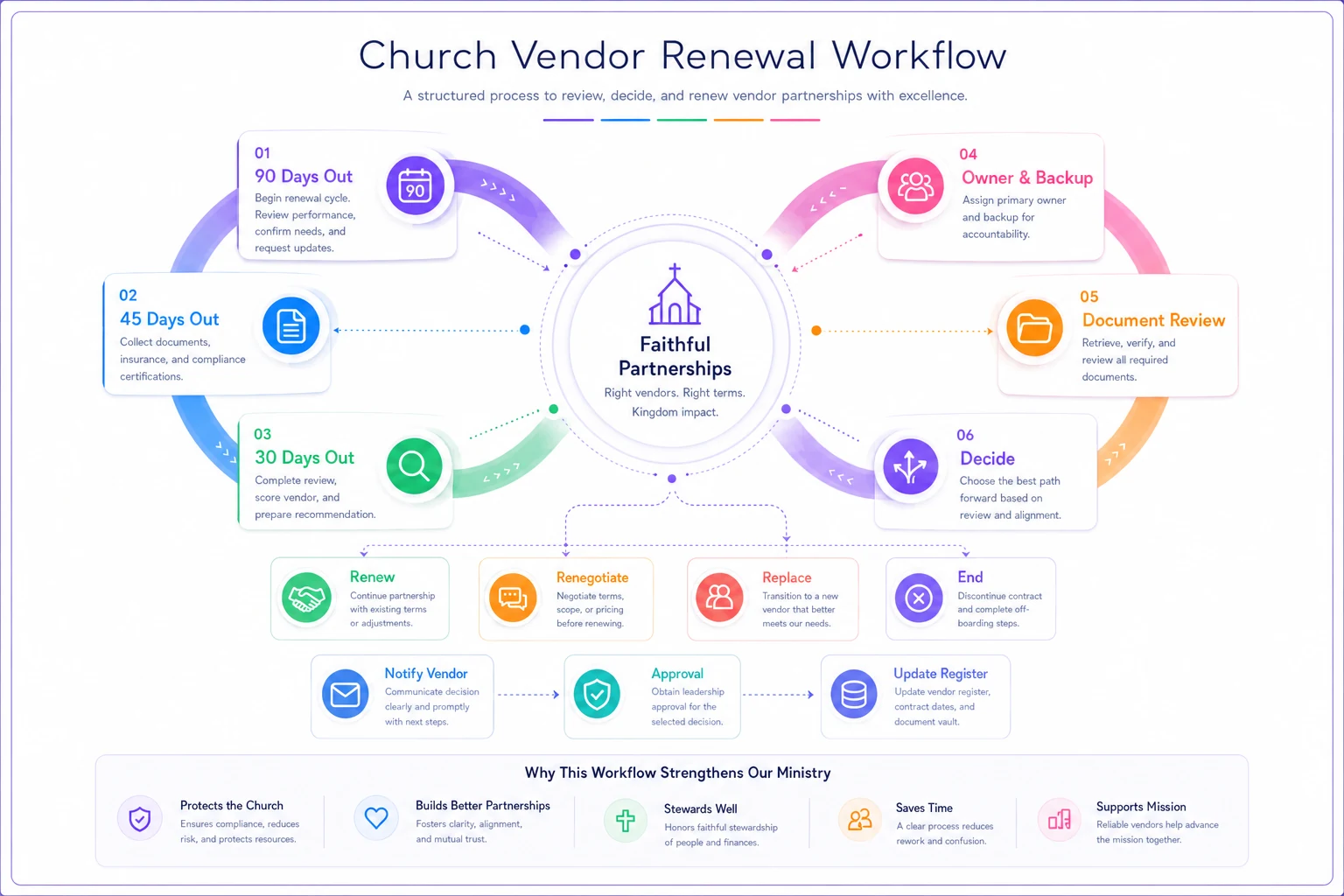
Step 6 catches something real. Equipment leases and some software agreements "renew" by issuing a new contract on current standard terms, which can undo the cap or termination clause you negotiated three years ago. Read the renewal paperwork as if it came from a brand-new vendor.
Also, churches often renew a mediocre vendor because switching feels like a big project and the deadline is close. That's a timing problem disguised as a vendor decision. Starting 90 days out mostly fixes it, since switching is still a realistic option.
Stage 8: Exit, where the risk lingers longest
Ending a vendor relationship feels finished when the last invoice is paid, but the riskiest leftovers usually outlast the contract. Admin logins still work. Data sits on the vendor's servers. An auto-pay is tied to a card belonging to a staff member who left last spring. A building key code was never changed.
Use this checklist for every Tier 2 and Tier 3 exit, and a quick version for Tier 1:
-
[ ] Written termination notice sent and acknowledged, with a copy saved
-
[ ] Final invoice reviewed; any prepaid amounts or refunds owed are tracked
-
[ ] Data export requested before access ends, in a usable format, and actually opened to confirm it's complete
-
[ ] Written confirmation of data deletion requested from the vendor
-
[ ] All user accounts removed or deactivated, including former staff and volunteers who still had access
-
[ ] Any integrations disconnected (giving sync, calendar feeds, email lists, API keys revoked)
-
[ ] Payment methods removed, auto-pay cancelled, recurring charges watched on the next two statements
-
[ ] Physical items returned or retrieved
keys, fobs, equipment, leased hardware (get a return receipt)
-
[ ] Building access codes or alarm codes changed if the vendor had them
-
[ ] Replacement vendor (if any) live and tested before the old one is fully shut off
-
[ ] Register updated
status set to "ended," exit date recorded, data deletion confirmation attached
-
[ ] Short note for the file
why we left and whether we'd use them again
"Actually opened the export to confirm it's complete" sounds obvious, but it's the step that gets skipped. A church exports its data from an old system, the file arrives, everyone moves on. Months later someone needs historical attendance or giving notes and finds the export left out custom fields or attachments. By then the old account is deleted and support won't help.
The last item, the note about why you left, is the cheapest institutional memory you'll ever create. Five years from now someone will propose that same vendor again with no idea the church already tried it.
A real scenario: what an audit of one church's vendors turned up
Picture a non-denominational church averaging around 340 in weekend attendance, with two full-time staff, one part-time administrator and a volunteer treasurer. No formal procurement process. Purchases were approved by whoever controlled the relevant budget line, and contracts were "around somewhere."
The new administrator started building a register mostly out of frustration. She worked from 14 months of bank and card statements, plus a sweep through the shared drive and a few staff inboxes. Leadership guessed the church had maybe 15–18 vendor relationships. The real number was 34 active ones.
What turned up:
-
Three separate tools doing group texting, bought by three different ministries, for a combined ~$1,100/year. One was enough.
-
A copier lease that had auto-renewed 20 months earlier into a new 60-month term, at a monthly rate about 22% higher than the original. The notice window had closed while the previous admin was on maternity leave.
-
A design subscription still charging a card belonging to a former youth pastor, who had been reimbursed monthly for about a year and a half after he left. Around $700 total.
-
Two software tools holding volunteer and kids' contact data with no listed owner. One had five active admin logins, two of them former staff.
-
A landscaping contractor with no certificate of insurance on file at all.
Over the next quarter, using roughly the system in this post, they consolidated the texting tools, cancelled four unused subscriptions, removed the stale admin accounts, and got the landscaper's insurance certificate. They also built a register with notice deadlines for every Tier 2 and Tier 3 vendor. Recurring vendor spend dropped by roughly $3,000–$3,500 a year, not counting the copier. They couldn't get out of the copier lease cleanly. They did negotiate a modest rate reduction by agreeing to a newer machine at the same term, and the next notice deadline is now on two people's calendars.
The bigger change was less visible. Before, renewal decisions happened by default. In the first year after, every Tier 3 renewal got a deliberate decision before its notice window. Upkeep runs about 2–3 hours a month for the administrator, mostly the rolling reviews.
What changes as the church grows
The system above is sized for a church of maybe 150–500 people. The pieces stay the same as you grow, but the pressure moves.
Under ~150 attendance, vendor count is usually low (often under 15) and one person can hold most of it in their head. The real risk is concentration: if that person leaves, everything leaves with them. At this size the register and the notice-deadline calendar are the essentials, and the scorecard can be informal.
Around 300–700, ministries start buying things independently and the number of vendors grows faster than anyone tracks. Intake becomes non-negotiable here. Duplicated tools and orphaned subscriptions pile up because nobody can see across ministry budgets, and triage volume climbs enough that one admin can get buried.
Multi-site or 1,000+, the problem shifts to central versus local contracts, consistent clause standards across campuses, and making sure one campus's renewal doesn't undercut another's negotiation. Approval thresholds need to be clearly written, because "who can sign" gets fuzzy once campus pastors are involved. The register usually needs real filtering by campus, category and owner, and a flat spreadsheet starts to strain.
At every size the most common failure is the same: a vendor relationship that outlives the person who started it, with no handoff.
When this makes sense, and when it doesn't
When this makes sense:
-
You have more than roughly 10–12 recurring vendor relationships, or you don't know how many you have (which is often the real answer).
-
Multiple people or ministries can commit church money without one central view.
-
You hold sensitive data with outside vendors
giving, kids' info, pastoral notes.
-
You've been surprised by an auto-renewal, a price increase, or a charge nobody recognized in the last couple of years.
-
Your insurer has started asking about vendor management or third-party risk.
When this is a bad idea (or at least the full version is):
-
During a staff transition or a major crisis. Build the register first. Hold the full scorecard and addendum process until things stabilize.
-
If you'd be building it as a compliance project with no owner who'll keep it alive. An abandoned register is arguably worse than none, because people trust dates that are no longer true.
-
If you're about to force every $15 purchase through a three-tier approval process. That teaches ministry leaders to route around the system, and you lose visibility on everything.
Who should NOT do this (at least not all of it):
-
Very small church plants with a handful of vendors and one person handling everything. A single shared calendar of notice deadlines and a basic list is enough. Revisit in a year.
-
Churches whose denomination or diocese already runs centralized procurement and contracting. Don't build a parallel system. Find out what's centrally covered and build only the local pieces, usually the register and exit checklist.
-
Anyone hoping this replaces a lawyer on a property purchase, construction contract or major lease. It won't. It just makes sure those contracts get to a lawyer in time.
It won't. It just makes sure those contracts get to a lawyer in time.
Where automation helps, and where it doesn't
The parts of this system that actually break are all tracking parts: remembering notice deadlines, chasing review reminders, spotting duplicate subscriptions on statements, and checking that an offboarding really removed every login. That's where operational software with some AI assistance earns its place.
A few uses are realistic for small teams right now. Software can read an uploaded contract and pull the term end, notice period, auto-renewal language and price escalators into the register, so someone confirms the dates instead of hunting for them. It can route intake forms to the right tier from the answers given. It can send renewal prompts to owners at 90 and 45 days with the contract and spend history attached, and flag a new charge on a statement that doesn't match any vendor in the register. None of that replaces the judgment calls, like whether to renew, whether a vendor's risk is acceptable, or whether a clause is fair. It just keeps those calls from getting skipped because nobody saw the date coming.
The test for any tool here is simple: does it reduce the hours the administrator spends keeping the register true? If it adds another place to update, it's making the problem worse.
Wrapping up
Procurement in a small church doesn't fail because people are careless. It fails because the decision point and the consequence are far apart in time. The person who signs is rarely the one dealing with the renewal two or three years later, and nothing connects the two.
The lifecycle here closes that gap. Intake captures ownership at the start. The scorecard keeps scrutiny in proportion. A one-page addendum protects the exits. The register turns notice deadlines into dates someone actually sees, and rolling reviews plus a real offboarding checklist close the loop. You don't need all of it in the first month. If you only have a weekend, build the register from your last year of statements and fill in the notice deadline column. Most churches find at least one decision they need to make before it gets made for them.
Ready to transform your church management?
Join 500+ churches using Parshly to enhance community engagement, streamline administration, and grow their ministries.