
Most churches don't lose control of their technology in one big decision. They lose it in twenty small ones. A staff member signs up for a scheduling tool. Someone else picks a texting platform because it was cheaper. The worship team adopts a media library nobody vetted. Two years later the board discovers the church's member data lives across nine vendors, three of them run by companies nobody has heard from in a while, and nobody can actually export a clean copy of anything.
That's the real gap in church technology governance — not the technology itself, but the approval process that sits between "a staff member wants this tool" and "the church is now legally and operationally dependent on it." Boards approve budgets. They rarely approve the terms of dependency.
This is a blueprint for closing that gap. Not with vendor-specific advice — because your CRM, your giving platform, and your check-in system will all change eventually — but with a repeatable stewardship process any board can run. Minimum SLA clauses, an API-priority scorecard, a vendor-risk signoff template, and an evidence-ready checklist so approvals actually mean something.
Why vendor decisions quietly outgrow the people making them
The pattern that shows up again and again in small and mid-sized churches: the person choosing the tool is almost never the person who bears the consequences if it fails.
A ministry leader picks software based on features and how nice the demo felt. The consequences — a data breach, a vendor going dark, a renewal that triples, a locked-in system nobody can migrate out of — land on the board, the treasurer, and eventually the congregation's trust. The decision-maker and the risk-holder are different people, with no formal handoff between them.
At small scale this is survivable. When you're running three or four tools, informal trust works fine. The problem is vendor sprawl compounds. What shows up across a lot of church operations is that the number of active vendors roughly doubles every few years once a church starts growing programs — kids ministry, small groups, events, online giving, livestream, communications. Each one is a reasonable individual choice. Together they form a web of dependencies nobody designed on purpose.
-
The staff member who set up the account leaves, and nobody has admin access.
-
A vendor changes pricing at renewal and there's no exit plan, so you pay.
-
Data lives in a format you can't easily get out of, so switching feels impossible.
-
Two systems hold conflicting member records and nobody owns reconciliation.
-
A vendor has a breach, and you have no contract language saying who tells whom, or when.
None of these require a bad vendor. They just require the absence of a stewardship process. If you've already felt the pain of tools that don't talk to each other, our breakdown of when integrations cost more than they save covers the roadmap side of this — this article is the approval and governance side that should sit in front of it.
The four things a board is actually approving
When a board signs off on a vendor, they think they're approving a purchase. They're really approving four separate commitments, and most of the risk lives in the ones nobody reads.
Simplify your church’s day-to-day operations.
Parshly helps you organize events, track donations, and engage your congregation—all in one place.
- Centralized member management
- Donation tracking & reporting
- Volunteer scheduling & notifications
No credit card required
| What the board thinks they're approving | What they're actually committing to |
|---|---|
| A monthly cost | A renewal trajectory they don't control |
| A feature set | An operational dependency for a core workflow |
| A tool for one ministry | A holder of member and possibly financial data |
| A convenient integration | Who owns, exports, and deletes the data long-term |
Once you separate these out, the review stops being "is this a good product?" and becomes "are we comfortable being dependent on this company, on these terms, for this data?" That's a much better question, and it's one a board is actually qualified to answer.
Minimum SLA clauses every church vendor contract should contain
You don't need a lawyer to insist on a handful of baseline terms. Most vendors already offer these — they just don't volunteer them unless you ask. The goal isn't to negotiate a Fortune 500 contract. It's to make sure the boring-but-critical protections exist before you're depending on them.
Here are the minimums worth treating as non-negotiable:
-
Data ownership clause. In writing
the church owns its data, not the vendor. This sounds obvious and is frequently not true by default.
-
Export rights. You can retrieve your full data set at any time, in a usable format (CSV or equivalent), without paying a "data ransom" fee.
-
Deletion terms. What happens to your data after you cancel, and how long until it's actually deleted from their systems.
-
Breach notification window. A defined timeframe — 72 hours is a reasonable ask — in which the vendor must notify you of a security incident.
-
Uptime commitment. A stated availability target and what happens if they miss it. Even a modest credit is better than nothing.
-
Sub-processor disclosure. Who else touches your data. A lot of small tools quietly route data through larger platforms.
-
Renewal and price-change notice. Advance notice before auto-renewal and before price increases, so nothing catches the treasurer off guard.
-
Support response time. A realistic response window for critical issues, especially for anything tied to Sunday operations.
Request a live export during onboarding to verify the export rights.
A useful rule of thumb: any vendor that touches member data, financial data, or a Sunday-critical workflow — check-in, giving, communications — should meet all of these. A vendor holding a public event flyer? You can relax most of them. Match the rigor to the risk.
The API-priority scorecard
Not every tool needs to integrate with everything. Chasing integrations is actually one of the fastest ways to overspend. The point of an API-priority scorecard isn't to demand connections — it's to score how well a vendor lets you keep control of your own data, without prescribing any specific integration.
-
Data export freedom — Can you pull a complete, clean copy of your data yourself, anytime?
-
Open API availability — Is there a documented API, even if you never build on it? This is your future escape hatch.
-
Standard formats — Does it use common formats, or a proprietary structure that locks you in?
-
Admin control — Can the church manage its own users, permissions, and access without going through the vendor?
-
Portability — If you left tomorrow, how painful is the exit? (5 = clean export, 1 = you're stuck.)
Add it up. A score of 20+ means the vendor respects your data ownership even if you never write a line of code. Below 12, you're looking at a tool that will be very hard to leave — which matters far more than whether it integrates with your current CRM today.
The insight most churches miss: you're not scoring for integration, you're scoring for exit. Vendors that make it easy to leave are almost always the ones that treat your data with respect while you stay. High portability is a decent proxy for trustworthiness.
Vendor-risk signoff template
Vendor Risk Signoff
-
Vendor name / product
-
Requested by (ministry / staff member)
-
Workflow it supports
-
Data it will hold (member / financial / children / none) — check all that apply
-
Sunday-critical? (yes / no)
-
Monthly cost / annual cost
-
Renewal terms and notice period
-
SLA minimums met? (checklist attached — all met / exceptions noted)
-
API-priority score (out of 25)
-
Admin owner at the church (who holds the account long-term — must be a role, not just a person)
-
Exit plan (how we'd leave and where the data would go)
-
Reviewed by (staff lead)
-
Approved by (board / designated authority)
-
Review date set for (annual re-check)
The two lines that quietly do the most work here are admin owner as a role and review date. Naming a role instead of a person is how you avoid the "the guy who set this up left and nobody has the password" problem. Setting a review date is how you catch a vendor before its next auto-renewal instead of after.
A realistic scenario
A church running around 450 in weekend attendance had accumulated roughly a dozen software subscriptions over about four years — giving, a CRM, two separate texting tools (nobody remembered why there were two), event registration, kids check-in, a volunteer scheduler, and a handful of smaller add-ons.
When they finally ran a vendor audit, three things surfaced. They were paying for two overlapping communication tools running close to $200 a month combined for functionality one could handle. Their check-in vendor's contract had no export clause at all — their kids' data was effectively locked in. And two former staff members were still the only admins on active accounts holding member data.
Nothing had broken yet. That was the point — the risk was invisible until someone looked. After putting the signoff template and SLA minimums in place, they consolidated the duplicate tools, negotiated an export clause into the check-in renewal (the vendor agreed without much fuss once asked), and reassigned every admin role to a current staff position rather than an individual. Direct savings were modest, maybe $2k–$3k a year. The real win was that the board could, for the first time, actually answer the question: "What happens to our data if a vendor disappears?"
Evidence-ready vendor checklist
Before any vendor gets board approval, the requesting staff member should be able to produce evidence — not opinions — for each of these. "Evidence-ready" means you could hand this to an auditor, an insurer, or a new administrator and they'd understand the church's position without needing to ask follow-up questions.
-
[ ] Signed or documented data-ownership terms confirming the church owns its data
-
[ ] Confirmed export capability (screenshot or documentation of the export function)
-
[ ] Written renewal terms and price-change notice period
-
[ ] Breach notification clause with a defined timeframe
-
[ ] Named admin role (not individual) responsible for the account
-
[ ] Completed API-priority scorecard
-
[ ] Documented exit plan
-
[ ] Confirmation of what data the vendor holds and whether it's Sunday-critical
-
[ ] Sub-processor list (who else touches the data)
-
[ ] Annual review date scheduled
If a staff member can't produce these, the vendor isn't rejected — the process just isn't finished. That reframe matters. You're not being difficult; you're being a steward.
How the pieces work together as a workflow
A ministry leader identifies a need and proposes a tool. Before anything gets signed, they run it through the SLA minimum checklist to confirm baseline protections exist. Then they complete the API-priority scorecard to measure data portability. Both feed into the vendor-risk signoff, which the board or a designated authority reviews. Approval requires the evidence-ready checklist to be complete. Once approved, the vendor gets an assigned admin role and an annual review date.
Every year, at review, the vendor gets re-scored — and vendors that have degraded (raised prices, dropped support, changed data terms) get flagged for replacement well ahead of renewal.
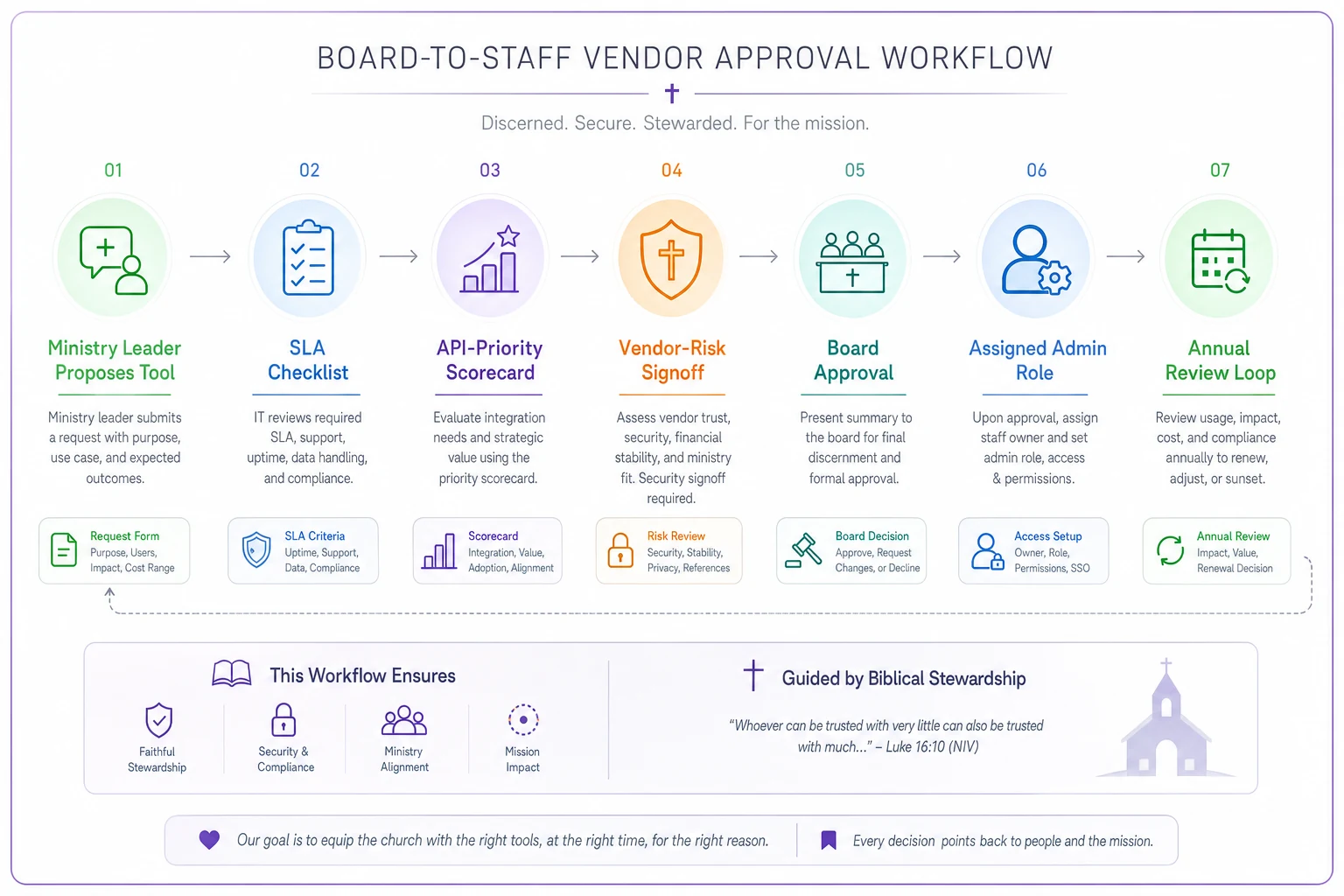
A simple visualization of that loop makes it easy to see where leverage exists and when to act.
That last loop is what turns governance from a one-time gate into an ongoing practice. Vendors don't stay the same. A tool that scored a 22 three years ago might score a 14 today after a pricing change and an acquisition. Without an annual re-check, you only find out at renewal, when your leverage is lowest.
When this level of rigor makes sense — and when it doesn't
When it's worth the full process: Any vendor holding member data, financial data, or children's information. Anything tied to Sunday operations. Anything with a contract over a certain threshold — most churches land somewhere around $1,000–$2,000 annually as a reasonable cutoff. Multi-site churches especially, where a single vendor decision ripples across campuses; the coordination challenges there overlap with the ones covered in our multi-site event logistics playbook.
When it's overkill: A free design tool for making flyers. A one-off event registration for a single retreat. Low-cost tools that hold no sensitive data and could be dropped tomorrow with zero consequence. Running a full signoff on these just trains staff to see governance as bureaucracy, and they'll start routing around it.
Who should not adopt this wholesale: Very small churches with two or three tools and one person managing everything. For them, a lighter version — just the SLA minimums and a shared admin/password list — is probably enough. The full scorecard and signoff template start earning their keep once vendor count climbs past six or seven, which is usually where the sprawl starts to cause real problems.
The mistake nearly everyone makes
The most common failure isn't picking a bad vendor. It's treating vendor approval as a purchasing decision instead of a stewardship decision. Purchasing asks "can we afford it?" Stewardship asks "are we comfortable being dependent on this, and can we get our data back if we need to?"
Boards are wired to think about money and mission. They're often less comfortable thinking about data ownership, exit plans, and contract terms — so those questions get skipped, and the church accumulates dependencies it never consciously chose. The blueprint here doesn't require technical expertise. It requires a repeatable set of questions and the discipline to ask them before the commitment, then again once a year.
Good vendor stewardship isn't about distrust. Most vendors serving churches are genuinely trying to help. The point is that trust and governance aren't opposites — governance is what lets you extend trust responsibly, keep ownership of what belongs to your congregation, and hand a clean, documented set of relationships to whoever leads the church after you.
Ready to transform your church management?
Join 500+ churches using Parshly to enhance community engagement, streamline administration, and grow their ministries.