


Most churches don't have a recruiting problem. They have a quiet attrition problem. Someone signs up at a ministry fair, serves twice, then fades. Nobody notices until the greeter team is short three people on Easter and the children's check‑in desk is running with one adult who hasn't had a day off since September.
The frustrating part is that this loss is almost always invisible while it's happening. There's no exit interview, no red flag, no moment where someone says "I'm done." They just stop showing up on the schedule, and because most churches track attendance but not volunteer continuity, the drop never surfaces as a number anyone is responsible for.
A church volunteer retention system fixes that by making retention measurable — specifically by treating a new volunteer's first 90 days as a managed lifecycle with defined check‑ins, small recognition milestones, and a renewal conversation before they drift. This post lays out that lifecycle, a sample KPI dashboard, and low‑cost ways to run it even with a tiny staff.
The 90‑day cliff is where most volunteers are actually lost
If you plotted when volunteers quit, you wouldn't see a smooth decline. You'd see clusters. The biggest one hits somewhere between the 6th and 12th time someone serves — roughly the two‑to‑three‑month mark for a monthly or biweekly rotation.
The first few serves run on enthusiasm and novelty. The person feels useful, someone thanked them, it's new. By the 90‑day point, the novelty is gone and the real question kicks in: Does anyone here actually know me, and does it matter if I show up? If the honest answer is no, they leave — not angrily, just gradually.
Nobody owns that window. Recruiting gets attention because it's exciting. The substitute scramble gets attention because it's urgent. But the 90‑day stretch is neither exciting nor urgent on any given week, so it slips. By the time a leader notices a reliable person has gone quiet, they've already mentally checked out, and win‑back is far harder than retention would have been.
The whole point of a lifecycle is to force attention onto that window before it closes.
The retention lifecycle, start to finish
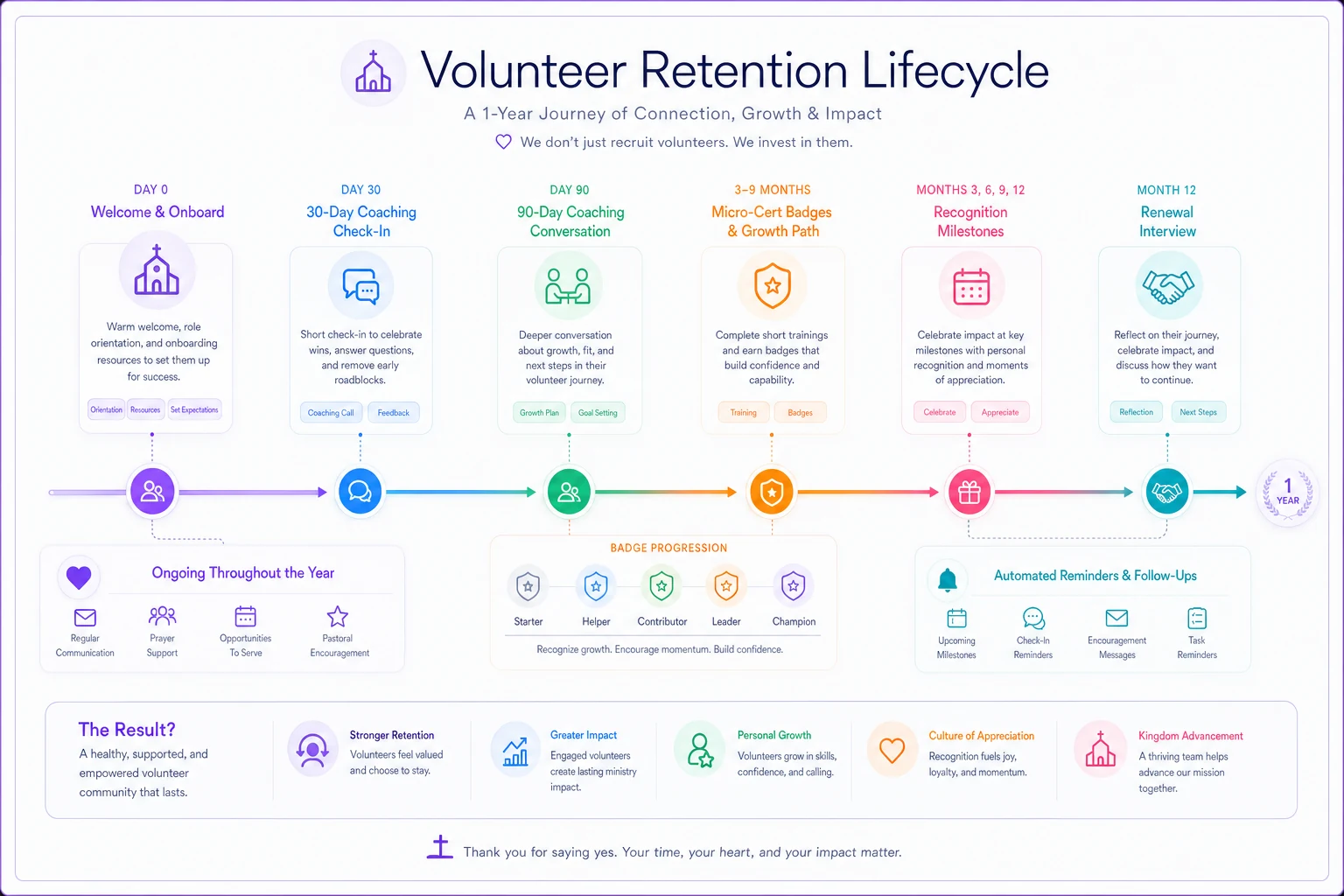
Think of it as four touchpoints spread across a volunteer's first season, then a renewal decision. None of these are heavy. The value isn't in the length of each conversation — it's in the fact that they reliably happen instead of depending on whether a team leader remembers.
Simplify your church’s day-to-day operations.
Parshly helps you organize events, track donations, and engage your congregation—all in one place.
- Centralized member management
- Donation tracking & reporting
- Volunteer scheduling & notifications
No credit card required
A quick visual of the lifecycle helps make the cadence clear.
The 30‑day coaching check‑in
Thirty days in (or after the 3rd–4th serve, whichever comes first), someone the volunteer knows has a short, specific conversation. Not "how's it going?" — that gets a reflexive "good." Instead:
-
"What part of serving has felt clearest, and what's still confusing?"
-
"Is the time commitment matching what you expected?"
-
"Anything about the setup or handoff that's annoying?"
The 30‑day check is diagnostic. You're catching friction while it's fixable — a confusing check‑in process, a shift that runs 20 minutes long, a team lead who never introduced them to anyone. Small stuff, but small stuff compounds into "this isn't for me."
The 90‑day coaching conversation
By 90 days the person knows how to do the role. The question now is whether they see a future in it. Good prompts:
-
"Do you feel like part of this team, or still like a guest helping out?"
-
"Is there something you'd like to learn or grow into?"
-
"Would you rather keep this rhythm, do more, or scale back for a season?"
That last question is the one most churches are terrified to ask because they're afraid of the "scale back" answer. But giving someone permission to adjust is exactly what keeps them from quitting entirely. A volunteer who moves from biweekly to monthly stays on your team. A volunteer who feels trapped at biweekly disappears.
Micro‑certification badges
Between and around those check‑ins, you layer in small, earnable credentials. Not a graduation ceremony — think "verified" markers that signal competence and progress.
-
Check‑in Certified — completed the children's check‑in and release workflow correctly three times
-
Lead‑Ready — can open or close a station without supervision
-
Trainer — qualified to onboard a new volunteer
-
Safety Verified — current on background check and safety policy
The psychology here is simple and underused in churches: people stay where they're growing. A badge is cheap to issue and gives a volunteer a sense of forward motion. It also solves a real operational problem — leaders stop guessing who can be trusted with what. When the nursery coordinator can see at a glance who's "Lead‑Ready," scheduling gets easier and safer.
Recognition on a schedule, not a whim
Recognition that depends on someone feeling grateful at the right moment is unreliable. Put it on a calendar:
| Milestone | Recognition | Owner |
|---|---|---|
| 1st serve | Personal thank‑you text within 48 hrs | Team lead |
| 30 days | Handwritten note | Ministry coordinator |
| 90 days | Public shout‑out (bulletin/team channel) | Ministry coordinator |
| 6 months | Micro‑cert badge celebrated + small gift | Volunteer director |
| 1 year | Renewal interview + anniversary acknowledgment | Pastor/director |
The pattern that separates healthy teams from struggling ones isn't how much they recognize people — it's how consistently. A church that reliably sends a thank‑you after every single first serve outperforms a church that throws one big appreciation banquet a year, every time.
The renewal interview
Around the one‑year mark, you have an actual conversation about continuing — framed as a two‑way check, not an assumption. This does three things: it surfaces burnout before it becomes a no‑show, it gives you clean data on who's re‑committing, and it treats the volunteer's time as a real choice rather than a default.
-
"Looking back at the year, what drained you and what energized you?"
-
"Do you want to continue in this role, shift roles, or rest for a season?"
-
"Is there anyone you'd recommend we invite to serve?"
That third question quietly turns renewal into recruiting. People who are re‑committing are your warmest referral source — and they only get asked if the conversation actually happens.
A sample KPI dashboard you can actually maintain
Retention stays invisible until you count it. You don't need anything elaborate — four or five numbers reviewed monthly will tell you more than most churches know about their teams.
| Metric | How to calculate | Healthy target |
|---|---|---|
| 90‑day retention rate | % of new volunteers still serving at 90 days | 70%+ |
| Check‑in completion | % of 30/90 check‑ins actually done | 90%+ |
| Active‑to‑roster ratio | Volunteers who served in last 60 days ÷ total roster | 60%+ |
| Renewal rate | % saying yes at 1‑year interview | 75%+ |
| Badge progression | % of 90‑day volunteers holding 1+ micro‑cert | 50%+ |
The sleeper metric here is check‑in completion. It's the only leading indicator on the list — everything else tells you what already happened, but check‑in completion tells you whether the process is running. If completion drops to 40%, your retention numbers are about to get worse and you have a month or two of warning. Most dashboards only track lagging outcomes, which is like checking the smoke detector after the fire.
One caution on the active‑to‑roster ratio: nearly every church has a wildly inflated roster full of people who "signed up" years ago and never really served. Clean that first, or the number will look alarming for no useful reason.
A real scenario
A mid‑sized church — around 450 in weekend attendance, mostly one paid staffer plus a part‑time coordinator overseeing volunteers — was recruiting steadily but constantly short‑handed. They brought in roughly 60 new volunteers across a year and ended the year with barely more active people than they started with. The leak was almost entirely in the first 90 days; their best guess was that fewer than half of new recruits were still serving by month three.
They didn't add staff. They added structure: a 30‑day text‑based check‑in, a 90‑day conversation, three simple micro‑cert badges in children's and hospitality, and a monthly 20‑minute review of five numbers. The coordinator owned the cadence.
Within about two seasons, 90‑day retention climbed to somewhere in the low‑70s percent and the "always short" feeling eased — not because they recruited more, but because they stopped losing the people they already had. The coordinator's blunt summary was that the badges did more than expected; volunteers kept asking what they had to do to earn the next one.
Where tools quietly carry the load
The honest problem with everything above is that it's simple to design and brutal to sustain by memory. A part‑time coordinator cannot reliably remember that volunteer #37 hits their 30‑day mark on Thursday while also running the weekend schedule.
This is where AI‑assisted operational software earns its keep — not as anything flashy, but as the thing that makes the cadence run without someone tracking dates on sticky notes. A workflow platform with light automation can watch each volunteer's serve history, trigger the 30‑ and 90‑day check‑in reminders to the right leader, flag anyone who's gone quiet past their normal rhythm, log badge progress, and surface the dashboard numbers so nobody has to rebuild a spreadsheet each month.
Automate the 30‑ and 90‑day reminders and badge logging so the coordinator doesn't have to track dates manually.
The system doesn't replace the conversation — the handwritten note and the "how are you really doing" still have to come from a person. What automation removes is the forgetting. In real operations, the retention lifecycle fails for one reason more than any other: the touchpoints are optional in practice, so busy weeks skip them until skipping becomes the norm. Automated reminders and quiet escalation turn those touchpoints from optional into default.
It connects naturally to work you may already have in place. If you've built a trial‑shift recruitment funnel, the retention lifecycle is simply what happens after someone converts — the next stage of the same journey. And it pairs directly with capacity planning: better retention is the cheapest way to fix chronic shortages, because keeping an existing volunteer always costs less than finding a new one.
Low‑cost implementation steps
You can start this with tools you already own. Here's a realistic sequence:
-
Clean the roster first. Mark anyone who hasn't served in 6+ months as inactive. Work from reality, not the inflated list.
-
Pick one ministry to pilot. Children's or hospitality usually — enough volume to learn, small enough to manage by hand.
-
Write the four touchpoints as scripts. Three bullet prompts each for the 30‑ and 90‑day checks. Don't overthink the wording.
-
Define 2–3 micro‑cert badges with clear, observable criteria. Keep them earnable within the first few months.
-
Build the recognition calendar and assign an owner to each row. Ownership is the whole game — an unowned step doesn't happen.
-
Set up the dashboard as a simple shared sheet with the five metrics. Review it monthly for 20 minutes.
-
Run it for two seasons, then expand. Let the pilot prove the cadence before rolling it across every team.
When this makes sense — and when it doesn't
This lifecycle is worth the effort when you're recruiting steadily but staying flat, when a few burned‑out veterans are carrying teams that should be shared, or when you genuinely don't know your retention rate. Those are the conditions where structure pays for itself fast.
It's a bad fit if your onboarding is still broken — if new volunteers can't figure out how to serve, no amount of 90‑day coaching will save them. Fix the front door first. It's also overkill for a church with a dozen total volunteers who all know each other by name; the relationships already do what the system is designed to replicate.
And it's genuinely the wrong move if nobody will own the cadence. A retention lifecycle with no owner is just a document. Better to run one real touchpoint consistently than to design five that never happen.
Volunteers rarely leave because of one dramatic failure. They leave because the gap between their enthusiasm and anyone noticing them grew a little too wide, a little too quietly, right around the 90‑day mark. A measurable retention lifecycle closes that gap on purpose — with timed check‑ins, small markers of growth, recognition that doesn't depend on anyone's mood, and a yearly conversation that treats serving as a real choice.
Start with one ministry, five numbers, and four conversations you commit to actually having. That's enough to turn a steady trickle of departures into teams that stick — and to finally see retention as something you manage instead of something that just happens to you.
Ready to transform your church management?
Join 500+ churches using Parshly to enhance community engagement, streamline administration, and grow their ministries.