



The children's ministry director needs $180 for craft supplies before Sunday. She texts the office manager, who's out sick. She emails the executive pastor, who's in back-to-back meetings. By Thursday she gives up, buys the supplies on her own card, and now there's a reimbursement sitting in limbo that nobody approved in advance. Multiply that by six ministries and you've got a finance system that quietly trains everyone to route around it.
That's the real problem with most church expense approval workflow setups. They're not too loose — they're too slow, and slowness breeds workarounds. People stop asking because asking takes longer than just spending the money and sorting it out later.
The fix isn't more control. It's clearer control. Small requests move fast, big requests get real scrutiny, and everybody knows exactly how long an answer should take.
The actual bottleneck is ambiguity, not amount
Most churches think their approval problem is about dollar thresholds. "Anything over $500 needs the pastor." Fine. But what kills momentum isn't the threshold — it's that nobody knows when they'll get an answer.
A ministry leader submits a request and then just… waits. No confirmation it was received. No idea if it's sitting in someone's inbox or already approved. So they follow up, which interrupts the approver, who now has to context-switch away from something else. The follow-up itself becomes the bottleneck.
Approval frustration in small organizations tracks almost perfectly with uncertainty, not strictness. A ministry owner will happily wait two days if they know it's two days. What they can't stand is submitting into a void.
So the first thing to fix is response-time expectations, and the second is making requests dead simple to submit. Everything else follows from those two things.
A lightweight expense‑request form that people will actually use
The failure mode here is obvious once you've seen it a few times: churches build an expense form that asks for everything, so nobody fills it out. Twelve fields, a required account code the ministry leader doesn't know, a dropdown of GL categories that means nothing to a volunteer.
Simplify your church’s day-to-day operations.
Parshly helps you organize events, track donations, and engage your congregation—all in one place.
- Centralized member management
- Donation tracking & reporting
- Volunteer scheduling & notifications
No credit card required
A good request form is the smallest set of fields that lets an approver say yes or no without a follow-up email. That's the whole test.
-
Who's asking (name + ministry)
-
What it's for (one line — "VBS snacks week 1")
-
Amount (estimate is fine for pre-approval)
-
When it's needed by (this field alone prevents half the chaos)
-
Budget line (let them pick from their ministry's lines, not the full chart of accounts)
-
Already spent or pre‑approval? (reimbursement vs. request-to-spend)
-
Receipt upload (optional at request, required at reconciliation)
Notice what's missing: no vendor tax details, no project codes, no approval chain selection. The person submitting shouldn't have to know who approves it. The system — or the office — routes it. Making the requester figure out routing is one of the most common reasons forms go unused.
One thing most churches miss: the "needed by" date should drive urgency, not just sit there as data. A request needed in three weeks and a request needed Friday are not the same thing, and your SLA should treat them differently.
The SLA matrix: match scrutiny to amount
This is the heart of it. An approval SLA matrix by amount does two jobs at once — it tells the approver how fast to respond, and it tells the requester what to expect. Both sides stop guessing.
| Amount | Who approves | Target response (SLA) | Notes |
|---|---|---|---|
| Under $100 | Ministry owner's own budget authority | Auto-approved if within budget line | Logged, not gated |
| $100–$499 | Ministry owner + office confirmation | 1 business day | Fast lane for weekly operations |
| $500–$1,999 | Executive pastor / business admin | 2 business days | Requires budget-line check |
| $2,000–$4,999 | Exec pastor + one board/finance member | 3–4 business days | Second signature required |
| $5,000+ | Finance committee / board | Next scheduled meeting | Plan ahead; not an urgent lane |
A few things worth calling out.
Name a backup approver for every SLA tier so approvals don't stall when someone is out.
The "under $100, auto-approved within budget" row is the one churches resist most and need most. If you've already approved a ministry's annual budget, re-approving every $40 purchase inside that budget is theater. You gave them a budget — let them spend it, and log it. The control is the budget line, not a second human signature on tiny amounts.
The SLA column is a promise, not a hope. If the exec pastor is going to be unreachable for a week, there has to be a named backup for the $500–$1,999 tier, or the lane clogs. An SLA with no backup approver is just a longer wait with better documentation.
And the top tier is deliberately slow. A $6,000 expense should almost never be an emergency. If it is, that's a planning failure worth addressing separately — not a reason to loosen board oversight.
Petty cash is where the real leakage hides
Petty cash feels small, so it gets ignored. That's exactly why it's a problem. The amounts are tiny, the oversight is casual, and over a year it adds up to a number nobody can fully explain.
A typical scenario: a church keeps a $300 petty cash box in the office. People take cash, sometimes leave a receipt, sometimes an IOU note, sometimes nothing. At year-end the box has $140 in it, receipts totaling $95, and a $65 gap that gets written off as "miscellaneous." Nobody stole anything — it just evaporated through sloppiness. And that same casual pattern is what makes broader giving errors and reconciliation headaches so hard to untangle when they show up elsewhere.
The reconciliation template fixes this by forcing the box to always balance to the original float. The rule is simple: cash on hand + receipts = starting float, always. If it doesn't balance, you find out this week, not next December.
A clean petty‑cash reconciliation template tracks, per transaction:
-
Date the cash left the box
-
Who took it (name, signed)
-
Purpose and ministry
-
Amount taken
-
Receipt attached? (yes/no — and "no" needs a reason)
-
Change returned to the box
-
Running balance after the transaction
Then at replenishment time, you run the close:
-
Count the physical cash in the box
-
Add up all receipts since last replenishment
-
Confirm cash + receipts = original float
-
Note any variance (and investigate anything over a small tolerance, say $5)
-
Write one check to replenish back to the float
-
File the receipts against the ministry budget lines they belong to
The part most churches skip: the person who holds the petty cash box should not be the only one reconciling it. Even in a tiny church, a second set of eyes at replenishment — the treasurer, a finance volunteer — closes the gap between "trustworthy person" and "no accountability structure." It protects good people from suspicion as much as it deters anything else.
When to keep petty cash — and when to kill it
Worth saying plainly: a lot of churches should just shrink or eliminate petty cash altogether.
Petty cash still makes sense when you genuinely have frequent tiny cash needs — a benevolence fund that hands out small amounts, a food pantry buying day-of produce, ministries that deal with people who can't be reimbursed by check later.
Petty cash is a bad idea when the box is really just a slow substitute for giving ministry leaders a budget and a reimbursement path, or a church card with a low limit. If 80% of your petty cash goes to planned purchases, those shouldn't be cash at all. A couple of low-limit ministry debit cards with automatic receipt capture will reconcile themselves far better than any cash box.
Who should absolutely not run a loose petty cash system: any church that's had recent staff turnover in the finance role, or that can't name who last counted the box. If you can't answer that question, the box is a liability, not a convenience.
The monthly ministry‑owner report package
Here's the part that keeps the whole thing from becoming bureaucratic: you push information to ministry owners every month so they stop needing to call the office to ask about it.
Most budget anxiety in ministries comes from leaders not knowing where they stand. They either overspend because they lost track, or they underspend out of fear — not wanting to be the one who went over. A simple monthly package fixes both.
The monthly ministry‑owner report should fit on one page per ministry and include:
-
Budget line, spent to date, remaining (the only three numbers most leaders actually need)
-
Percent of annual budget used vs. percent of year elapsed (a quick pacing check)
-
Open requests still awaiting approval, with how long they've been waiting
-
Any SLA breaches — requests that blew past their target response time
-
Petty cash drawn by that ministry this month
-
A short note flagging anything unusual
That SLA-breach line is the quiet genius of the whole package. It makes the approval process itself accountable, not just the spenders. If the exec pastor keeps blowing the two-day SLA, it shows up in black and white every month. The conversation shifts from "why do ministries keep going rogue" to "our approval lane is broken, let's fix the backup approver."
If you're already building leadership visibility elsewhere, this slots naturally alongside your board-ready dashboards — same philosophy, just pointed at ministry owners instead of the board.
A real scenario
A church with roughly 450 attenders and six active ministries was running everything through one overloaded office manager. Expense approvals happened by whoever caught her in the hallway. Petty cash was a $250 box that came up $40–$60 short most quarters. Ministry leaders routinely bought supplies on personal cards and submitted reimbursements weeks later, which wrecked month-end close.
They put in three things: the lightweight request form, the SLA matrix (with the under-$100 auto-approve-within-budget rule), and the one-page monthly report per ministry.
The change wasn't dramatic in dollars — it rarely is. What shifted was the friction. Reimbursement requests dropped off because leaders now requested before spending. Month-end close went from a multi-day scramble of chasing receipts to something the treasurer could mostly finish in an afternoon. The petty cash variance basically disappeared once a second person signed off at replenishment. And the "hey, did you approve my thing?" interruptions fell to almost nothing, because the monthly report already told leaders where their requests stood.
Nobody would call it a transformation. It was just a system that stopped leaking time.
Where software quietly helps — and where it doesn't
You can run all of this on paper and spreadsheets, and plenty of small churches do. The form can be a Google Form, the SLA matrix a laminated sheet, the reconciliation a spreadsheet tab. It works.
Where it gets painful by hand is the routing and the reminders. Someone has to notice a request came in, send it to the right approver, nudge them when the SLA is about to breach, and compile the monthly reports. That manual coordination is exactly the work that evaporates into busy weeks — which is how hallway approvals became the norm in the first place.
This is the narrow place where an operational platform earns its keep. It routes each request to the right approver by amount, timestamps the SLA clock, sends a reminder before the deadline slips, and assembles the per-ministry monthly package automatically from the same data. Not because automation is impressive, but because the one thing a small church office genuinely can't do reliably is remember to follow up on everything. Let the platform hold that, and the humans stay focused on judgment calls that actually need them.
Here's a simple visual of how the software enforces routing, SLA timers, reminders, and report assembly.
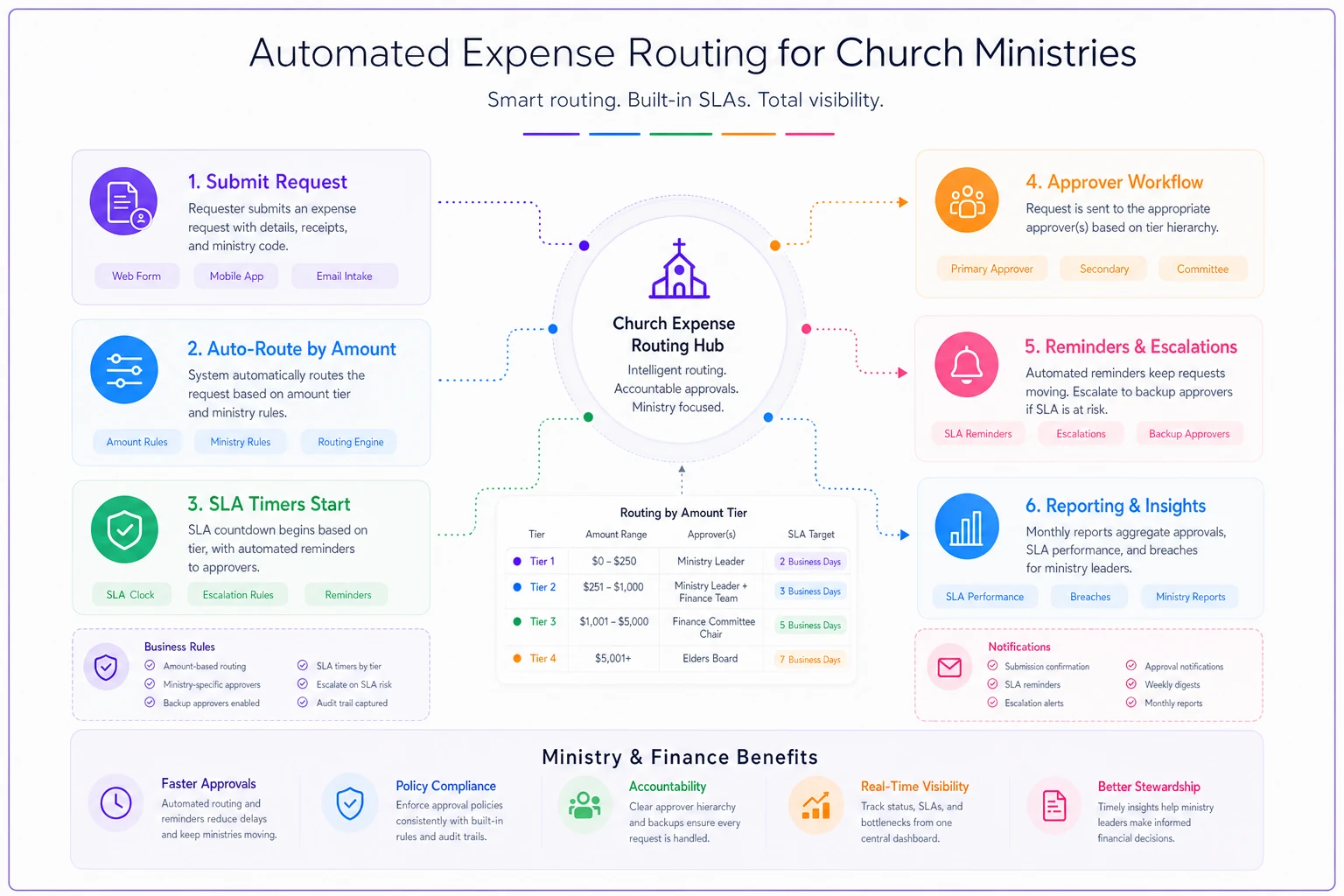
This shows the flow from request to approver, SLA timing and reminders, and the assembly of the monthly ministry report.
The thing to actually do this week
Don't rebuild your finances. Just do the smallest version:
-
Write down your SLA matrix — four or five amount tiers, who approves each, how fast.
-
Name a backup approver for every tier. No backup, no SLA.
-
Trim your expense request down to seven fields, max.
-
Count your petty cash box today and reconcile it to the float.
-
Send each ministry owner their three numbers — spent, remaining, pacing — once this month and see what questions stop coming in.
The goal isn't tighter control. It's faster, clearer control, so ministry leaders spend their energy on ministry instead of chasing down a yes for forty dollars of craft supplies. Bureaucracy isn't caused by having rules. It's caused by having rules nobody can predict. Make the rules predictable and the bottleneck mostly solves itself.
The goal isn't tighter control. It's faster, clearer control, so ministry leaders spend their energy on ministry instead of chasing down a yes for forty dollars of craft supplies. Bureaucracy isn't caused by having rules. It's caused by having rules nobody can predict. Make the rules predictable and the bottleneck mostly solves itself.
Ready to transform your church management?
Join 500+ churches using Parshly to enhance community engagement, streamline administration, and grow their ministries.