
There's a specific flavor of panic that hits when a key volunteer drops out an hour before service. It's not the same as not having enough people signed up — that's a planning problem you can see coming. This is the other thing: the schedule was full, everything looked fine Friday, and now at 7:12am your nursery is one adult short of ratio, or your sound guy just texted that he's throwing up.
Most churches handle this with a frantic group text and a prayer. Somebody's spouse gets volun-told. A teenager who's never run the board gets thrown at the sound desk. Or worse — the room just runs short and you hope nobody notices.
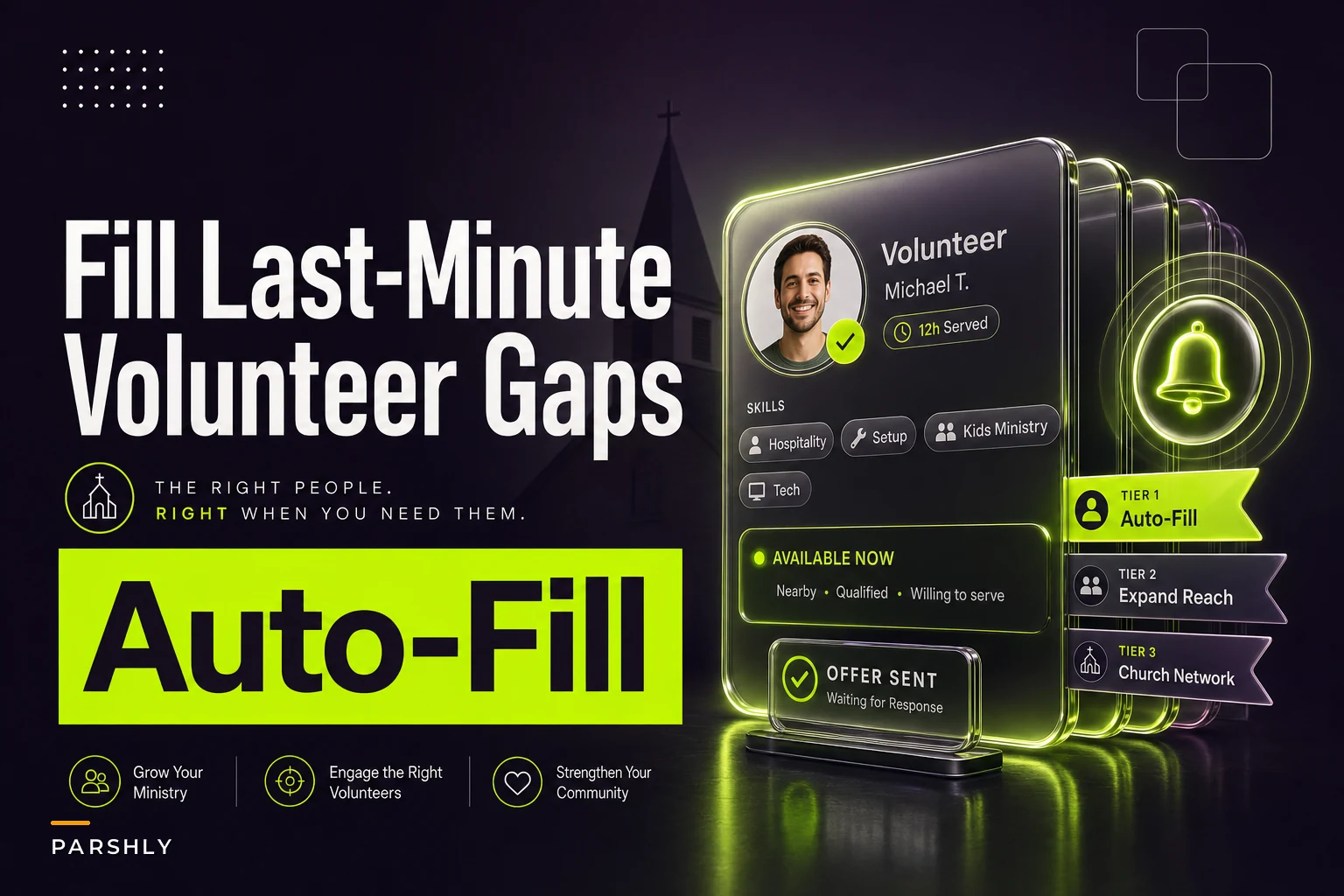
The fix isn't "recruit more people." You probably have enough people. The fix is having a vetted substitute pool with skill tags and a system that actually reaches those people in the right order, with deadlines, before you're the one making calls. That's what this post is about.
If your actual problem is that you never have enough volunteers to begin with, that's a different lifecycle — go read the capacity-planning lifecycle for ministries and event spikes first. This post assumes your rosters are mostly full and the issue is coverage when someone falls out.
Why last-minute gaps blow up worse than they should
The gap itself is rarely the real problem. The problem is how churches respond to it.
Here's the pattern. A volunteer cancels. The ministry lead — who is usually also leading something else that morning — now has to do three things simultaneously: figure out who could cover, figure out who's actually qualified (background-checked for kids, trained on the specific equipment, physically present that day), and then contact them one by one and wait to hear back.
That last part is the killer. You text Dana. You wait. Dana doesn't answer because she's driving to church. You text Mike. Mike says "I can't but maybe ask Rachel." You text Rachel. It's now 7:40. Service is at 8:00.
And this is the part people underestimate: the manual approach forces the leader to choose between speed and qualification. When you're panicking, you grab whoever responds, not whoever's actually a good fit. That's how an untrained person ends up in the toddler room or how your worship set gets mixed by someone who's never touched the board.
A few things make this predictably worse:
-
Nobody has a clean list of who's actually available as backup vs. who's "sort of around sometimes"
-
Skill and clearance info lives in someone's memory, not written down
-
There's no agreed order for who gets asked first
-
There's no deadline on the ask, so people "see it later"
-
When nobody responds, there's no plan for what happens next
A few things make this predictably worse:
What a vetted substitute pool actually looks like
A substitute pool is not "the all-volunteers text thread." It's a deliberately smaller, pre-qualified group of people who have explicitly agreed to be on-call backup for specific roles.
Simplify your church’s day-to-day operations.
Parshly helps you organize events, track donations, and engage your congregation—all in one place.
- Centralized member management
- Donation tracking & reporting
- Volunteer scheduling & notifications
No credit card required
The word vetted matters. Everyone in the pool should already have the clearances and training required for the roles they can fill. You do not want to be running background checks or figuring out who's safe to be alone with kids during a 7am scramble. If your screening process is messy, fix that first — a clean volunteer screening, consent and record workflow is a prerequisite, not a nice-to-have.
The second piece is skill tags. Every person in the pool gets tagged with what they're cleared and able to do. Not vague labels — specific ones.
Here's the difference between a useless tag and a useful one:
| Vague (useless) | Specific (useful) |
|---|---|
| "Kids ministry" | "Nursery, 0–2, background-check current through 3/2026" |
| "Tech team" | "ProPresenter operator, trained; NOT audio board" |
| "Greeter" | "Front door greeter + mobility assistance trained" |
| "Can help" | "Available Sundays 2nd service only, within 15 min of campus" |
The tag isn't just what they can do — it's also the constraints. Someone cleared for the sound board who lives 40 minutes away is useless for a 7:15 emergency. Tag the constraint so the system doesn't offer them a shift they can't physically make.
A realistic pool for a church of around 300–400 people might be 15–25 people total, spread across roles. You don't need everyone. You need enough qualified depth per role that any single person falling out doesn't leave you stuck.
The auto-offer sequence: reach people in the right order, with a clock
This is the part that actually saves Sunday mornings, and it's where most churches are still doing everything by hand.
Here's the sequence as a simple workflow.
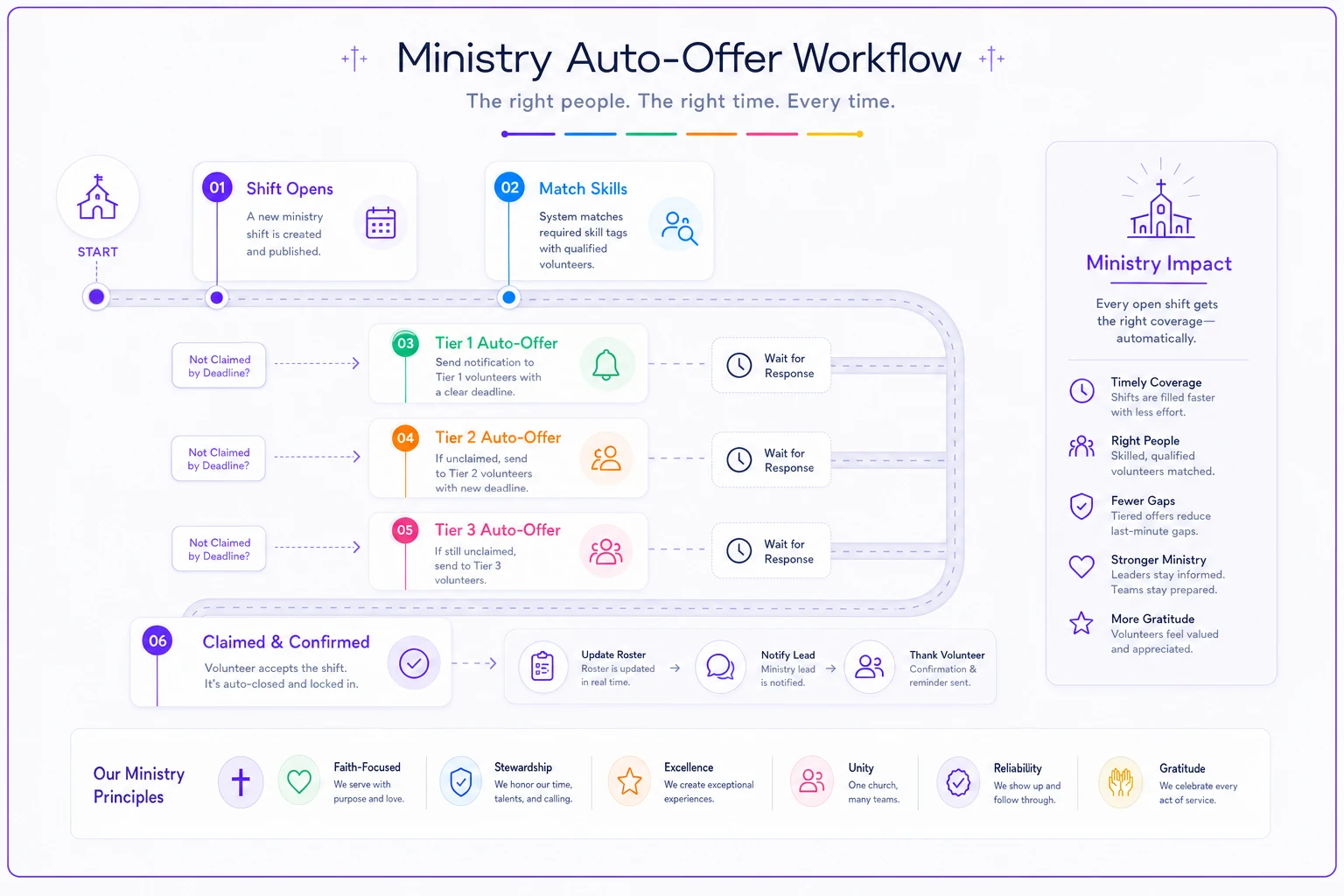
Instead of the leader picking who to text, you define auto-assign rules ahead of time. When a shift opens up, the offer goes out in a pre-set order, one layer at a time, each with a deadline.
-
Shift opens (volunteer cancels, or a slot was never filled by Saturday night). The system knows the role, the required skill tags, and the time.
-
Tier 1 offer goes to the closest-match people — same role, cleared, available that service, nearby. They get a notification: "Nursery needs coverage, 2nd service today. Can you? Reply YES by 7:30."
-
Deadline hits. If nobody from Tier 1 claims it by the cutoff, the offer automatically rolls to Tier 2 — slightly wider net, maybe people who are cleared but usually serve a different service.
-
Tier 2 deadline hits. Rolls to Tier 3, the broadest qualified group.
-
Someone claims it. The offer closes immediately for everyone else, the roster updates, and the ministry lead gets a confirmation so they're not still worrying.
Set Tier 1 deadlines to allow realistic travel time for volunteers, not just an instant cutoff.
Two things make this work that manual texting can't.
Deadlines. A text with no deadline is a text people answer "when they get to it." An offer that says "reply by 7:30 or it moves on" creates urgency and — importantly — tells people exactly when they're off the hook. Volunteers actually like this. "Reply by 7:30" is less stressful than an open-ended "can anyone help???" sitting in a thread all morning.
First-claim-wins with auto-close. The worst version of a group text is when four people all say "I can come!" and three of them wasted their morning. Auto-close means the first qualified yes locks it and quietly tells everyone else it's covered. The leader doesn't touch any of this — they find out it's handled, not that there's a problem.
The escalation ladder: what happens when nobody says yes
Sometimes nobody is available. It's a holiday weekend, half the team's out of town, and your pool comes up empty. You need a plan for that, defined in advance, so it's not a judgment call made in panic.
An escalation ladder is just the pre-agreed answer to "what do we do if the pool doesn't cover it." Written down, by role, before the morning it happens.
A reasonable ladder for a mid-size church:
-
Level 1 — Pool offer sequence (Tiers 1–3 as above). Target
resolved 45+ min before service.
-
Level 2 — Ministry lead personal ask. If the pool is exhausted, the lead gets a notification with a short list of "maybe" people to call directly. Human judgment kicks in here, but only after the automated reach has failed.
-
Level 3 — Role fallback plan. If the role still isn't covered, you fall back to a pre-defined contingency. For nursery, that might be "combine rooms and adjust ratio within policy." For sound, "run the simplified preset Pat built for this exact situation." The fallback should already exist on paper for each specific role.
-
Level 4 — Staff/on-call backup. A named staff member or deacon who is the final catch. This should rarely trigger. If it triggers often, your pool is too thin.
The point of the ladder isn't to automate every decision. It's to make sure nobody is inventing a response at 7:45am. Each level has an owner and a trigger. When Level 1 fails, everyone knows exactly what Level 2 is.
This is especially worth building out for predictable surge weekends. During holidays, your gaps and your available subs both get weird at the same time — more roles to cover, fewer people around. If that's your pain point, pair this with proper season-aware volunteer schedules and surge rules so your pool is sized for the hard weekends, not just the easy ones.
A real scenario: the nursery that stopped scrambling
A church running two Sunday services, around 350 in weekly attendance, had a recurring nursery problem. They averaged roughly two last-minute dropouts a month — someone sick, a kid sick, a flat tire. Every time, the children's director spent the pre-service window texting people individually, and about one time in three she ended up either short-staffed or pulling an uncleared parent into the room "just to watch."
They built a substitute pool of about 11 cleared nursery volunteers, each tagged by age-group comfort, availability by service, and background-check status. They set up a two-tier offer sequence with a 7:25 deadline on the early service and a 9:40 deadline on the second, and wrote a simple escalation ladder ending with "combine the 0–2 and 2–3 rooms within ratio."
The change wasn't dramatic on paper, but it was dramatic in the room. Over the following months, nearly every gap got claimed inside the Tier 1 window — usually within 10–15 minutes of the offer going out. The director went from personally working the phones every couple of weeks to getting a "covered" confirmation on her phone before she'd even finished setting up. The uncleared-parent workaround basically disappeared, which quietly fixed a liability issue nobody had wanted to talk about out loud.
The honest caveat: it didn't magically create volunteers. On two genuinely tough weekends the pool still came up short, and the "combine rooms" fallback is what saved them. That's the system working correctly — the point was never zero gaps, it was never scrambling.
Building your pool: a practical starting checklist
Start small and role-specific. Don't try to do every ministry at once. Pick your most painful area — usually kids or tech — and build one clean pool there first.
-
[ ] List every role that has ever caused a last-minute scramble. Rank by how often and how bad.
-
[ ] For your top 1–2 roles, identify everyone already cleared and trained for it.
-
[ ] Ask those people, explicitly, if they'll join the backup pool (this is a different ask than "serve every week" — many people who won't commit to a regular slot will say yes to occasional on-call).
-
[ ] Tag each person
skills, clearance expiry, which service(s), proximity/availability constraints.
-
[ ] Write the offer order (who gets asked first, second, third) and the deadline for each tier.
-
[ ] Write the escalation ladder, including the contingency fallback for when the pool is empty.
-
[ ] Name an owner for each level above the automated layers.
-
[ ] Do one dry run. Fake a gap on a normal Sunday and watch how fast it fills.
That dry run matters more than it sounds. It surfaces the stuff you forgot — the volunteer whose clearance lapsed, the tag that was too vague, the deadline that was too tight for people driving in. Don't skip it.
When this makes sense — and when it doesn't
This is worth building if: you have recurring last-minute dropouts in roles that genuinely require qualification or clearance — nursery, children's, tech, security, anything with safety or custody implications. The cost of grabbing the wrong person is high, so pre-qualifying the pool pays for itself.
This is overkill if: your gaps are in low-stakes roles where literally anyone can step in, like a second greeter or a coffee station. For those, a simple open text thread is fine. Don't build infrastructure for a problem a shrug can solve.
Who should NOT start here: if your rosters are chronically under-filled — not "someone dropped out" but "we never had enough to begin with" — a substitute pool won't help. You can't pull subs from a bench that doesn't exist. Fix the recruiting and capacity pipeline first, then layer coverage on top.
The real test is simple: are your Sunday-morning problems about people who canceled, or people who were never there? Substitute pools solve the first. They do nothing for the second.
Where automation earns its place
Most of this can be run manually — a printed pool list, a known calling order, a leader who texts fast. Plenty of small churches do exactly that, and it's a real upgrade over chaos.
But the manual version breaks on the two things that matter most under pressure: timing and order. A human running the sequence at 7:15am will skip the deadline step, call out of order because they panicked, or forget to close the offer when someone says yes. The value of a scheduling platform that handles tiered offers, deadlines, auto-close, and escalation isn't that it's fancy — it's that it does the boring, disciplined part reliably at the exact moment your people are least capable of being disciplined. It's 7am. Everyone's stressed. That's precisely when you want the process running itself instead of living in someone's head.
If you do adopt a tool for this, judge it on whether it handles skill-tag matching, tiered offers with real deadlines, and automatic escalation — not on how many features it lists. Those three things are the whole job.
The deeper shift is cultural, though. A good substitute system changes the unspoken rule from "never cancel, we're counting on you" to "if you have to drop, the system's got it." That second rule is kinder to your volunteers, and counterintuitively it makes them more reliable — because serving stops feeling like a trap they can't get out of.
The gap stops being a crisis and becomes just a thing that gets handled, which is exactly what it should have been all along.
Ready to transform your church management?
Join 500+ churches using Parshly to enhance community engagement, streamline administration, and grow their ministries.