
The problem with most church transitions isn't the goodbye party. It's the Tuesday afterward, when someone realizes the outgoing youth director was the only one who knew the gate code to the storage unit, had the vendor's cell number for the bus rental, and kept the parent permission forms in a personal Google Drive nobody else could reach.
That's the real shape of a leadership gap. Not a dramatic void, but dozens of tiny "wait, who does this now?" moments that stack up over weeks. Each one is small. Together they stall ministries, frustrate volunteers, and quietly bleed trust with families who notice things stopped running smoothly.
Most church succession planning advice fixates on the big chair — replacing the senior pastor after a decade. That matters, but it's rare. What happens far more often is a worship leader taking another job with six weeks' notice, a treasurer stepping down mid-year for health reasons, or a long-time volunteer coordinator who just burns out and stops answering emails. These are the transitions that catch churches flat-footed, because nobody wrote anything down.
This post is narrow on purpose. It's about the paperwork and rules that keep momentum going when someone leaves — specifically a one-page continuity packet for each critical role, clear interim-owner rules, a 30/60/90 ramp checklist for the next person, and lightweight knowledge-capture templates you can actually get volunteers to fill out.
Start with the roles that hurt most when empty
Not every role needs a packet. You'll waste effort and burn goodwill if you ask every greeter to document their process. The trick is identifying which roles create a mess when they suddenly go dark.
A role is "critical" for continuity purposes if losing the person for two weeks would cause one of these:
-
Money can't move (bills unpaid, deposits not made, payroll delayed)
-
Kids' safety or check-in breaks down
-
A recurring service or event can't run
-
Access is lost — accounts, keys, codes, vendor relationships
-
A legal or compliance obligation gets missed
Run every paid position and every key volunteer role through that filter. In a typical mid-size church you'll land on somewhere between eight and fifteen roles that genuinely need continuity documentation. Treasurer, facilities coordinator, children's ministry lead, worship/tech lead, communications, and volunteer scheduling almost always make the list. A Wednesday-night meal coordinator usually doesn't — unless she's also the one holding the food-safety certification.
One pattern worth naming: the most dangerous roles to lose are rarely the highest-paid ones. They're the ones held longest by the same person. A volunteer who's run the same ministry for twelve years has an enormous amount of undocumented context in their head, and precisely because they've never left, nobody has ever needed to write it down.
The one-page continuity packet
Keep it to one page. The second you make it three pages, nobody maintains it and it rots. The whole point is that a stranger could pick it up and keep the lights on for a couple of weeks.
Simplify your church’s day-to-day operations.
Parshly helps you organize events, track donations, and engage your congregation—all in one place.
- Centralized member management
- Donation tracking & reporting
- Volunteer scheduling & notifications
No credit card required
Here's the structure that works:
| Section | What goes in it | Why it matters |
|---|---|---|
| Role in one sentence | What this person is actually responsible for | Cuts through fuzzy titles |
| Recurring duties | Weekly/monthly/annual tasks with rough timing | Tells the interim what can't slip |
| Access & credentials | Systems, accounts, keys, codes — pointer, not the password itself | The #1 thing that gets lost |
| Key contacts | Vendors, staff, external partners with direct numbers | Stops the frantic "who do I call" |
| In-flight items | Whatever's mid-project right now | The stuff that dies silently |
| Who to ask | Backup person or interim owner | A human fallback |
A note on the access row, because it's where churches get themselves in trouble. The packet should say where credentials live and who controls them — not list passwords in a shared doc. Something like "Facility booking login: managed in the church password vault, access granted by the office administrator." That keeps the packet useful without turning it into a security hole. If you haven't sorted out who can hold what access temporarily, that's worth reading up on separately in a proper church role matrix with temporary access rules, because the packet assumes those decisions already exist.
Point to the password vault entry and the person who grants access instead of pasting credentials in the packet.
The "in-flight items" section is the one everyone skips and everyone regrets. A packet that only describes the steady-state job misses the actual danger: the half-negotiated vendor contract, the reimbursement waiting on one signature, the volunteer who was promised a callback. These are the threads that snap the moment someone leaves.
Interim-owner rules: decide before you need them
The gap between "she left" and "we hired someone" is where most churches improvise badly. Someone with too much on their plate absorbs the role informally, does it poorly because they're stretched, and then quietly drops half of it. Three months later you discover the restricted-fund reporting hasn't been touched since March.
Interim ownership works better when the rules are written before the vacancy, not decided in a panic. A few principles that hold up:
Name the interim by role, not by name. Write "if the treasurer role goes vacant, the finance team chair holds it on an interim basis" rather than tying it to a specific person who might also leave. This survives turnover.
Cap the interim period. An interim arrangement with no end date becomes permanent by accident, usually on someone who never signed up for it. Set a review date — 60 or 90 days — where leadership either fills the role, extends deliberately, or restructures it.
Shrink the job on purpose. An interim owner shouldn't be expected to do 100% of the role. Define the "must-not-drop" subset — the money, the safety, the legally-required stuff — and explicitly permit everything else to pause. A volunteer coordinator's interim might keep Sunday scheduling running while every new-volunteer onboarding project sits frozen. That's fine. Pretending the interim can do the whole job is how you burn out your best remaining people.
Grant access deliberately, remove it on schedule. Temporary access should have a written expiration. When the permanent hire lands, the interim's elevated access gets pulled the same week. This is boring and it's exactly the thing that never happens without a rule forcing it.
The 30/60/90 ramp checklist for the next person
The continuity packet keeps the seat warm. The ramp checklist gets the new person actually productive instead of spending their first two months guessing. Volunteers and staff both need this — the volunteer version is just shorter.
Here's a workable ramp structure. Adapt the specifics per role, but keep the three-phase shape.
First 30 days — orient and stabilize
-
Read the continuity packet start to finish and flag anything unclear
-
Get access to every system on the list, and confirm each one actually works
-
Meet the interim owner and get a walkthrough of in-flight items
-
Identify the three tasks that absolutely cannot slip, and confirm they're covered
-
Meet the top five contacts (vendors, key volunteers, adjacent staff)
Days 31–60 — take ownership
-
Run one full cycle of the recurring work with the interim available as backup
-
Rebuild or update anything in the packet that was wrong or stale
-
Close out or restart the in-flight items that were paused
-
Sit in on one meeting or event they'll eventually own solo
-
Flag any process that seems broken — new eyes catch what everyone else stopped seeing
Days 61–90 — run it solo and improve
-
Operate the role independently; interim steps fully out
-
Document one thing the previous person never wrote down
-
Propose one change or improvement now that they understand the reality
-
Confirm their own continuity packet is updated for whenever they eventually leave
Here's a simple visual of the 30/60/90 ramp workflow.
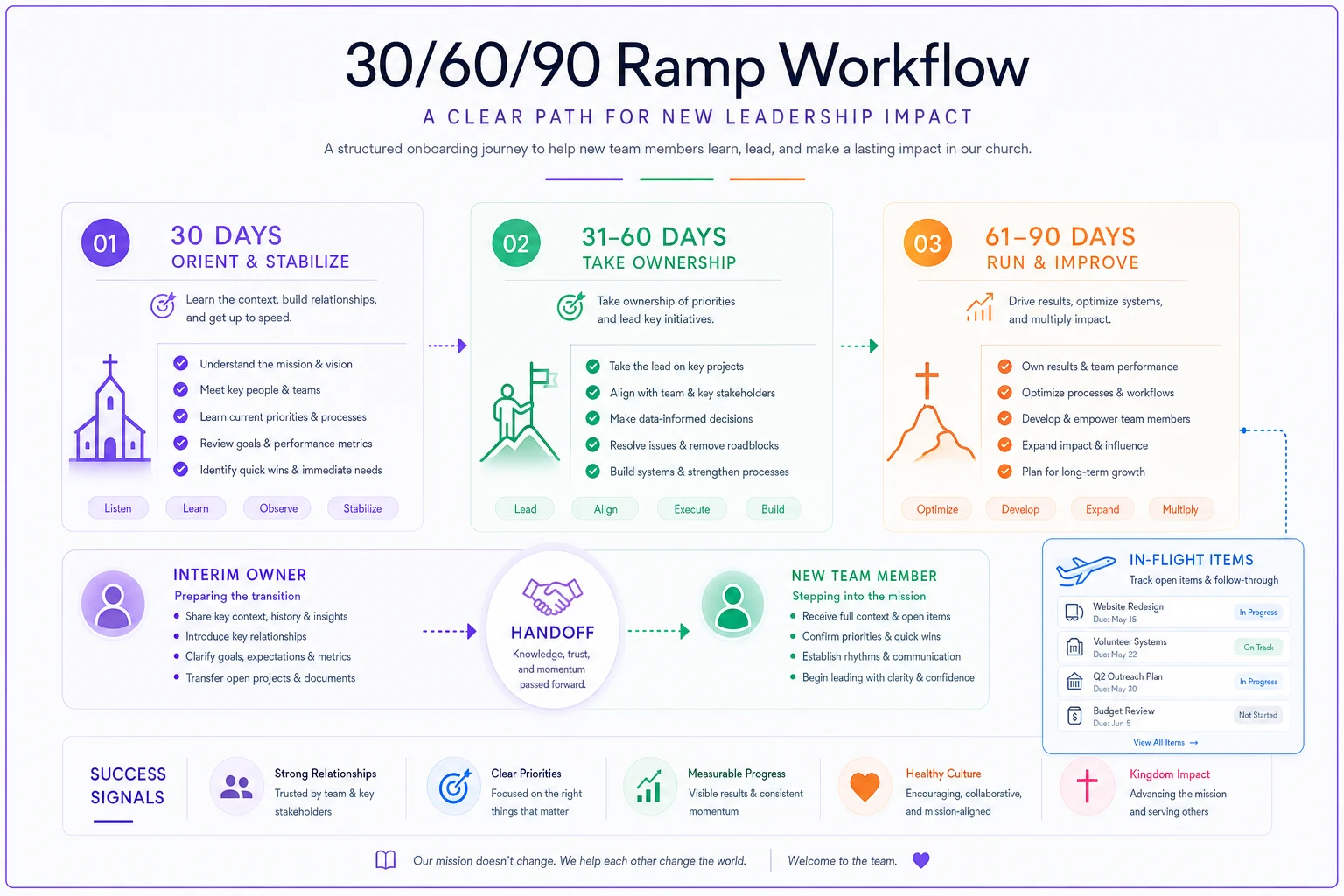
That last point closes the loop. A ramp checklist that ends with the new person updating their own continuity packet means the church never starts from zero again. The single biggest failure in church succession planning isn't the first transition — it's that the documentation created for one handoff is never maintained for the next one.
Knowledge-capture templates that volunteers will actually use
The honest problem: you cannot get a busy volunteer to write a five-page manual. They won't do it, and if you pressure them they'll do it resentfully and badly. The documentation has to be small enough that filling it out feels reasonable during a normal week.
A few formats that actually get completed:
-
The "if I got hit by a bus" note. Half a page, plain language: "Here's what I do, here's where the stuff is, here's who to call." Blunt framing works because it's concrete.
-
The five-question voice memo. Some people won't type but will happily talk for four minutes. Ask: What do you do weekly? What breaks if you disappear? Where's everything stored? Who do you deal with outside the church? What's currently unfinished? Transcribe it later.
-
The screenshot walkthrough. For anything involving software — check-in, giving, scheduling — a handful of annotated screenshots beats paragraphs. Ten minutes with a screen-capture tool captures more than an hour of writing.
-
The recurring-calendar dump. Ask them to export or list everything on their ministry calendar with a one-line note on each. This surfaces the annual stuff people forget exists until it's suddenly due.
The pattern across all of these: capture is a conversation, not an assignment. The best results come from someone sitting with the volunteer for twenty minutes and filling out the template together, then handing it back for a quick check. Left alone with a blank form, most people freeze. Guided, they'll tell you everything.
A real scenario
A church of roughly 400 attendees lost its facilities and events coordinator — a paid part-timer who'd held the role for around nine years — with about three weeks' notice. No documentation existed. Everything lived in her head and her personal phone.
The first month was rough. Two outside groups showed up for room rentals nobody had recorded. A HVAC service visit got missed because the vendor only ever texted her cell. A wedding walkthrough got double-booked against a funeral. Nothing catastrophic, but the office spent maybe fifteen to twenty extra hours that month just reconstructing what she'd known.
The recovery was straightforward once someone forced the structure. Leadership named the office administrator as interim owner with a hard 75-day cap, defined the must-not-drop list (rentals, vendor coordination, key control), and let the non-urgent projects sit. They built a one-page packet from what they could piece together, then finished it by phone with the former coordinator — who was happy to help once someone just asked specific questions instead of expecting a manual.
By the time the permanent hire started, the ramp checklist meant she was running room bookings solo inside her first month instead of the two-plus it would've taken otherwise. The whole reconstruction cost a few hours of scattered work, versus the ongoing drag of learning the role by hitting problems one at a time.
Where documentation lives actually matters
A continuity packet stored in the departing person's personal Drive is worse than useless — it leaves when they do. The packets, the ramp checklists, and the captured knowledge need to sit somewhere the church controls, that survives any individual, and that has clear rules about who can see and edit what.
This is where centralizing operational records in a shared church management system earns its keep — not because software magically solves succession, but because scattered documentation is the root cause of most transition pain. When packets, access records, and role assignments live in one governed place instead of across personal accounts and someone's memory, a handoff becomes a lookup instead of an excavation. The same discipline that makes rollouts stick — clear ownership, a place records live, someone accountable for keeping them current — is the discipline that makes succession survivable. If you're building this into a broader operational habit, it pairs naturally with a real change-management approach with clear ownership and adoption tracking.
When to build this out — and when not to bother
Full continuity packets for every role is overkill for a very small church where three people know everything and talk daily. If your whole operation fits around one table, spend your effort on the two or three roles that touch money, kids, and building access — and skip the rest.
It becomes genuinely worth the effort when you have paid staff whose departure would strand a system, you rely on long-tenured volunteers nobody could replace quickly, or you've already been burned by a messy transition and don't want a repeat. That last one is usually what finally motivates people, which is a shame, because the whole point is to do it before the departure, not after.
The one thing not to do is treat this as a one-time project. A continuity packet written once and never touched becomes a liability — it tells the next person confidently wrong things about access and contacts that changed two years ago. Tie packet updates to a rhythm: reviewed whenever someone's role changes, and swept once a year alongside whatever annual governance review you already run. Momentum after a leader leaves isn't about heroics from whoever's left standing. It's about having quietly written down the boring stuff before you needed it.
Ready to transform your church management?
Join 500+ churches using Parshly to enhance community engagement, streamline administration, and grow their ministries.