


Your youth pastor needs member contact info for summer camp registration. The finance team needs donation records for quarterly reports. Volunteers handle check-in systems every Sunday. Meanwhile, sensitive pastoral care notes sit in the same database as public event announcements.
Without clear boundaries on who sees what, churches face a real paradox—either lock everything down and watch ministry grind to a halt, or keep things open and risk exposing personal struggles, financial situations, or confidential prayer requests to the wrong people.
The solution isn't choosing between security and functionality. It's building a role matrix that defines exactly which fields each person can access, when temporary permissions make sense, and how often you verify those boundaries still reflect reality.
Why standard user permissions fail in ministry contexts
Church data access is fundamentally different from a corporate environment. A facilities coordinator might need building codes and vendor contracts but has no business seeing counseling notes. Guest services teams need allergy information and family connections but not giving history. Small group leaders need participant contact details during active semesters, but those permissions should expire when groups pause for summer.
Most churches end up at one of two extremes. Some grant wide access to simplify operations—letting anyone on staff view full member profiles including pastoral notes, financial giving, and private prayer requests. Others lock things down so tightly that staff constantly request overrides just to complete basic tasks like updating attendance or scheduling volunteers.
The deeper problem is overlapping responsibilities. Your worship leader coordinates with facilities for stage setup, works with finance on equipment purchases, collaborates with children's ministry for family services, and manages volunteer musicians. Traditional all-or-nothing permissions can't handle that complexity without either exposing unnecessary data or blocking legitimate needs.
There's also a constant stream of temporary access situations to deal with. Guest speakers need presentation systems and facility codes for one weekend. Seasonal volunteers need check-in permissions during VBS or Christmas programs. Interim staff fill roles during sabbaticals or transitions. Manual permission management becomes a part-time job on its own, and forgotten access creates security holes that quietly persist for months.
Building your church role matrix from actual ministry workflows
Before assigning any permissions, map out data sensitivity levels. Four categories tend to reflect both privacy concerns and ministry impact:
Simplify your church’s day-to-day operations.
Parshly helps you organize events, track donations, and engage your congregation—all in one place.
- Centralized member management
- Donation tracking & reporting
- Volunteer scheduling & notifications
No credit card required
Public Information: Event details, service times, ministry descriptions, general announcements. Anyone including website visitors can access this.
Directory Level: Names, photos, general contact info, ministry involvement, attendance patterns. Most staff and key volunteers need this for basic coordination.
Sensitive Ministry: Pastoral care notes, private prayer requests, counseling records, accountability relationships. Limited to pastoral staff and specific caregivers.
Protected Records: Giving history, financial assistance requests, background check results, medical conditions, legal matters. Restricted to essential roles only.
| Role | Directory Info | Attendance | Groups | Giving | Pastoral Notes | Facility | Events |
|---|---|---|---|---|---|---|---|
| Lead Pastor | Full | View All | View All | View All | Full Access | Override | Approve |
| Worship Director | View | View Service | View Teams | None | None | Schedule | Create Worship |
| Children's Director | View Families | Edit Kids | Edit Kids Groups | None | View Allergies/Safety | Request | Create Kids |
| Finance Admin | Limited | None | None | Full Reports | None | None | Budget View |
| Group Leader | View Members | View Group | Edit Own Group | None | None | None | View Related |
| Volunteer Coordinator | View Active | View Serving | View Teams | None | None | Schedule | Support |
| Facilities Manager | Contact Only | None | None | None | None | Full Access | Setup Requirements |
Notice how permissions align with actual ministry needs, not hierarchical position. The worship director sees team attendance but not member giving. Children's directors access medical notes for safety but not family financial situations. That's intentional.
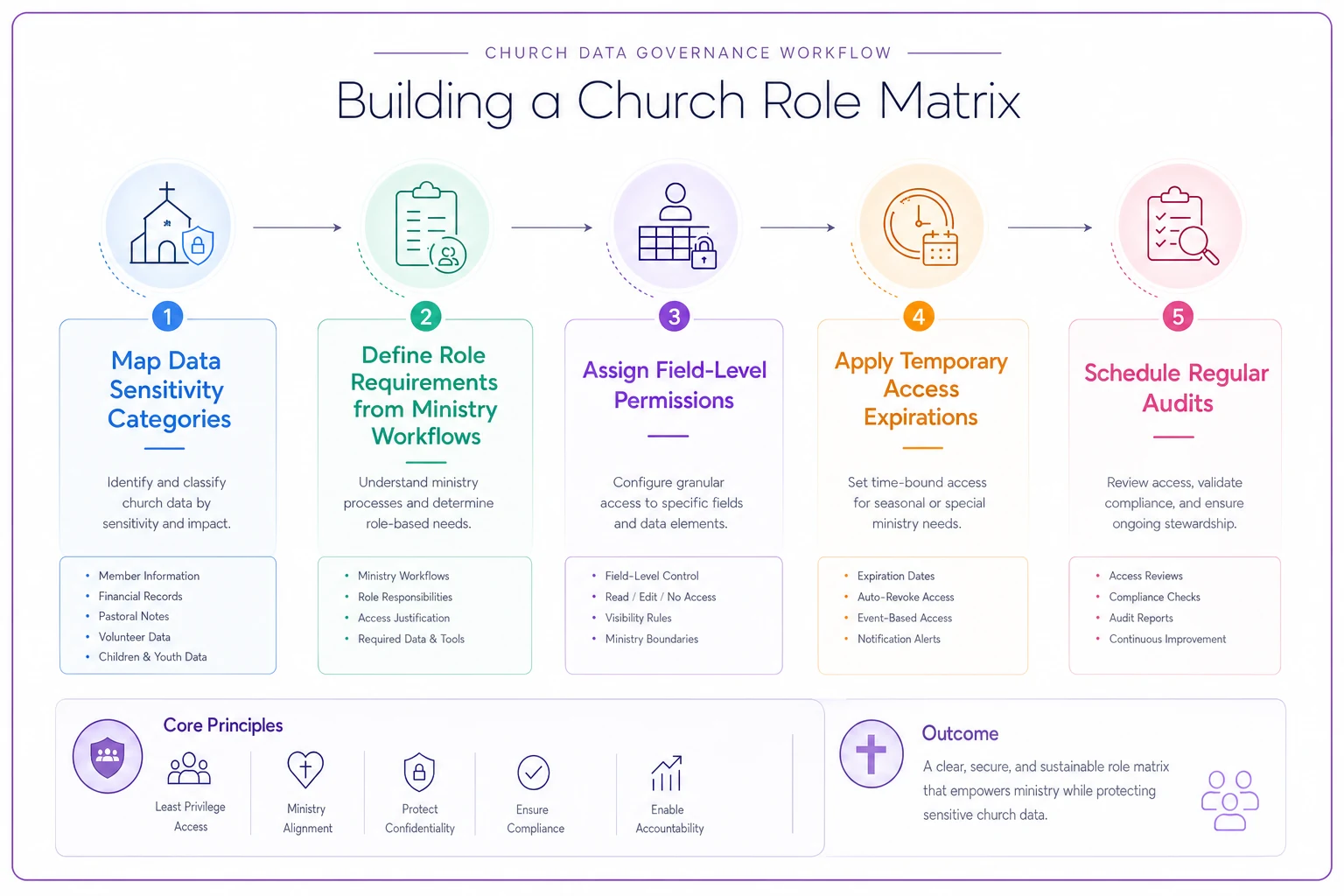
A quick visual like this helps teams see how mapping, assignment, temporary rules, and audits connect.
From there, define role boundaries based on actual workflows—not titles. Rather than "Associate Pastor - Full Access," specify exactly what each ministry area actually requires:
Temporary access procedures that don't become permanent problems
Churches regularly need temporary permission changes—guest preachers accessing presentation systems, contractors viewing building plans, seasonal staff managing programs. Without clear procedures, these quick fixes quietly become permanent security risks.
Standard temporary access templates for common scenarios help a lot:
Event Coordinator Package (expires after event date):
-
Volunteer contact information for assigned teams
-
Facility scheduling and setup requirements
-
Budget line items for specific event
-
Attendee registration and dietary restrictions
Guest Ministry Leader (auto-expires in 72 hours):
-
Presentation and sound system access
-
Facility codes for designated areas
-
WiFi and printing credentials
-
Emergency contact list
Seasonal Program Staff (tied to program dates):
-
Participant registration and medical forms
-
Volunteer schedules and training records
-
Program-specific communication tools
-
Limited financial reports for program budget
Build expiration into the permission itself rather than relying on someone remembering to revoke access. When the VBS director's enhanced permissions automatically reset two weeks after VBS ends, you eliminate the common problem of discovering former staff still accessing systems months later.
For emergency overrides, a two-person approval system is worth the friction. When someone needs immediate access outside their role—an admin pulling financial records while the finance manager is hospitalized, for example—require documented approval from two authorized leaders. Log those overrides clearly and review them within 48 hours to determine if standard permissions need adjustment.
The onboarding checklist that prevents permission creep
New staff often receive permissions based on whatever their predecessor had accumulated, not what the role actually requires. That youth pastor who left might have gathered access over five years—finance permissions from helping with fundraisers, facilities access from running lock-ins, communication tools from covering announcements. The new hire doesn't need all of that on day one.
-
Week 1 - Baseline Access - Email and calendar setup - Directory viewing (no editing) - Public facility access - Basic communication tools - Orientation materials
-
Week 2 - Department Specific - Review role matrix for position - Grant standard permissions for role - Add to relevant team channels - Assign ministry-specific tools - Schedule permission review for 30 days
-
Day 30 - Access Adjustment - Review access logs from first month - Identify needed permissions not yet granted - Remove unused permissions - Document any variations from standard role - Set 90-day review reminder
-
Day 90 - Final Configuration - Confirm all permissions align with actual duties - Remove any temporary or experimental access - Document final permission set - Add to regular audit cycle
Track permission additions separately from the standard role template. When your children's director needs donor database access for a capital campaign, document it as a role exception with justification and a review date. This keeps temporary needs from quietly becoming permanent vulnerabilities.
Track permission additions separately from the standard role template.
When your children's director needs donor database access for a capital campaign, document it as a role exception with justification and a review date. This keeps temporary needs from quietly becoming permanent vulnerabilities.
Offboarding procedures that actually close access gaps
The Sunday after a staff member announces departure, their access remains fully active. Two weeks later at their farewell reception, they still have complete system permissions. A month after they've started their new position across town, their login might still work because someone forgot to notify the right person—or because only email got disabled while database access stayed open.
-
Upon resignation/termination notification
- Document all current system access - Identify data that needs transition - Flag any shared passwords requiring changes - Note any personal devices with church data
-
Two weeks before departure
- Begin permission step-down for non-essential systems - Transition recurring tasks to other staff - Export necessary historical data - Update emergency contact trees
-
Final week
- Reduce to read-only access for transition purposes - Transfer ownership of documents and projects - Collect any physical access cards or keys - Verify backups of critical information
-
Last day
- Disable all account access at close of business - Change any shared passwords they knew - Remove from communication channels - Archive their user data appropriately
-
Within 72 hours
- Verify all access points are closed - Check for automated tasks still running under their credentials - Update public directories and contact information - Send confirmation to leadership that offboarding is complete
For involuntary departures, compress this to immediate action. Disable access during the termination meeting, not after. Have someone ready to lock accounts while HR handles the conversation.
Creating an audit rhythm that catches problems before they explode
Running an access audit once a year means you're discovering problems 11 months too late. Former staff still in systems, volunteers with expired roles viewing member data, temporary permissions that never got removed—these accumulate slowly and surface dramatically during a breach or complaint.
Overlapping audit cycles catch different types of permission drift:
Weekly Automated Checks:
-
Failed login attempts exceeding thresholds
-
Access from unusual locations or devices
-
Bulk data exports or unusual viewing patterns
-
Password reset requests from inactive accounts
Monthly Role Reviews: Each department head verifies their team's access is still appropriate. Takes maybe 15 minutes per department when built into regular staff meetings. They confirm active staff, flag role changes, and identify unnecessary permissions.
Quarterly Deep Dives:
-
Pick one department each quarter for a comprehensive review
-
Check every permission against actual duties
-
Review access logs for unusual patterns
-
Verify temporary permissions expired properly
-
Update the role matrix if standard duties have shifted
Annual Comprehensive Audit:
-
Full system review including dormant accounts, vendor access, integration permissions, and shared credentials
-
Compare actual permissions against the documented role matrix
-
Generate reports showing permission changes over time
-
Update security training based on what you find
Between formal audits, pay attention to warning signs. Staff complaining about access problems might indicate permissions are too restrictive. Never hearing any access complaints might mean they're too open. Worship team members editing financial records or facilities staff viewing pastoral notes are obvious red flags that need immediate investigation.
Setting field-level permissions that match ministry reality
Basic role permissions often aren't granular enough for church operations. Your small groups coordinator needs participant names and contact info but not giving history. Finance teams need donation data but not pastoral counseling notes. Youth leaders need parent contacts and medical information but not family financial struggles.
Modern church management platforms allow field-level restrictions within the same member record. Instead of all-or-nothing profile access, you define exactly which fields each role can view or edit:
Small Group Leader Permissions:
-
View
Name, photo, preferred contact, group participation
-
Edit
Group attendance, participant notes for their group only
-
Hidden
Giving data, pastoral notes, financial assistance history
Financial Secretary Permissions:
-
View
Name, giving history, pledge status, tax acknowledgment data
-
Edit
Donation records, pledge amounts, receipt information
-
Hidden
Pastoral notes, counseling records, personal prayer requests
Guest Services Volunteer:
-
View
Family names, children, special needs, attendance patterns
-
Edit
Check-in status, guest information cards
-
Hidden
All financial data, pastoral information, volunteer background checks
This level of control prevents uncomfortable situations where volunteers stumble onto sensitive information while doing completely legitimate ministry tasks. The greeting team volunteer looking up a family for check-in doesn't accidentally see they're receiving financial assistance. The youth intern updating event attendance doesn't land on a confidential counseling situation.
When manual systems meet digital security
Not everything lives in your church management software. Pastoral notes in personal notebooks, prayer requests on paper cards, financial assistance tracked in spreadsheets, counseling appointments in separate calendars—these parallel systems create security gaps that no role matrix can address.
Map where sensitive information actually lives, not just where it should live. That Excel file with member giving that a finance volunteer maintains on their personal laptop needs the same access controls as your official database. The prayer request cards from Sunday service sitting in an unlocked box require physical security protocols. The WhatsApp group where staff discuss pastoral situations needs clear guidelines about who's in it and when messages delete.
Bridge procedures help connect manual and digital security. Physical prayer cards get locked in the pastoral office, with digital summaries entered by authorized staff only. Financial assistance paperwork stays in a locked filing cabinet with access logged manually. Counseling notes move from paper to secured digital storage within 48 hours, then physical copies get shredded.
Train staff to recognize that security extends beyond login credentials. The church bulletin draft with member medical needs sitting on the copy machine poses the same risk as an unsecured database. The volunteer schedule posted in the hallway with personal phone numbers needs the same consideration as an online directory.
Building accountability without breeding suspicion
Access controls can quickly feel like distrust, especially in churches built on community and transparency. Staff wonder why they can't see information they've always accessed. Volunteers feel insulted by background checks and restricted permissions. Long-time members push back against security measures that seem to contradict fellowship culture.
Frame security as stewardship, not suspicion. You're protecting the vulnerable stories people trust you with—the marriage struggles shared in counseling, the financial hardships revealed when seeking help, the addiction battles disclosed in recovery ministry. Access controls honor those sacred trusts by ensuring only people who genuinely need information can access it.
Communicate changes in terms of protection, not restriction. "We're implementing role-based permissions to better protect the sensitive information our members entrust to us" lands better than "We're restricting what you can access." Focus on safeguarding the congregation rather than limiting staff.
Be transparent about the process itself. Share the role matrix openly so staff understand their access levels and the reasoning behind them. Explain audit procedures so reviews feel routine rather than targeted. Publish the security incident response plan so everyone knows what happens if something goes wrong. Openness about the system reduces the feeling that security measures are hiding something.
Real scenario: How one church prevented a crisis through proper access controls
Grace Community Church ran into serious trouble when a former youth volunteer—still processing their departure from six months earlier—logged into the church system and downloaded the entire youth directory. They used it to contact families about starting their own competing youth program at another church. Parents felt violated, kids felt confused, and the church faced hard questions about data protection.
The investigation revealed cascading permission failures. The volunteer's access was never revoked after stepping down. Their permissions had actually expanded over two years from basic volunteer to quasi-staff level access through informal requests. No audit had caught the dormant account. And the youth directory contained not just contact information but medical details, counseling notes, and family situations that should never have been visible to volunteers in the first place.
After implementing a proper role matrix with automated expiration dates, the situation changed. Volunteers now receive permissions tied directly to their serving schedule—access activates when they're scheduled and deactivates two weeks after their last shift. Youth leaders can see student contact info and relevant medical data but not family financial information or parental counseling notes. Quarterly audits catch anomalies before they become crises.
Over the following 18 months: zero unauthorized access incidents. Staff felt more confident about data security. Families trusted the church with sensitive information because they could see it was being handled carefully. And ministry continued smoothly because permissions matched actual needs rather than arbitrary restrictions.
Making church user roles access control sustainable for small teams
Small churches often assume robust access control requires enterprise-level complexity and a dedicated IT person. It doesn't. A simple but consistent system beats elaborate protocols that nobody follows.
Start with the basics: document who has access to what, review it regularly, and adjust based on actual ministry needs. The key is building habits, not perfect systems. A monthly five-minute review where each ministry leader confirms their team's permissions catches more problems than an annual comprehensive audit nobody has time to complete. Automatic permission expiration prevents more breaches than complex approval chains everyone bypasses for convenience.
Focus energy on the highest-risk areas first. Donor data and pastoral counseling notes need stricter controls than event attendance or volunteer preferences. Get those critical boundaries right before worrying about edge cases. You can always add granularity later, but establishing core protections now prevents the crisis that makes security suddenly urgent.
Church management platforms with built-in automation can handle a lot of this in the background—tracking access patterns, flagging unusual behavior, expiring temporary permissions, and maintaining audit logs without constant manual oversight. That kind of automation turns access control from a recurring burden into a background process, freeing staff to focus on actual ministry rather than permission housekeeping.
The goal isn't perfect security. It's appropriate security that protects your congregation while enabling ministry. Build a role matrix that matches how your church actually operates. Create procedures people will actually follow. Run audits that actually catch problems. When security measures align with ministry reality rather than fighting against it, protection becomes sustainable even for small teams juggling a dozen responsibilities.
Your congregation trusts you with their struggles, their finances, and their families. A thoughtful approach to church user roles access control honors that trust by ensuring their information stays exactly as private or public as they intended. That's not really about technology or policies—it's about faithfully stewarding what's been entrusted to your care.
Ready to transform your church management?
Join 500+ churches using Parshly to enhance community engagement, streamline administration, and grow their ministries.