
Most church security conversations fall apart because they start in the wrong place. Someone reads about a ransomware attack, gets nervous, and suddenly the room is talking about firewalls and penetration tests — expensive things a 200-person congregation with a part-time office admin will never realistically maintain. Meanwhile the actual weak spots sit untouched: a shared Gmail login four volunteers have used since 2019, donor records in a spreadsheet synced to someone's personal laptop, and a giving platform where nobody can remember who has admin rights anymore.
Security posture isn't something you buy. It's the sum of a lot of small operational habits that either hold together or quietly rot. And in a church, the rot is usually invisible until the day it isn't — a compromised email account blasting the whole directory, or a departing staff member who still has access to the donation dashboard eight months after they left.
This is a walkthrough of how the whole thing breaks down in practice, and how to build a program you can actually sustain with the staff and budget you have.
Where church security actually fails (it's not what you think)
The mental image most people carry is a hacker breaking through some technical wall. In reality, the failures across small congregations are almost entirely about access and identity, not sophisticated attacks. The pattern repeats with striking consistency:
-
One email account is the front door to everything — the giving platform password reset, the ChMS login, the Facebook page, the domain registrar.
-
That email account has a weak password and no second factor.
-
Three or four people know the password because "it's easier that way."
-
Nobody has looked at who has access to what in over a year.
When something goes wrong, it's rarely dramatic. A volunteer clicks a phishing link, the attacker gets into the shared inbox, and from there they reset passwords on everything connected to it. The donation platform gets a payout redirect. The member directory gets scraped. And because access was shared and undocumented, nobody can say with confidence who or what was actually affected.
The strength of your entire posture is often set by the weakest single login in the building. Security isn't a wall — it's a chain, and churches tend to run on chains held together with shared passwords and good intentions.
The prioritization problem: why churches protect the wrong things
Small churches have limited attention and near-zero budget for security, so prioritization is the whole game. The mistake is treating every risk as equal, which means either nothing gets done or the wrong thing gets done first.
Simplify your church’s day-to-day operations.
Parshly helps you organize events, track donations, and engage your congregation—all in one place.
- Centralized member management
- Donation tracking & reporting
- Volunteer scheduling & notifications
No credit card required
A useful filter: how likely is this to happen, and how bad is it if it does? When you run church risks through that lens, the ranking almost always looks like the table below — and it's rarely where churches are actually spending their energy.
| Risk | Likelihood | Impact | Typical church attention |
|---|---|---|---|
| Shared/weak logins & no MFA | High | High | Low |
| Ex-staff/volunteers keeping access | High | Medium-High | Very low |
| No backups (or untested backups) | Medium | Very High | Low |
| Phishing of staff email | High | High | Low |
| Unencrypted laptops/phones with member data | Medium | High | Almost none |
| Sophisticated external hacking | Low | High | High (misplaced) |
The top four rows are cheap or free to fix and account for the bulk of real-world incidents. The last row — the thing people worry about most — is the least likely and the most expensive to defend against. Fix identity, access, backups, and phishing awareness and you've addressed maybe 80% of the realistic threat surface for close to nothing.
Building the program in the order that actually matters
The sequence below is deliberate. Each step makes the next one easier and closes the most dangerous gaps first.
-
Inventory your accounts and identities. Before anything else, list every system that holds member, giving, or financial data, and every login that touches it — church management software, giving platform, email, accounting, website admin, social media, cloud storage. Note who has access to each. This one exercise usually surprises people. The average small church turns up two or three "orphan" accounts belonging to people who left months ago.
-
Fix identity hygiene. Every person gets their own login. No shared credentials, ever, for anything that touches data. Turn on multi-factor authentication (MFA) everywhere it's offered — this single step blocks the overwhelming majority of account takeovers. Use a shared password manager so the office admin isn't storing passwords in a Notes file or a sticky note.
-
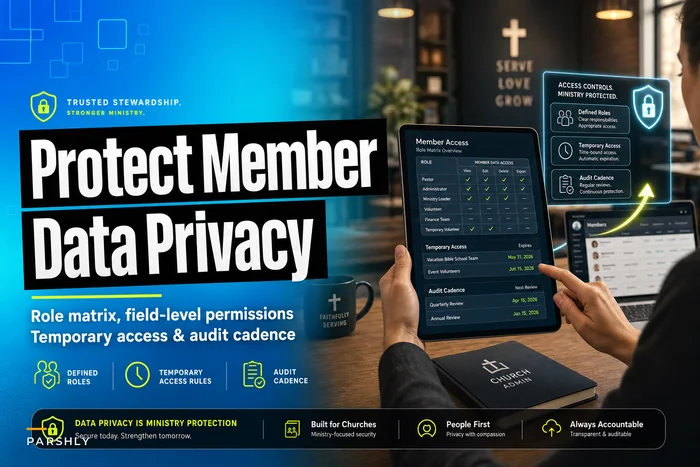
Do a real access review. Now that you know who has what, ask a blunt question for each: does this person still need this, at this level, today? Volunteers who ran the fall event don't need standing access in March. This connects directly to having defined roles in the first place — a church role matrix with temporary access rules and an audit cadence is what makes access reviews fast instead of a guessing game every time.
-
Get backups working and prove they work. Cloud platforms are not backups. If your ChMS gets corrupted or your account gets locked, can you actually recover your data? Set up automated exports or a backup tool, and — this is the step everyone skips — actually restore a copy and confirm it opens.
-
Cover encryption basics. Any laptop or phone that touches member data should have full-disk encryption enabled (FileVault on Mac, BitLocker on Windows — both free and built in). This is what protects you when a device gets stolen from a car in the church parking lot, which happens more often than most leaders expect.
-
Train against phishing. Not a lecture. A five-minute standing item: here's what a fake password-reset email looks like, here's the rule (we never change payout accounts by clicking an email link), here's who to forward suspicious messages to. Repetition matters more than sophistication here.
Start the inventory with systems that touch money and member data to get the most value quickly.
The whole sequence costs almost nothing. The expensive part is attention, not money.
What breaks as the church grows
The program above works for a single-site church with a couple of staff. What changes as you scale is the coordination burden — and this is where most churches quietly lose control.
At one location with three staff, you can keep the access picture in your head. Add a second campus, a school or preschool, a counseling ministry, and a rotating cast of forty volunteers, and the informal approach collapses. New failure points show up fast:
-
Onboarding and offboarding volume. With turnover across ministries, someone joins or leaves nearly every week. Without a defined offboarding step, access accumulates like sediment. Some churches end up with more active giving-platform logins than current staff members.
-
Data spreading sideways. Ministry leaders start their own spreadsheets, their own group chats, their own cloud folders. Member data now lives in a dozen uncontrolled places, and your posture is only as good as the sloppiest one.
-
Vendor sprawl. Each new tool is another login, another data store, another thing to review. This is exactly why a broader church data governance framework matters — security controls only hold if there's an agreed-upon map of what data exists, where it lives, and who owns it.
At small scale, security is about doing the controls. At larger scale, it's about systematizing them so they happen without depending on any one person remembering to do it. The audit cadence stops being optional.
Making it testable — the audit cadence
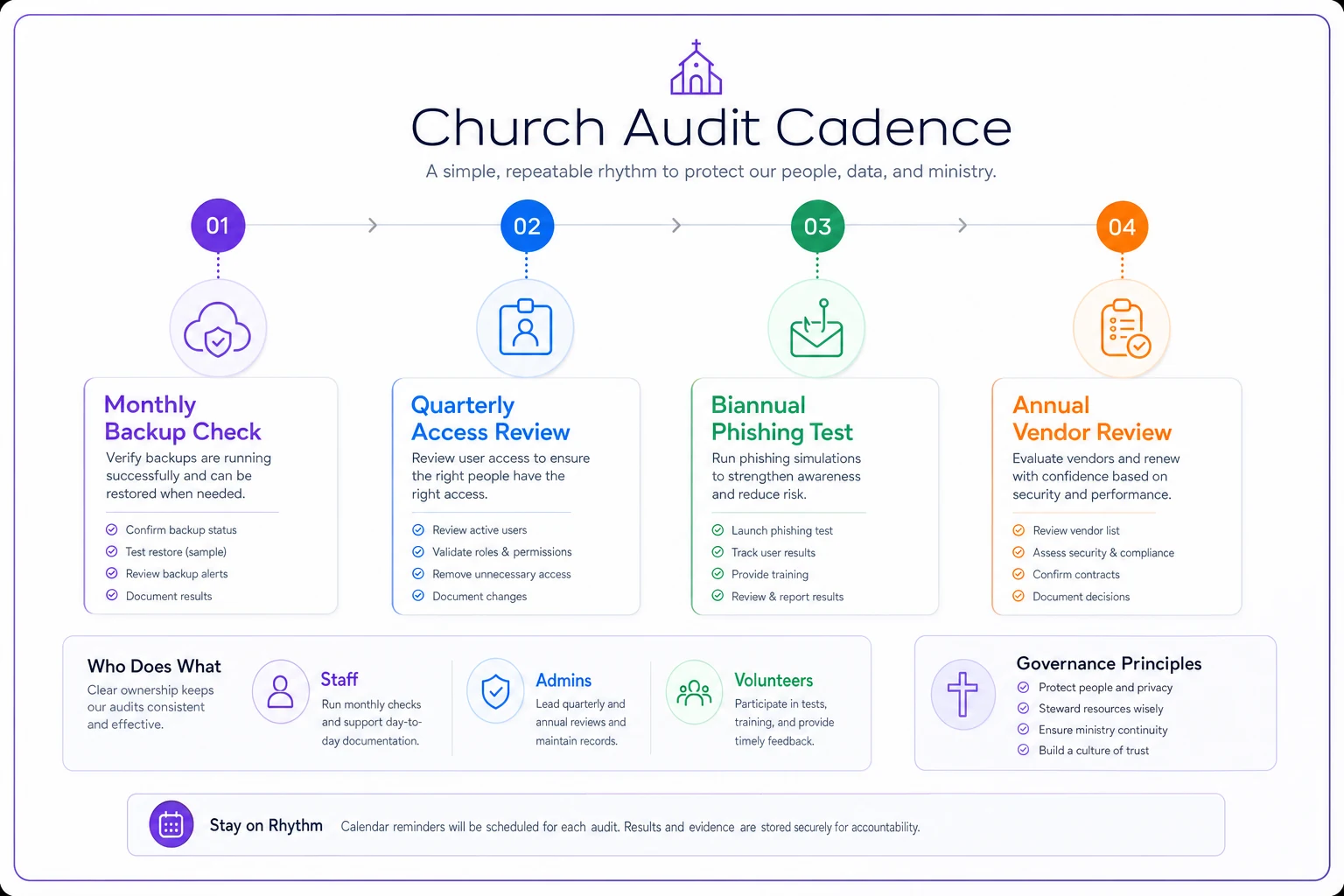
A control you can't test isn't a control, it's a hope. The difference between a church that recovers from an incident and one that doesn't is usually whether they ever verified their assumptions before the bad day.
Set a rhythm you can actually keep. For most small churches:
-
Monthly Confirm backups ran and spot-check that a recent backup restores cleanly. Review any new accounts created that month.
-
Quarterly Full access review against the role matrix. Remove anyone who left or changed roles. Confirm MFA is still enabled across all critical systems.
-
Twice a year Run a fake phishing test on staff (free tools exist), and review the full account inventory — not just changes, the whole list.
-
Annually Review vendor list and their security practices, rotate any shared service credentials that can't be individualized, and update the board summary.
Use this simple audit workflow to keep checks regular.
Here's a testable checklist you can print and initial each cycle:
-
- [ ] Every critical system has MFA enabled
-
- [ ] No shared logins remain on data-touching systems
-
- [ ] Access list matches the current role matrix (no orphans)
-
- [ ] Latest backup restored and verified within the last 30 days
-
- [ ] All staff/volunteer laptops confirmed encrypted
-
- [ ] Departing people from this period fully offboarded
-
- [ ] Phishing reminder delivered to staff
Initialing forces honesty. "We have backups" becomes "I personally restored a file on the 14th and it opened." That gap — between posture on paper and posture in reality — is where incidents live.
The one-page board summary
Boards don't want a security report full of jargon. They want to know: what's our exposure, and what are we doing about it. The most useful artifact you can produce is a single page showing residual risk — the risk that remains after your current controls — and the remediation timeline for anything still open.
| Risk area | Current control | Residual risk | Remediation | Target (SLA) |
|---|---|---|---|---|
| Account access | MFA on, individual logins | Low | — | — |
| Backups | Automated, tested monthly | Low | — | — |
| Ex-volunteer access | Quarterly review | Medium | Move to monthly offboarding | 60 days |
| Device encryption | 4 of 6 laptops done | Medium | Encrypt remaining 2 | 30 days |
| Phishing resilience | Annual reminder only | Medium-High | Add biannual test | 90 days |
The residual-risk column is what makes this honest. It tells the board you're not claiming perfection — you're claiming awareness plus a plan. The SLA column turns vague intentions into commitments with dates, which is what actually gets things done in a volunteer-run organization.
A real scenario
A congregation of around 400 people — one full-time pastor, one part-time office administrator — ran their entire operation off a single shared "office@" email account. That inbox handled password resets for their giving platform, their ChMS, and their website. Four people had the password. No MFA anywhere.
The trigger wasn't dramatic. The admin clicked a convincing "your mailbox is full" phishing email and entered the shared password. Within a day, the attacker was inside the inbox and attempted to change the payout account on the giving platform. It got caught only because the platform sent a payout-change confirmation to the same compromised inbox — which the attacker had set to auto-delete. A board member happened to notice something looked off in the giving dashboard during a routine check. Cleanup took close to three weeks and cost somewhere in the $2k–$3k range for a security consult, plus an enormous amount of the admin's time resetting and re-securing accounts. No money was ultimately lost, but it was close. The fixes afterward cost almost nothing: individual logins for each person, MFA on all critical systems, a shared password manager, a quarterly access review. About a year later they ran a phishing simulation — the same admin who'd been fooled the first time reported the fake email within ten minutes. The posture improved not because they spent money, but because they closed the identity gap and built a habit of checking.
When to keep it simple — and when to invest more
When the lightweight program is enough: Single-site church, under a few hundred people, a handful of systems — the free-and-built-in approach genuinely covers most of your realistic risk. MFA, individual logins, native encryption, tested exports, quarterly review. Don't let anyone talk you into enterprise tooling you can't maintain. An unmaintained expensive control is worse than a maintained free one.
When to invest more: Once you're multi-site, running a school or childcare program, handling counseling records, or managing large volumes of financial data, the coordination overhead justifies dedicated tools — a proper password manager for teams, centralized identity management, possibly outside help for annual reviews. The signal to invest isn't a scary headline. It's when your access reviews take longer than an afternoon, or when you genuinely can't answer "who has access to giving data" without asking around.
Who should not overbuild: A fifty-person church with two systems doesn't need a security consultant. It needs MFA turned on and one person who checks the account list every quarter. Complexity that outruns your capacity to sustain it becomes its own risk.
The point that ties it together
A church's information security posture isn't determined by how much technology it owns. It's determined by whether the boring habits — individual logins, second factors, tested backups, regular access reviews — actually happen and actually get verified. The congregations that stay safe aren't the ones with the biggest budgets. They're the ones that treat security as an operating rhythm rather than a one-time project, and who can point to the last time they proved a control worked instead of just assuming it did.
Start with the account inventory this week. Everything else builds from knowing what you have and who can touch it.
Ready to transform your church management?
Join 500+ churches using Parshly to enhance community engagement, streamline administration, and grow their ministries.