



The moment a 15-passenger van pulls out of the parking lot for a weekend retreat, your church has effectively taken legal and moral custody of a group of minors. And the paperwork that's supposed to protect everyone — signed permission slips, allergy lists, emergency contacts, driver screenings — is almost always scattered across three binders, a shared drive, someone's email inbox, and a group text.
That gap between "we collected the forms" and "the forms are actually usable on the trip" is where churches get burned. Not because leaders are careless, but because youth trip operations at most churches were never designed as a workflow. They were assembled piece by piece, one summer at a time.
The specific failure point most churches ignore: the disconnect between the roster and everything attached to each kid on it.
The real failure isn't missing forms — it's forms that don't link to a roster
Here's the situation that actually causes problems. A youth pastor collects 34 permission slips for a mission trip. Great. But the roster — the living list of who is actually going — changes six times in the two weeks before departure. Two kids drop out. Three get added last minute. One switches from Van A to Van B because a friend is in that van.
By departure morning, the stack of permission slips no longer matches the roster. Nobody notices because the forms and the roster live in two different places. A leader grabs the folder, assumes it's complete, and drives off.
-
Kids on the bus with no signed consent on hand
-
Allergy info for a student who canceled, but nothing for the student who replaced them
-
An emergency contact list printed three days ago that's already wrong
The document exists. It's just not connected to reality.
Why this happens even at well-run churches
Youth ministry runs on volunteers and momentum. The permission slip goes out as a PDF or paper form. Parents return it whenever they get around to it. Someone — usually one overloaded coordinator — pieces the responses together.
Simplify your church’s day-to-day operations.
Parshly helps you organize events, track donations, and engage your congregation—all in one place.
- Centralized member management
- Donation tracking & reporting
- Volunteer scheduling & notifications
No credit card required
The roster, meanwhile, lives in a spreadsheet or a registration platform and keeps changing. There's no rule that says "a student is not on the confirmed roster until their consent, medical form, and emergency contact are all attached and current." So kids float in a gray zone: signed up, sort of approved, maybe missing a form, probably fine.
That "probably fine" is the entire liability exposure.
The other reason this breaks: the vetting side and the participant side are handled by different people. Whoever screens adult drivers and chaperones is often not the same person managing student paperwork. So you can end up with fully-screened adults driving students whose medical forms were never verified — or worse, an unscreened parent who volunteered to drive at the last minute because you were short a vehicle.
The workflow that actually holds up
The fix is treating the trip as one linked record set, not a folder of documents. Every student on the roster needs four attached, current, timestamped items before they're cleared to travel. Every adult needs their screening clearance before they're cleared to supervise or drive.
Here's the linkage that matters:
| Roster item | Must be linked to | Cleared when |
|---|---|---|
| Student name | Signed permission/consent | Consent timestamped after roster confirmation, matching this specific trip |
| Student name | Medical & allergy info | Reviewed by trip medical lead, flagged conditions acknowledged |
| Student name | Two emergency contacts | Both reachable, verified within 30 days of departure |
| Student name | Van/transport assignment | Assigned vehicle + driver, seat count confirmed |
| Adult name | Extended screening | Background check + references + interview complete before roster lock |
The key detail people miss: consent has to be timestamped and tied to this trip specifically. A general "media and activities" waiver signed at the start of the ministry year is not the same as consent for a whitewater rafting trip with an overnight stay three counties away. If your consent isn't dated after the trip details were finalized, it's weaker than you think.
Extended screening for trips is not the same as annual volunteer screening
-
A trip-specific interview covering supervision scenarios (what do you do if a student wanders off, gets sick at 2am, refuses to follow instructions)
-
Confirmation the screening is current, not expired mid-summer
-
Driver-specific checks
valid license, clean MVR, insurance verification for anyone operating a church or personal vehicle with kids in it
-
A hard rule that no adult gets added to the driver or chaperone list after roster lock without completing the full check
That last one prevents the single most common liability gap: the well-meaning parent who "just drives the extra van" and was never screened at all.
A tight process for locking a trip roster
Below is the sequence that keeps the roster and its attachments in sync. Notice that roster lock is a real event with a real deadline — not a vague "when everyone's signed up."
-
Open registration with trip details finalized (dates, location, activities, cost, transport plan). Consent language references these specifics.
-
Collect consent, medical, and emergency contacts as students register — not as a separate later step. A student is "pending" until all three are in.
-
Screen all adults in parallel. Chaperones and drivers must clear extended screening before roster lock, not after.
-
Set a roster lock date — usually 5 to 7 days before departure. After this, no additions without a rush exception process.
-
Verify emergency contacts in the final week. A number that was good in March may be disconnected by July.
-
Assign transport and generate manifests from the locked roster, so every van's list is pulled from the same source everyone else is using.
-
Do a final match check every name on every van manifest has all four attached items current. Any gap = that student doesn't board until resolved.
Steps 6 and 7 are where this actually holds together. When the manifest is generated from the locked roster rather than typed up separately, the two can't drift apart. And the final match check is the moment you catch the kid who switched vans but whose consent still says the other trip.
A simple visual workflow for the roster lock process:
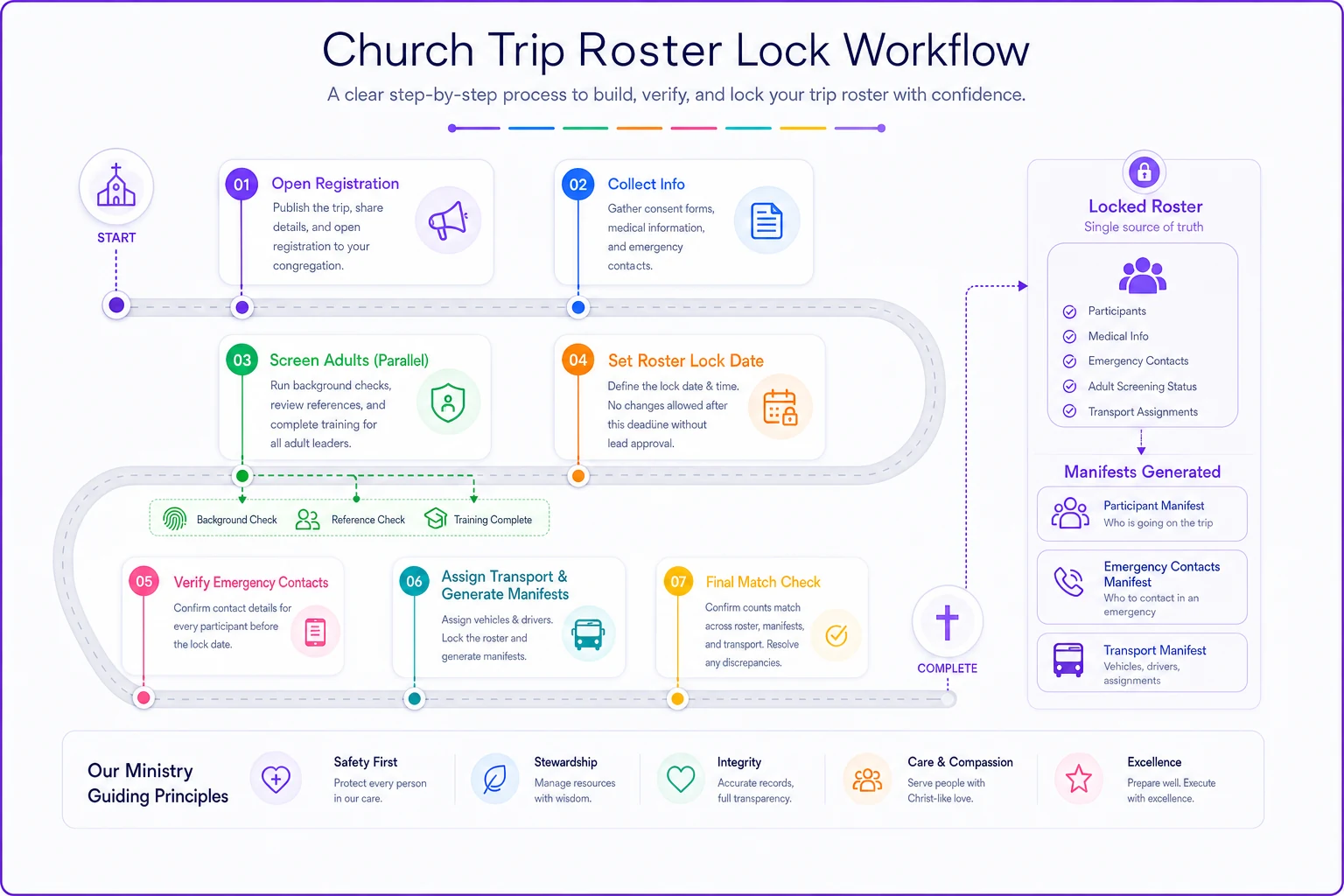
This visual maps to the numbered steps above.
Transport manifests that hold up when it counts
A transport manifest is not just a headcount. When something goes wrong — a breakdown, an accident, a student who's missing at a rest stop — the manifest is the first thing anyone reaches for. It needs to answer, instantly:
-
Who is in this specific vehicle
-
Who is driving it
-
Which students have medical conditions the driver needs to know about right now (severe allergy, seizure disorder, insulin)
-
Emergency contact for each student in that vehicle
-
Where this vehicle is supposed to be and when
The mistake churches make is printing one master list and handing generic copies to every driver. Each driver needs their van's manifest, with the medical flags for their passengers visible — but the full medical detail kept confidential and accessible only when needed. The check-in logic here mirrors the guardian-matching discipline covered in our secure children's check‑in workflow with guardian matching and release controls: the person responsible for a child at any given moment needs to be able to confirm identity and release authority without digging through a binder.
Handling medical info without oversharing
-
On the manifest only the flags that require immediate action (life-threatening allergy, condition requiring medication, EpiPen location).
-
Held by the trip medical lead full medical details, medication schedules, dosages, physician contacts.
-
Access rule drivers and chaperones know who has a flag and what to do in an emergency, but detailed records stay with the designated lead.
One trip, one medical lead who has actually read every form before departure. Not the youth pastor skimming forms in the parking lot.
A real scenario: what the gap costs versus what the fix saves
A mid-sized church runs an annual summer camp for around 60 middle and high schoolers — three vans plus a rented bus. For years, forms lived in a binder and a shared drive. The coordinator spent the final week — easily 15 to 20 hours — chasing missing signatures, calling parents, and reprinting lists every time the roster shifted.
Two summers ago it nearly went sideways. A student with a severe peanut allergy switched vans the morning of departure. Her allergy info was on the original van's printed list. Her new driver had no idea. Nothing happened that day, thankfully — but a snack stop could have turned into an ER visit with a driver who didn't know to look.
After that, they rebuilt the process around a locked roster with attached records and manifests generated from that single list. The next summer, the final-week scramble dropped to a few hours. Roster changes automatically flagged which attachments needed updating. On departure morning, every driver's manifest matched exactly who was in their vehicle, allergy flags included. Not a dramatic transformation — just the difference between "we got lucky" and "we're actually covered."
Post-trip incident reporting: the part everyone skips
The workflow doesn't end when the vans get back. Minor incidents — a twisted ankle, a kid who got homesick and called a parent, a near-miss at a swimming hole, a chaperone conflict — need to be documented while memories are fresh. Not because you expect a lawsuit, but because patterns only show up if you're recording them.
-
What happened, when, and where
-
Who was involved and who witnessed it
-
What action was taken on the spot
-
Whether parents were notified, and when
-
Any follow-up needed
The value is cumulative. If three separate trips report the same unscreened-driver near-miss, or the same location keeps producing injuries, that's something you can only act on if it was written down. Most churches never capture it, so they relearn the same lessons every summer.
When a lightweight approach is fine — and when it isn't
Not every outing needs the full workflow. A judgment guide:
A lighter process is reasonable when: the trip is short, local, staying within cell range, low-risk activity, small group, and drivers are already-screened regular volunteers.
You need the full linked workflow when: the trip is overnight, out of the immediate area, involves higher-risk activities (water, heights, distance), includes last-minute driver recruitment, or the group is large enough that no single person can hold every detail in their head.
Who should not run trips on the honor system: any church adding drivers or chaperones close to departure, any trip crossing state lines, and any group that's grown past the point where the coordinator personally knows every family. That's exactly when the roster-to-attachment drift becomes invisible — and dangerous.
Where good tools quietly help
None of this requires expensive software, and the discipline matters more than the platform. That said, the reason paper-and-spreadsheet trips break down is that a human has to manually keep the roster, the forms, the screenings, and the manifests all in sync — and humans miss things under deadline pressure.
Schedule emergency-contact verification as a tracked task tied to the roster lock date so it can't be overlooked.
Operational platforms that link records to a roster remove the drift. When a student's status can't turn "cleared" until consent, medical info, and emergency contacts are all attached and current — and when manifests generate straight from the locked roster — the two physically cannot fall out of sync. Screening expirations can flag themselves before they cause a problem. Emergency contact verification can be scheduled and tracked instead of remembered. That's the practical role of these tools: not replacing the youth pastor's judgment, just making sure the paperwork reflects who's actually on the bus.
The one thing to change before your next trip
If you do nothing else: stop treating the roster and the forms as separate things. Set a roster lock date, refuse to clear any student who's missing a current consent, medical form, or verified emergency contact, and generate your van manifests from that single locked list.
That one change — linking permission to roster and roster to manifest — closes the specific gap that causes almost every youth-trip liability scare. The forms were never really the problem. The connection between them was.
If you do nothing else: stop treating the roster and the forms as separate things. Set a roster lock date, refuse to clear any student who's missing a current consent, medical form, or verified emergency contact, and generate your van manifests from that single locked list.
That one change — linking permission to roster and roster to manifest — closes the specific gap that causes almost every youth-trip liability scare. The forms were never really the problem. The connection between them was.
Ready to transform your church management?
Join 500+ churches using Parshly to enhance community engagement, streamline administration, and grow their ministries.