

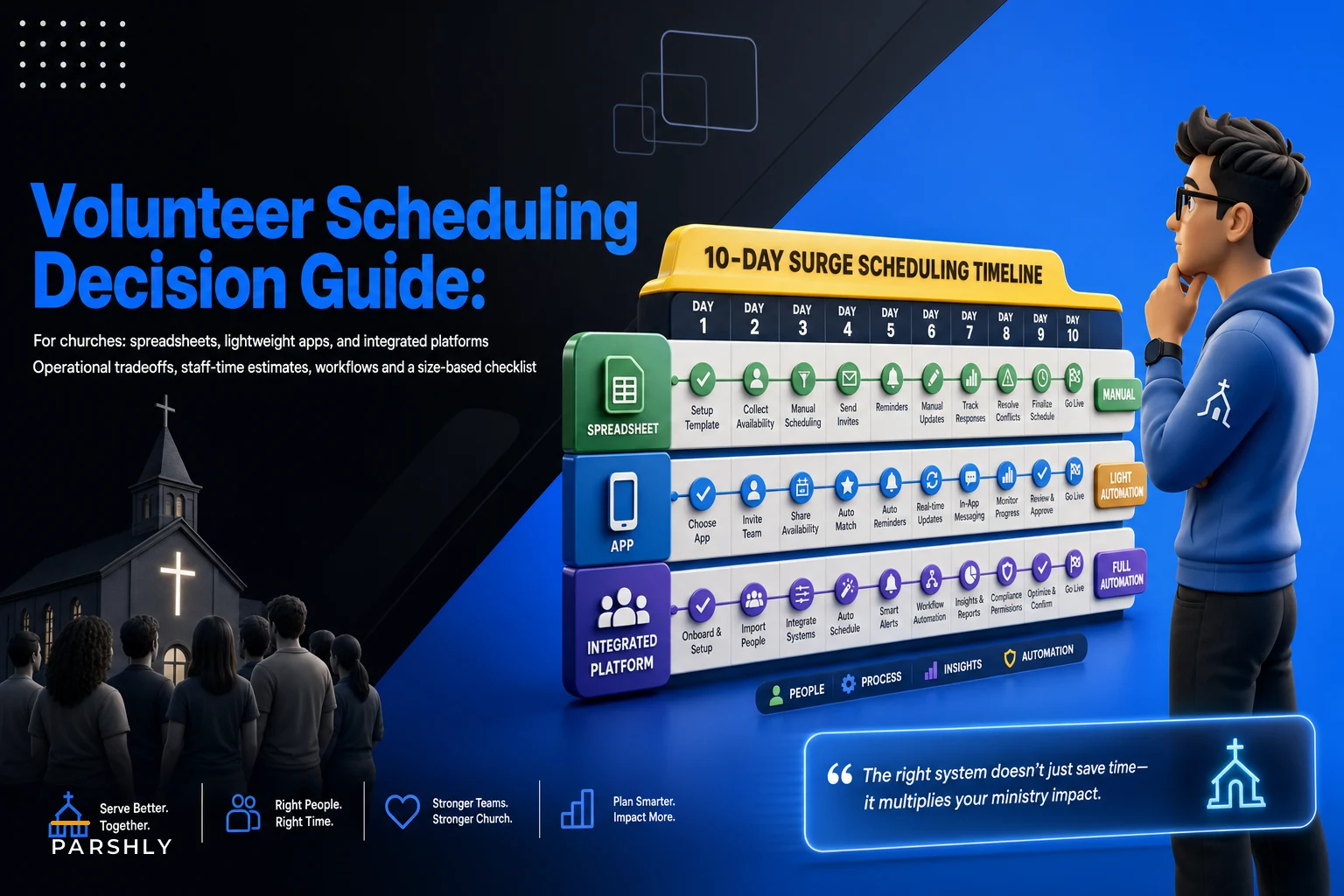

Most churches don't realize their scheduling system is broken until a surge exposes it. A spreadsheet that runs fine with 18 volunteers across two Sunday services suddenly becomes a nightmare when Christmas Eve needs 60 people across four services — plus a parking team, a greeter rotation, and a nursery that doubles in size.
So instead of asking "what's the best scheduling tool," the better question is: how much does each approach cost you in staff time when demand spikes? That's the lens this comparison uses. Not features for the sake of features — but what actually happens to your administrator's week when the calendar gets hard.
This is a church volunteer scheduling solutions comparison built around four criteria churches actually care about: staff time to manage (both baseline and surge), level of automation, the mobile experience for volunteers, and how well it connects to your check‑in system.
The Four Criteria That Actually Matter
A lot of scheduling advice online fixates on calendar aesthetics or monthly price. Those matter less than people think.
-
Staff time to manage — measured two ways
a normal week, and a surge week. The gap between those two numbers tells you everything.
-
Automation depth — does the system handle shift reminders, swaps, and backup coverage on its own, or does a human chase every one of those?
-
Mobile volunteer experience — can a volunteer confirm, decline, or swap a shift from their phone in under a minute, or do they need a laptop and a login they've forgotten?
-
Check‑in integration — when a volunteer is scheduled, do they automatically show up in your children's or event check‑in system, or does someone re‑key names on Saturday night?
These criteria aren't equally weighted for every church. A 90‑person congregation with one part‑time admin weighs staff time heavily. A 700‑person multi‑site church weighs integration and automation heavily because manual labor doesn't scale past a certain point.
Approach 1: Spreadsheet + Email (and Group Texts)
This is where almost everyone starts, and for good reason. It's free, flexible, and the admin already knows how to use it.
Simplify your church’s day-to-day operations.
Parshly helps you organize events, track donations, and engage your congregation—all in one place.
- Centralized member management
- Donation tracking & reporting
- Volunteer scheduling & notifications
No credit card required
A typical setup: one Google Sheet with tabs per ministry, color‑coded cells for filled vs. open slots, and a weekly email (or group text thread) reminding people they're scheduled. Swaps happen by someone posting in the group chat: "Can anyone cover nursery this Sunday?"
Where it holds up
For a church running two services with a stable roster of 15–30 volunteers who mostly show up the same week each month, this works surprisingly well. Baseline staff time is low because the roster rarely changes. Duplicate last week's tab, adjust a few names, send the reminder. Call it 45 minutes to an hour a week.
Where it breaks
The spreadsheet's weakness isn't the spreadsheet itself — it's what happens to human attention during a surge.
A surge week looks something like this: Christmas needs four services instead of two. Each service needs its own greeter, usher, nursery, parking, and sound coverage. Suddenly one tab becomes four, and you've got roughly 50–60 slots to fill instead of 15. Every confirmation trickles back by text or email, and the admin manually marks each one. When someone drops out Thursday night, there's no automatic backup — just the admin texting people one at a time until someone says yes.
A realistic surge‑week estimate for a spreadsheet church: 6 to 10 hours of pure scheduling labor, most of it in the final 72 hours when stress is highest. That's the number nobody budgets for.
The hidden failure mode: no audit trail. When a volunteer says "I never agreed to that shift," there's no record. And when your check‑in system needs the nursery roster, someone types all those names in by hand — which is exactly where custody and ratio errors sneak in.
Who should NOT rely on spreadsheets
Churches with high seasonal volatility, children's ministries with legal ratio requirements, or any church where the person running the sheet is a volunteer who might leave. The moment the "spreadsheet keeper" burns out or moves, institutional knowledge walks out the door.
Approach 2: Lightweight Scheduling Apps
These are purpose‑built scheduling tools — ones that handle rostering, send automatic reminders, and let volunteers swap shifts from their phones, but aren't full church management platforms. The middle tier.
Where it holds up
Automation changes the math completely. Reminders go out on their own. A volunteer who can't make it taps "request swap" and the app notifies eligible people instead of the admin playing switchboard. Confirmations update the roster automatically.
Baseline staff time drops because the chasing disappears. A normal week might take 20–30 minutes — mostly building the schedule once and letting the system run.
The real value shows up during surges. Because reminders, confirmations, and swaps are automated, a surge week doesn't multiply your labor the way a spreadsheet does. Filling 55 slots still takes setup time, but the follow‑up — the part that eats evenings — largely handles itself. Surge weeks often land around 2 to 4 hours instead of 8–10.
Where it gets awkward
The gap is usually check‑in integration. Many lightweight apps schedule well but don't push rosters into your check‑in system. So you've automated scheduling and still manually sync who's working the nursery. For children's ministry, that's a real problem — the scheduling tool knows Jessica is on, but the check‑in kiosk doesn't.
The second issue is data fragmentation. Volunteer contact info lives in the scheduling app, member info lives in your ChMS, and now you're maintaining two lists that drift apart over time.
When a lightweight app is the right call
-
You've outgrown the spreadsheet but a full platform feels like overkill
-
Surges are predictable (holidays, VBS) and painful mainly because of follow‑up volume
-
Your check‑in needs are modest, or you're okay with a manual sync step
When a lightweight app is the right call
Approach 3: Full Volunteer‑Management Platforms (Integrated with Check‑In)
These are platforms built into or tightly connected with your broader church management system — scheduling, communication, background‑check tracking, and check‑in all in one place.
Where it holds up
Everything connects. When you schedule a volunteer, they appear in check‑in automatically. Background‑check status is visible on the roster, so you don't accidentally schedule someone whose clearance lapsed. Communication, reminders, swaps, and reporting all run from a single source of truth.
For large or multi‑site churches, this is the only approach where surge weeks don't scale linearly with labor. Doubling the number of services doesn't double the admin's work because the system absorbs the repetitive coordination.
Baseline staff time is low — often 15–25 minutes a week — and surge weeks stay surprisingly flat because automation and integration carry the load. The platform handles the tedious parts: nudging unconfirmed volunteers, surfacing coverage gaps before they become emergencies, matching available substitutes to open roles based on skills and clearance status. The admin stops being the bottleneck.
Where it gets expensive (in more ways than one)
The cost isn't only the subscription. Full platforms require setup, configuration, and adoption. A church that buys a powerful platform and configures it badly ends up worse off than one running a clean spreadsheet. Churches that pay for robust systems and still schedule in a side spreadsheet because nobody got proper training — that happens more than you'd expect.
There's also a staffing‑cost angle worth thinking through. If you're already reassessing labor budgets — and many churches are, especially after wage changes rippled through — then the time a platform saves your paid staff is a real line‑item benefit. Our payroll, budget, and volunteer‑policy checklist walks through how to weigh that staff‑time savings against subscription cost.
Who should NOT buy a full platform
A 70‑person church with stable volunteers and a single service. The integration you're paying for solves problems you don't have, and the configuration overhead will frustrate everyone.
Sample Weekly Staff‑Time Estimates
The numbers below are approximate and assume a church with meaningful seasonal swings. The pattern holds across most congregations even if your specific numbers vary.
| Approach | Baseline week | Surge week | Automation | Mobile experience | Check‑in integration |
|---|---|---|---|---|---|
| Spreadsheet + Email | ~45–60 min | ~6–10 hrs | None (manual) | Poor | Manual re‑entry |
| Lightweight App | ~20–30 min | ~2–4 hrs | Reminders + swaps | Good | Partial / manual sync |
| Full Platform | ~15–25 min | ~1–2 hrs | Reminders, swaps, backups, gap alerts | Strong | Native |
The column that matters most is the one people ignore at purchase time: the jump from baseline to surge. A spreadsheet multiplies your labor by roughly 8–10x during a surge. A solid integrated platform might multiply it by 2x or less. That gap is the business case.
A Decision Checklist Keyed to Size and Volatility
Run through these. If you're checking boxes mostly in one tier, that's your answer.
Choose spreadsheet + email if:
-
[ ] Congregation under ~100 with a stable, repeating roster
-
[ ] One or two services, low seasonal swing
-
[ ] Children's ministry is small and you can manually verify ratios
-
[ ] You have a reliable, long‑term person maintaining the sheet
Choose a lightweight app if:
-
[ ] Congregation roughly 100–400
-
[ ] Surges are predictable but the follow‑up volume exhausts your admin
-
[ ] Volunteers want to confirm and swap from their phones
-
[ ] Your check‑in needs are simple or you tolerate a manual sync
Choose a full integrated platform if:
-
[ ] Congregation 400+ or multi‑site
-
[ ] Children's ministry requires clearance tracking tied to scheduling
-
[ ] Surges happen often enough that manual coordination burns out staff
-
[ ] You need one source of truth across scheduling, check‑in, and communication
Run through these. If you're checking boxes mostly in one tier, that's your answer.
Recommended Workflows (With Templates You Can Steal)
Tools don't fix bad process. The workflow below holds up regardless of which approach you choose — the automation just determines how much of it a human has to push manually.
The 10‑day surge workflow:
-
Day ‑10 Publish the surge schedule with all slots, including backups. Mark which roles are safety‑critical (nursery, security, parking).
-
Day ‑9 Send the initial ask. First confirmations come in.
-
Day ‑7 Automated (or manual) reminder to anyone who hasn't responded.
-
Day ‑5 Review the gap report. Any critical role still unfilled gets escalated to a named coordinator — not left floating in a group chat.
-
Day ‑3 Final confirmations locked. Backups notified they're on standby.
-
Day ‑1 Check‑in roster verified against the confirmed schedule. For children's ministry, confirm clearance status on every scheduled person.
-
Day of Floaters and standby backups ready for no‑shows.
The difference between approaches is simply who sends these. In a spreadsheet, the admin sends every message manually. In an integrated platform, the first three steps largely run on their own and a human only steps in at escalation.
Here's a quick visual of the 10‑day surge workflow:
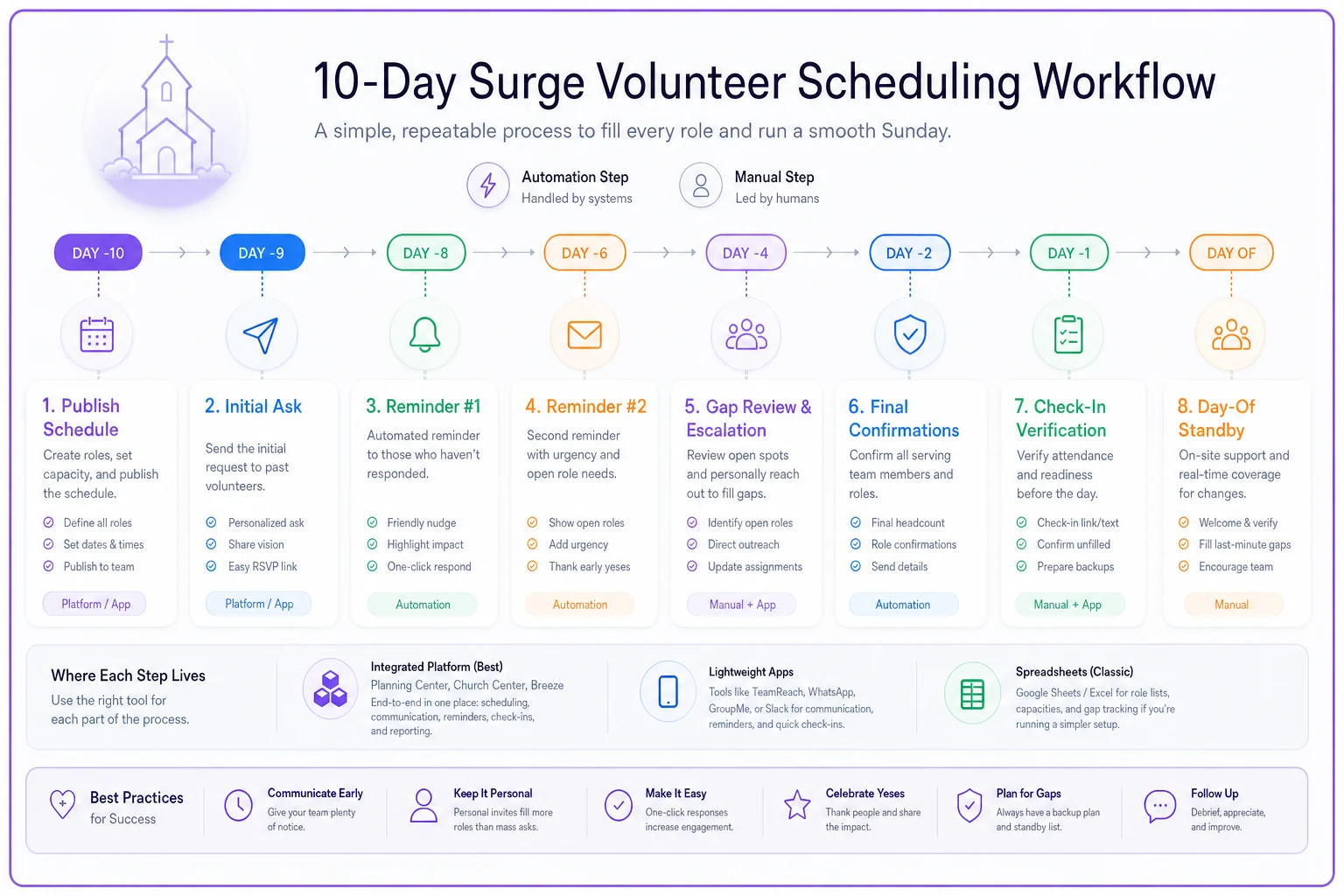
Mark safety‑critical roles and pre‑assign backups at Day ‑10 so escalation targets are clear if automation fails.
Template — initial surge ask (text or email):
> Hi [Name] — we're serving at [X] services for [Christmas Eve]. Can you take [Role] at the [6pm] service? Tap YES to confirm or NO if you can't. We'll send a reminder two days before. Thank you for serving!
Template — unconfirmed nudge (Day ‑7):
> Hi [Name] — we haven't heard back on [Role] for [service/time]. We need to lock the schedule by [date]. Can you still serve? A quick YES or NO really helps us plan.
Template — gap escalation (to coordinator, Day ‑5):
> [Role] at [service] is still open with 5 days left. Confirmed backups: [list]. Reaching out to: [names]. Will update by EOD tomorrow.
A Short Real Scenario
A suburban church running around 220 attendees across two Sunday services relied on a spreadsheet and a volunteer coordinator who dreaded the back half of every December. Baseline weeks were fine — under an hour. But their Christmas rollout needed roughly 48 volunteer slots across three services plus overflow parking.
The previous year, their coordinator logged close to 9 hours in the final week chasing confirmations and backfilling two Thursday‑night dropouts by texting people one at a time. Two nursery slots went uncovered until 20 minutes before the first service.
They moved to a lightweight scheduling app the following fall — nothing fancy, no full platform. The next Christmas, the same surge took the coordinator just over 3 hours, almost all of it upfront building the schedule. Reminders went out automatically. Two swap requests resolved without her involvement. Nursery was fully covered the night before.
Nothing dramatic changed about the church. Similar roster, similar services. What changed was that the follow‑up labor stopped landing on one exhausted person in the final 72 hours.
Picking the Right Fit
There's no universally "best" approach — there's a best approach for your size and your volatility. A spreadsheet isn't a failure; for a small, stable church it's genuinely the right tool. The mistake is keeping it past the point where surge weeks start quietly burning out your most reliable people.
Look hard at the baseline‑to‑surge gap. If your admin's workload multiplies by eight every holiday, you're not saving money by avoiding a tool — you're paying in volunteer fatigue, last‑minute scrambles, and the risk of an uncovered nursery slot. Match the approach to the gap you actually experience, use the workflow templates above regardless of which tier you land on, and revisit the decision every couple of years as your church grows. The right fit today may be the wrong fit two VBS seasons from now.
There's no universally "best" approach — there's a best approach for your size and your volatility. A spreadsheet isn't a failure; for a small, stable church it's genuinely the right tool. The mistake is keeping it past the point where surge weeks start quietly burning out your most reliable people.
Look hard at the baseline‑to‑surge gap. If your admin's workload multiplies by eight every holiday, you're not saving money by avoiding a tool — you're paying in volunteer fatigue, last‑minute scrambles, and the risk of an uncovered nursery slot. Match the approach to the gap you actually experience, use the workflow templates above regardless of which tier you land on, and revisit the decision every couple of years as your church grows. The right fit today may be the wrong fit two VBS seasons from now.
Ready to transform your church management?
Join 500+ churches using Parshly to enhance community engagement, streamline administration, and grow their ministries.