



The quarterly board meeting at Grace Community Church turned uncomfortable when the treasurer discovered their new HVAC system—scheduled for installation next month—couldn't be paid for. The $47,000 sitting in their building fund account? Gone. Not stolen, just spent on general operations over the past eight months because nobody tagged those donations correctly when they came in.
This happens constantly. Churches receive restricted donations every week—building funds, mission trips, youth programs, memorial gifts—and without proper tracking systems, that money disappears into the general fund. Then six months later, you're explaining to donors why their designated gift didn't go where they intended.
The problem isn't dishonesty or incompetence. It's that most church financial systems weren't built for restricted fund management. QuickBooks doesn't automatically know that check #4521 was for the Guatemala mission trip. Your bank statement doesn't separate building fund deposits from general tithes. And volunteer treasurers managing church finances part-time can't memorize which of the 200+ weekly donations carry restrictions.
Why churches struggle to track restricted donations correctly
Churches face a financial tracking challenge that most businesses never encounter. When a retail store receives payment, it's simple—money for products sold. But churches receive dozens of different contribution types weekly, each potentially carrying different restrictions or designations.
A typical Sunday might include:
-
General tithes (unrestricted)
-
Building fund contributions
-
Mission trip donations for specific families
-
Youth camp payments
-
Memorial gifts with family-specified uses
-
Benevolence fund offerings
-
Special project donations
Now multiply that by online giving, mailed checks, cash envelopes, and automatic bank transfers. You're looking at hundreds of transactions monthly, many with handwritten notes or verbal promises about how the money should be used.
Traditional accounting software treats all deposits the same unless someone manually codes each transaction. What usually happens: the volunteer counting team deposits everything Sunday night, the bookkeeper enters it all as "Sunday offering" on Monday, and by Tuesday those restrictions are already lost.
Even churches using donor management systems hit problems. The software might track that John Smith gave $500, but unless someone captures that he wrote "Guatemala mission - Martinez family" on his check memo line, that restriction vanishes into the general fund.
The cascade of problems from poor restriction tracking
Misallocated restricted funds create operational disasters that compound over time.
Simplify your church’s day-to-day operations.
Parshly helps you organize events, track donations, and engage your congregation—all in one place.
- Centralized member management
- Donation tracking & reporting
- Volunteer scheduling & notifications
No credit card required
First comes the immediate cash flow confusion. Your board approves hiring a part-time youth director because the general fund looks healthy. But $30,000 of that "available" money is actually restricted for the parking lot repaving project. Now you've committed to a salary you can't actually afford.
Then donors start noticing. Mrs. Henderson asks why the memorial bench for her late husband hasn't been installed yet, even though she donated $3,000 six months ago. You check the records and can't find any trace of that restriction. The money got absorbed into operating expenses. Now you need to find $3,000 from somewhere else to honor her wishes—essentially paying for the bench twice.
Legal and tax implications pile up next. Restricted donations create legal obligations. Using building fund money for salaries technically violates donor intent, which can trigger legal action in some states. The IRS also considers this during nonprofit audits. Churches have lost their tax-exempt status over persistent restricted fund violations.
The trust erosion is often the worst part. Members stop giving to special projects because they've seen designated funds disappear before. Major donors redirect their giving to other organizations with better financial controls. Capital campaigns fail because people remember what happened to the last building fund.
Staff relationships deteriorate too. The youth pastor gets blamed for overspending when their mission trip fund shows a negative balance, but the finance team never properly allocated the fundraiser proceeds to the restricted account. Department heads start hoarding cash donations instead of running them through proper channels because they don't trust the system.
Building a tagging system that actually works
Forget complex accounting software for a moment. The most effective restricted donation tracking starts with simple, consistent tagging at the point of entry. Every donation needs three pieces of information captured immediately: amount, donor, and restriction type.
Start with a basic restriction code list. Don't create 50 categories—you'll never maintain them. Most churches need somewhere between 8 and 12:
-
GF (General Fund - unrestricted)
-
BF (Building Fund)
-
MIS (Missions - general)
-
YTH (Youth programs)
-
BEN (Benevolence)
-
MEM (Memorial gifts)
-
SPEC (Special projects - requires sub-tag)
The key is capturing this information before the money moves anywhere. Your counting team needs restriction sheets at their station. Online giving platforms must have dropdown menus for fund selection. Office staff taking phone donations need a restriction checkbox form.
Here's what this looks like operationally: Sarah drops a check in the offering plate with "Youth Camp - Tommy" written on the memo line. The counting team sees this, writes "YTH-CAMP" on their deposit log next to Sarah's name and amount. That tag follows the donation through every step.
For online giving, build restriction options directly into the donation form. Don't use a generic "notes" field—people won't fill it out consistently. Create specific fund selections: "Building Fund," "Youth Mission Trip," "General Operating." Make the general fund the default, but require conscious selection for restricted gifts.
Cash creates special challenges. Use pre-printed envelopes with restriction checkboxes. When someone drops loose cash in the plate, it defaults to general fund unless they specify otherwise. No assumptions, no guessing.
Assign one person to own the tagging process and review every donation for restrictions.
The diagram below illustrates the tagging workflow from donation receipt to accounting and reconciliation.
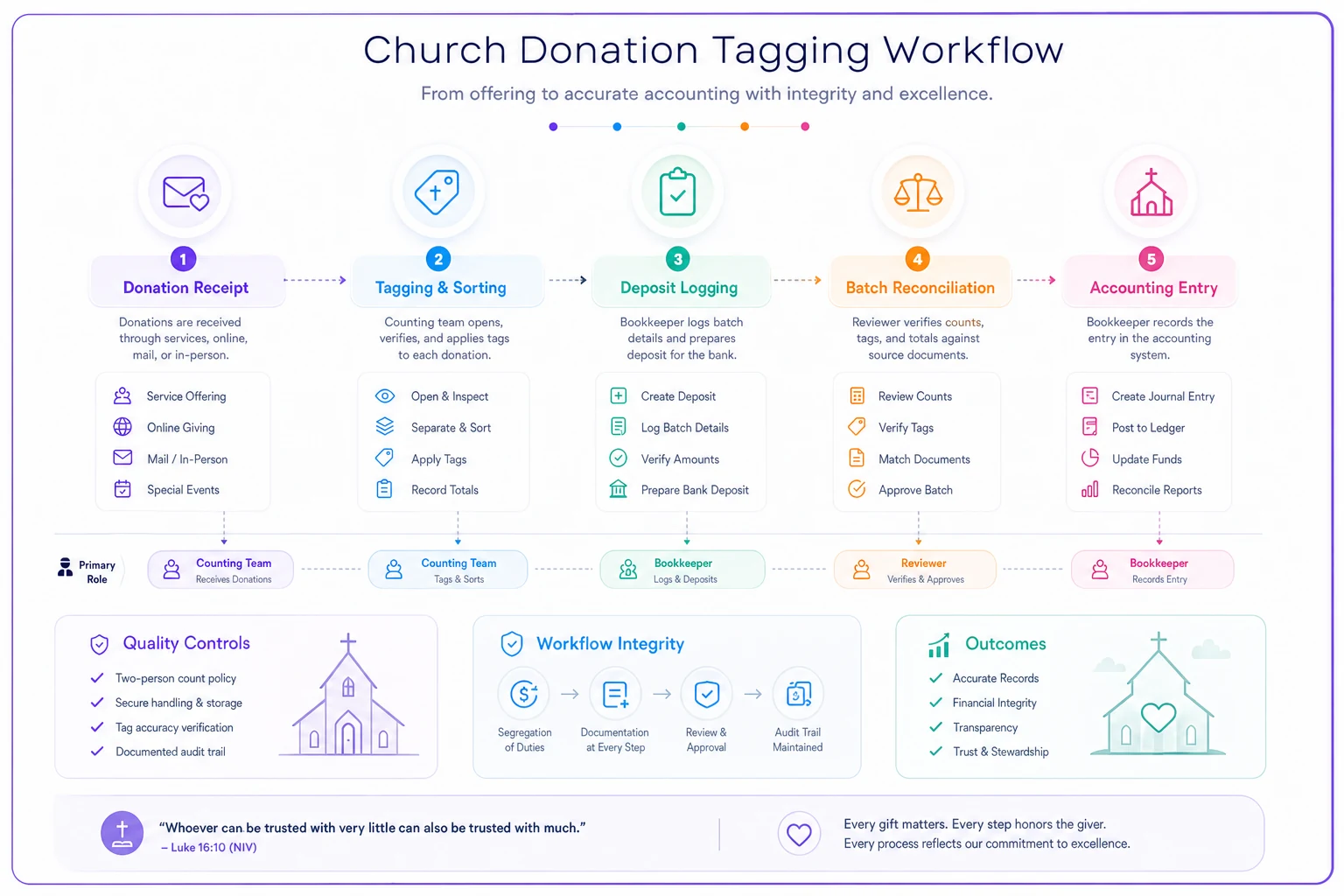
The most critical piece: one person owns the tagging process. Not the whole counting team, not whoever happens to be in the office—one person. They review every donation for restrictions and apply tags consistently. This takes maybe an hour after each service, but it prevents weeks of problems later.
Creating a chart of accounts that mirrors ministry reality
Your chart of accounts needs to reflect how ministry actually operates, not how accounting textbooks suggest. Most church accounting systems fail because they're structured for businesses, not religious organizations with restricted funds.
Instead of one "Donations" income account, you need separate accounts for each restriction type:
| Account Number | Account Name |
|---|---|
| 4100 | General Tithes & Offerings |
| 4200 | Building Fund Donations |
| 4300 | Missions Support |
| 4400 | Youth Program Donations |
| 4500 | Benevolence Offerings |
| 4600 | Memorial & Designated Gifts |
But this is where churches regularly mess up—they create income accounts and forget the corresponding expense and balance sheet accounts. You need a complete ecosystem:
Income accounts (4000 series) track money coming in.
Expense accounts (5000 series) track money going out.
Restricted fund accounts (in equity or liabilities) track balances.
When someone donates $1,000 to the building fund, you record:
-
Credit
4200 Building Fund Donations
-
Debit
1000 Checking Account
-
Also
Increase restricted Building Fund balance
Many churches skip that last step, which is exactly why restricted funds disappear. The money sits in your single checking account, looking available, while the restriction gets forgotten.
The batch reconciliation template that catches restriction errors
Weekly reconciliation saves churches from monthly disasters. But most churches either skip it entirely or do it so late that fixing errors becomes nearly impossible.
Here's a batch reconciliation approach that takes about 30 minutes weekly and catches restriction errors before they compound.
| Column | Purpose |
|---|---|
| Date | Date of deposit batch |
| Batch Number | Year-week format (e.g. 2024-15) |
| Total Deposited | Full deposit amount |
| General Fund Amount | Unrestricted portion |
| Building Fund Amount | Restricted - building |
| Missions Amount | Restricted - missions |
| Other Restricted | Additional categories as needed |
| Notes | Any exceptions or flags |
Every deposit batch gets one row. The counting team fills this out during their count. Finance enters these exact amounts into your accounting system. On Wednesday, someone compares the three documents: counting sheet, bank deposit, and accounting entry.
Discrepancies jump out immediately. The counting sheet shows $500 for youth camp, but accounting shows it all as general fund? Fix it now, while everyone still remembers the details.
The power is in the batch number. When Mrs. Johnson asks about her memorial gift from April, you find batch 2024-15, pull the counting sheet, and show exactly how her donation was processed. No hunting through hundreds of transactions.
This template also reveals patterns. Maybe online donations consistently get miscoded. Perhaps one counting team member frequently misses restriction notes. You can address systematic problems rather than just correcting individual errors after the fact.
Month-end checks that prevent restricted fund raids
Monthly closes in churches usually focus on paying bills and balancing the checkbook. Without specific restricted fund checks built in, you won't notice problems until angry donors start calling.
The Five Essential Month-End Checks:
-
Restricted Fund Balance Verification — Print your restricted fund balances from your accounting system and compare to last month. Any restricted fund balance that decreased without a corresponding approved expense needs investigation. Building fund dropped by $5,000 but no construction happened? That money went somewhere it shouldn't have.
-
Negative Balance Alert — No restricted fund should ever show negative. If the youth camp fund shows -$2,000, you've already spent money you haven't received. This usually means donations got miscoded to general fund while expenses hit the right restricted account.
-
Designation vs. Deposit Match — Pull your deposit records and count restricted donations. If you deposited $12,000 in building fund donations this month, your building fund income account should show exactly $12,000. A common problem: deposits get split wrong, with some building fund money landing in general fund.
-
Donor Intent Documentation Check — Sample 10 restricted donations from the month. Can you prove the restriction? Check for donor letters, memo lines, online giving designations. If you can't prove the restriction, you're one audit away from problems.
-
Restricted Expense Approval Trace — Every expense from a restricted fund needs a paper trail back to approval. Youth camp expenses need youth ministry sign-off. Building fund payments need board or building committee authorization. No approval means potential misuse.
These checks take around 2 hours monthly if your tagging and batch systems are working. Skip them and you'll spend 20 hours untangling problems later.
When multi-fund tracking becomes too complex
Some churches genuinely shouldn't try to track restricted donations in detail. If you're under 100 members with one part-time administrative person, complex fund accounting might create more problems than it solves.
Signs your church should simplify:
-
Nobody understands your financial reports
-
Restricted fund errors happen monthly
-
You spend more time tracking donations than doing ministry
-
Donors regularly complain about misallocated gifts
-
Your volunteer treasurer threatens to quit every quarter
The simplification approach: stop accepting restricted donations except for one or two major categories. Building fund? Yes. Everything else? "We appreciate your generosity, but all donations support our general ministry."
This sounds limiting, but smaller churches often function better with that kind of simplicity. Better to track two funds perfectly than 15 funds poorly.
For growing churches—somewhere in the 200 to 500 member range—the complexity usually hits around year three of having multiple staff. Suddenly the youth pastor has their own budget and fundraisers. The missions committee wants designated giving for specific missionaries. The building team needs a capital campaign fund.
This is where you need an actual system, not just good intentions. Either commit to proper fund tracking with dedicated administration time, or keep restrictions minimal. The middle ground—accepting many restricted donations without proper systems—is where things fall apart.
Turning tracking into trust: when donors see their gifts properly managed
Done right, restricted fund tracking builds real donor confidence. When someone gives to the youth mission trip and later sees photos of kids in Guatemala knowing their donation helped make it happen, they give more next time.
Churches with transparent restricted fund tracking tend to see this play out in predictable ways. Memorial gifts increase because families trust the church to honor their loved one's memory. Building fund campaigns succeed because donors watched the last campaign's money go exactly where promised. Mission giving grows when people can support specific missionaries and track the direct impact.
The operational improvements go beyond donor satisfaction. Department heads can actually plan when they know their restricted fund balances. The youth pastor can confidently book the winter retreat knowing the fundraiser money is properly designated and available. The building committee can sign contracts because the building fund balance is real, not theoretical.
Board meetings change too. Instead of arguing about whether money exists for a project, you pull up restricted fund reports showing exact balances. Instead of wondering why the budget looks tight despite increased giving, you see that $40,000 of those donations carried restrictions for future projects.
Implementing your restricted donation tracking system
Getting started doesn't require overhauling everything at once. Pick one upcoming restricted donation campaign—maybe the Christmas offering or spring mission trip—and track it properly using these methods.
-
Create your basic tagging codes.
-
Train one person on the batch reconciliation template.
-
Set calendar reminders for month-end checks.
-
Use that single campaign to work out the kinks before expanding.
Most churches need about three months to get comfortable with proper restricted fund tracking. Month one is messy as people learn new processes. Month two shows improvement but reveals gaps. By month three, the system usually starts working without constant intervention.
The payoff is real. The youth pastor who spent hours defending their budget can now pull up a restricted fund report and move on. The donor who called monthly checking on their building fund gift gets quarterly statements showing their donation properly designated. The board that delayed projects because they couldn't verify available funds can approve initiatives confidently, knowing exactly what money is restricted versus available.
Churches using AI-powered operational platforms find this easier to implement and maintain. Modern church management software can automatically tag donations based on donor history, flag potential restriction errors before they're posted, and generate restricted fund reports that actually make sense to non-accountants. The manual processes described here still matter for understanding the fundamentals, but automation handles much of the weekly administrative burden and reduces the risk of anything slipping through.
Whether you're tracking three restricted funds or thirty, the core principles stay the same: capture restrictions immediately, tag consistently, reconcile weekly, and verify monthly. Your donors trust you with gifts meant for specific purposes. A simple but disciplined tracking system ensures you honor that trust, every donation, every time.
Ready to transform your church management?
Join 500+ churches using Parshly to enhance community engagement, streamline administration, and grow their ministries.