


Most churches discover their usher scheduling and church service flow problems at the worst possible times. The offering plates sit unattended while volunteers scramble. Parents with crying babies stand confused at sanctuary doors because nobody's there. Half the congregation misses communion because dismissal ran in the wrong sequence.
Why traditional scheduling creates coverage chaos
Churches typically schedule ushers and greeters for entire services. Six volunteers arrive 30 minutes before the 9am service. They all leave after the 10:30am service ends. Clean spreadsheet, clean schedule—and almost guaranteed coverage gaps.
This ignores how services actually flow. You need maximum coverage during arrival (8:30–9:10am), minimal coverage during the sermon (9:40–10:10am), then a surge again for communion and dismissal (10:10–10:30am). Meanwhile, volunteers stand around during low-need periods, get tired, check their phones, or just wander off because nothing's happening anyway.
The waste compounds fast. A 200-member church running two Sunday services typically uses somewhere between 12 and 16 volunteer hours weekly for front-of-house roles. Under traditional scheduling, roughly 40% of those hours involve people standing idle—maybe 250 wasted volunteer hours a year. Time those same people could spend in small groups, children's ministry, or just actually worshipping.
Building your service-flow heatmap
Creating a useful staffing heatmap starts with mapping actual service segments, not just start and end times. Here's what a typical Sunday morning looks like broken down:
Simplify your church’s day-to-day operations.
Parshly helps you organize events, track donations, and engage your congregation—all in one place.
- Centralized member management
- Donation tracking & reporting
- Volunteer scheduling & notifications
No credit card required
-
9
00 AM Traditional Service Flow
-
8
30–8:55 AM: Pre-service arrival (HIGH need)
-
8
55–9:05 AM: Welcome and announcements (MEDIUM need)
-
9
05–9:25 AM: Worship music (LOW need)
-
9
25–9:55 AM: Sermon (MINIMAL need)
-
9
55–10:05 AM: Communion prep and service (HIGH need)
-
10
05–10:15 AM: Offering and closing (MEDIUM need)
-
10
15–10:30 AM: Dismissal and transition (SURGE need)
Most churches run multiple services with overlapping segments. The 11:00 AM contemporary service starts filling up while the traditional service is mid-communion. Traditional scheduling can't handle that—you're managing three different coverage needs simultaneously.
Track your actual service patterns for about four weeks. Note when bottlenecks happen, count how many people need help during each segment, and time how long communion actually takes versus what's on paper. Patterns will surface:
-
Arrival usually needs double the volunteers you think
-
Sermon time maybe needs one roaming volunteer for emergencies
-
Dismissal turns chaotic if you're short even one person
Each of those observations is worth more than any generic staffing formula.
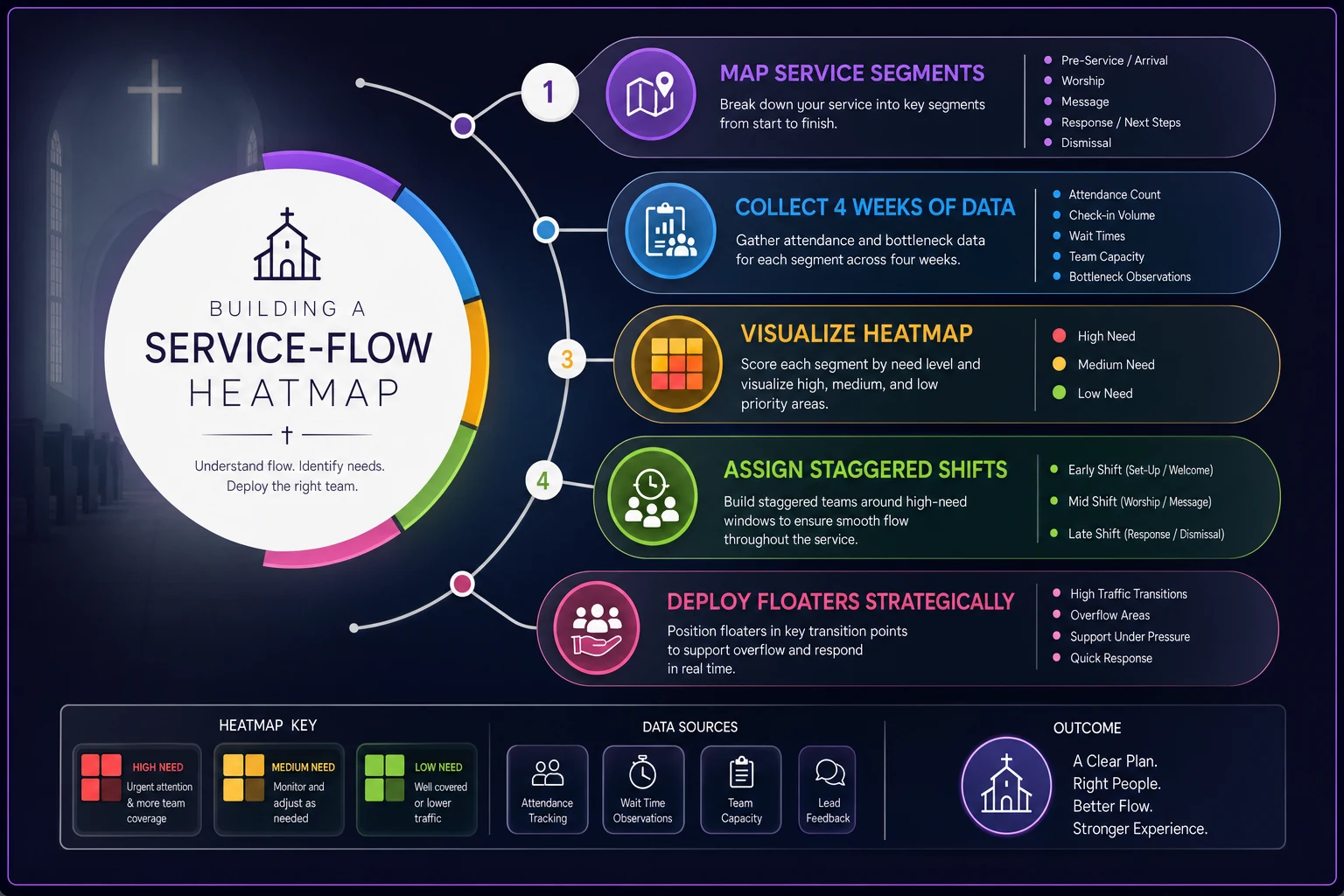
This visual shows the steps from mapping to assignment so teams can follow the process when they plan schedules.
Staggered shifts that match reality
Once you understand your flow, build shifts around service segments rather than service times. Instead of scheduling "9 AM service volunteers," create targeted shifts:
Arrival Team A (8:30–9:15 AM)
-
3 door greeters
-
2 parking lot attendants
-
1 information desk
Worship Support Team (9:00–10:00 AM)
-
1 sanctuary monitor
-
1 roaming assistant
Transition Team B (9:45–10:45 AM)
-
2 communion assistants
-
2 offering collectors
-
3 dismissal coordinators
This staggered approach means Arrival Team A finishes their shift and actually gets to attend most of the service. Transition Team B arrives fresh exactly when you need maximum coverage. Nobody stands around for 90 minutes waiting for something to happen.
The overlap windows matter more than people expect. Between 9:00–9:15 AM, Arrival Team A and Worship Support are both active. That creates natural mentoring opportunities and smoother handoffs. New volunteers learn by shadowing during these overlaps before they're on their own.
Schedule new volunteers in overlap windows so they can shadow experienced team members during live handoffs.
The overlap windows matter more than people expect. Between 9:00–9:15 AM, Arrival Team A and Worship Support are both active. That creates natural mentoring opportunities and smoother handoffs. New volunteers learn by shadowing during these overlaps before they're on their own.
The floater system that prevents meltdowns
Every service needs designated floaters—volunteers without fixed positions who handle unexpected needs. Churches resist this because it feels like wasting people. It isn't.
Your floater rotation should include one experienced volunteer who knows all positions, one newer volunteer still learning different roles, and clear escalation paths depending on the situation.
Floaters handle the things you can't plan for. Children's ministry runs over and parents arrive late. An elderly member needs help with stairs. Someone feels faint during communion. The offering team lead doesn't show. These aren't rare edge cases—they happen constantly, and without a floater, a fixed-position volunteer has to abandon their spot to deal with it.
| Floater Level | Experience Required | Typical Responsibilities | Decision Authority |
|---|---|---|---|
| Junior Floater | 0–2 months | Shadow fixed positions, basic assistance | None - escalate everything |
| Standard Floater | 2–6 months | Cover breaks, handle simple requests | Minor position adjustments |
| Senior Floater | 6+ months | Emergency coverage, train new volunteers | Reassign positions mid-service |
| Lead Floater | 1+ years | Coordinate all floaters, major decisions | Full service flow changes |
Smart churches build floater development paths where new volunteers spend four to six weeks as floaters before taking fixed positions. They learn the whole service flow, understand different roles, and build relationships across teams. These people often become your future team leaders.
The floater table above is worth printing and laminating. It removes the ambiguity that causes hesitation mid-service.
Quick handoff protocols that actually work
The biggest failure point in staggered scheduling happens at handoffs. First shift leaves, second shift arrives, nobody knows what went on. Information gaps create cascading problems for the rest of the service.
Effective handoffs take 60 seconds and cover three things:
-
What happened (attendance patterns, early issues)
-
What's different (VIP guests, medical needs observed)
-
What's coming (known late arrivals, special events after service)
The Arrival Team lead takes 30 seconds at 9:10 AM to tell the Worship Support volunteer: "Heavy attendance today, probably 220. Wheelchair guest in row 5 needs help at communion. Pastor's parents visiting—they're in row 2." That's it. Churches that nail this see the downstream improvement immediately.
Create physical handoff points where these exchanges happen—not mid-sanctuary, not shouted across the lobby. A specific spot, maybe the information desk or a side room, where outgoing and incoming volunteers connect briefly.
Some churches use simple handoff cards, index cards with checkboxes for common situations. Takes ten seconds, ensures nothing gets missed. Others use shared phones or tablets where teams log quick notes throughout their shift. Either works. The point is making it a defined step rather than something that happens if people remember.
When your scheduling system fights against you
Traditional scheduling tools—spreadsheets, paper sign-ups, even basic volunteer management software—weren't built for staggered shifts and dynamic coverage. They force rigid time blocks that don't match how services actually flow.
Modern operational platforms built for churches understand service segments. They calculate overlap periods automatically, track floater rotations, and make sure handoff protocols actually happen. When someone calls in sick, the system knows which segments need coverage and can text available volunteers with the specific time slots needed.
The better platforms use AI automation to learn your actual service patterns over time—noticing when communion consistently runs long on first Sundays, adjusting for seasonal attendance changes, flagging when you might need extra floaters based on community events. That kind of pattern recognition takes a volunteer coordinator months to develop manually. Useful stuff, though honestly, even a well-organized whiteboard beats forcing volunteers into scheduling patterns that don't match your service reality.
The hidden benefits of flow-based staffing
Churches using service-flow heatmaps and staggered shifts tend to see improvements beyond just coverage. Volunteer satisfaction goes up because people aren't standing around doing nothing. They serve during high-impact moments, then participate in worship themselves.
Recruitment gets easier too. Instead of asking for a two-hour commitment every Sunday, you're offering focused 45-minute shifts. Parents can volunteer during arrival and sit with their families for the rest. Students can serve during dismissal after attending youth service.
The congregation notices, even if they can't articulate why. Services feel smoother. Transitions happen naturally. Visitors get consistent attention rather than overwhelming help at arrival followed by nothing during dismissal. That chaotic post-communion exit that used to take 20 minutes? Down to 12 with proper coverage.
Training improves because volunteers work in smaller, specialized teams. Arrival experts get genuinely good at welcoming and wayfinding. Transition teams master communion flow. Floaters become the people who can step into anything—and they know it, which builds confidence.
Making the transition without disrupting services
Converting from traditional to flow-based scheduling takes planning. Don't flip everything overnight. Start with one service—usually your highest-attendance gathering where problems are most visible.
-
Week 1–2 Map your current flow and identify pain points
-
Week 3–4 Recruit for staggered positions, emphasizing shorter shifts
-
Week 5–6 Run parallel scheduling—old system official, new system testing
-
Week 7–8 Switch primary system, keep backups ready
-
Week 9–12 Refine timing, adjust positions, optimize handoffs
Communicate changes clearly to volunteers. Many will resist initially because they're attached to their position and their schedule. Show them how staggered shifts mean less standing around and more time in worship. Let natural leaders try floater roles first—they'll influence the rest of the group.
Expect some pushback from volunteers who enjoy socializing during slow periods. That's actually useful feedback. Maybe you need a hospitality area where off-duty team members can connect without abandoning coverage spots. It sounds minor but it matters for retention.
Real numbers from churches that made the switch
A 350-member Methodist church in Ohio tracked their transition to flow-based staffing over six months. They reduced total volunteer hours by about 30% while eliminating every coverage gap they'd had before. Volunteer retention jumped from around 60% annually to 85%.
-
Previous model
16 volunteers × 2 hours = 32 weekly hours
-
Flow-based model
18 volunteers × 1.25 average hours = 22.5 weekly hours
-
Coverage incidents dropped from 3–4 monthly to zero
-
Volunteer recruitment improved by roughly 40% with shorter shift options
The impact goes beyond volunteer hours. Fewer coverage gaps mean fewer liability incidents. Better dismissal flow means parking lots clear 10–15 minutes faster. Focused greeters catch security concerns earlier. None of those were the goals going in—they were just what happened.
The technology question you're probably asking
Managing staggered shifts, floaters, and handoffs gets complicated fast. Spreadsheets become unmanageable somewhere around 20 volunteers. And asking people to remember different arrival times each week based on segment assignment will cause problems.
Churches succeeding with flow-based staffing tend to use scheduling platforms built for this kind of complexity—not generic volunteer management tools, but systems that actually understand worship service operations. Features worth having:
-
Segment-based scheduling (not just time blocks)
-
Automatic overlap calculations
-
Floater rotation tracking
-
Handoff reminder systems
-
Coverage gap alerts
-
Mobile check-in for staggered arrivals
AI-powered automation helps by learning your patterns and predicting needs before gaps happen. But the core value comes from platforms built around service flow rather than ones that force your flow into rigid scheduling boxes.
Keeping flow-based staffing sustainable
The biggest risk with sophisticated scheduling is complexity creep. You start with smart segments and staggered shifts. Then add more positions. Then sub-segments. Then your elegant solution becomes harder to manage than the original problem.
Keep it simple:
-
Maximum 4–5 distinct segments per service
-
No more than 3 overlapping shifts at any time
-
Floater pools of 2–3 people, not armies
-
Handoffs under 60 seconds, always
Review and simplify quarterly. If volunteers can't easily explain their shift pattern, you've overcomplicated it. If handoffs consistently run past a minute, you're tracking too much. If the weekly schedule requires more than one page, scale back.
The goal isn't perfect optimization—it's sustainable coverage that works for both congregation and volunteers. Sometimes that means accepting slightly less efficient patterns that people actually understand and stick with.
Your scheduling system should reduce stress, not create it. When volunteers know exactly when they're needed, what they're doing, and who they're handing off to, Sunday mornings get noticeably less chaotic for everyone involved.
The congregation might never consciously notice when usher scheduling and church service flow works perfectly. But they absolutely notice when it doesn't. Getting this right removes friction from worship and lets people focus on why they actually showed up in the first place.
Ready to transform your church management?
Join 500+ churches using Parshly to enhance community engagement, streamline administration, and grow their ministries.