


The youth pastor at a church near me discovered their star volunteer mentor had a conviction for financial fraud from eight years ago. Not because their screening process caught it—but because a parent recognized the volunteer's name from a news article. The volunteer had filled out the consent form, but nobody actually ran the check because he "seemed trustworthy" and the church was trying to save the $35 screening fee.
This happens more than churches want to admit. Not because ministries don't care about safety, but because the actual workflow for collecting consent, running checks, storing records, and managing renewals gets messy fast—especially when you're juggling multiple volunteer roles, different screening requirements, and trying to keep costs reasonable.
The real cost breakdown that catches churches off guard
Most churches budget for the background check fees themselves—usually $15 to $45 per volunteer depending on the vendor. What kills the budget is everything else.
Staff time is the hidden expense nobody talks about. Processing one volunteer background check typically takes 45 to 90 minutes when you factor in consent collection, data entry, vendor submission, result review, filing, and calendar reminders for renewals. For a church with 40 active volunteers needing checks, that's somewhere between 30 and 60 hours of admin work annually just for basic compliance.
Then there's the compliance risk side of things. One incident involving an unscreened volunteer can result in insurance claims ranging from $50,000 to several million, not counting reputational damage. Insurance companies increasingly require documented screening processes, and some won't cover incidents involving volunteers who weren't properly checked.
Vendor selection adds its own layer of confusion. National database checks run about $8–15 but miss county-level records. State checks cost $20–35 and take 3–7 days. Full FBI fingerprint checks run $40–70 but require physical appointments. Most churches end up needing different levels for different roles, which means managing multiple vendor relationships.
Why the consent collection process breaks down
The typical church consent workflow looks deceptively simple: hand volunteer a form, they sign it, you file it, run the check. In practice, it falls apart at scale.
Simplify your church’s day-to-day operations.
Parshly helps you organize events, track donations, and engage your congregation—all in one place.
- Centralized member management
- Donation tracking & reporting
- Volunteer scheduling & notifications
No credit card required
Physical consent forms get lost between the welcome desk and the church office. I've watched churches scramble to find signed forms stuffed in desk drawers, mixed with other paperwork, or sitting in the volunteer coordinator's car. Digital consent through email works better until you realize half your volunteers don't check email regularly and the other half can't figure out DocuSign.
The consent form itself creates problems too. Federal requirements mandate specific language about how results will be used. State laws add their own consent requirements. Churches serving minors often need additional disclosures. Miss one required element and the entire screening becomes legally questionable.
Timing kills momentum. A volunteer shows up excited to serve in children's ministry. You hand them a background check form. They promise to bring it back next week. Three weeks later, they've found another place to serve or lost interest entirely. Churches lose a significant chunk of potential volunteers just during the screening delay.
The renewal trap catches everyone eventually. Background checks typically need renewal every 2–3 years, but tracking who needs renewal when becomes a nightmare. You either check everyone annually (expensive) or try to maintain a complex spreadsheet of individual renewal dates that nobody updates consistently.
Building a consent workflow that actually works
Start with role-based screening tiers. Not every volunteer needs the same level of screening, and trying to run FBI checks on parking lot attendants will destroy your budget.
Create three screening levels:
-
Tier 1 (Direct youth/vulnerable adult contact) National criminal database plus state repository check, sex offender registry, renewal every 2 years
-
Tier 2 (Indirect contact/supervised roles) National criminal database, sex offender registry, renewal every 3 years
-
Tier 3 (No vulnerable population contact) Basic identity verification, renewal every 5 years
This approach cut screening costs by roughly 40% for a 300-member church, while actually improving safety protocols for high-risk positions.
For consent collection, use a hybrid approach. Set up iPad stations during volunteer orientation where people can complete digital consent forms immediately. Keep paper backups for those uncomfortable with technology. The key is processing consent during existing touchpoints, not as a separate step that volunteers have to remember to come back for.
Process consent during existing touchpoints to avoid losing volunteers.
Bundle your consent forms while you're at it. Instead of separate forms for background checks, reference checks, and photo permissions, create one comprehensive volunteer packet. Include the background check consent, emergency contact info, availability preferences, and ministry interests. You're already collecting signatures—might as well get everything at once.
Vendor selection without the confusion
Churches typically overthink this. You need a vendor that provides:
-
Multi-state criminal searches (not just national databases)
-
Sex offender registry checks
-
Clear turnaround times (24–72 hours for most checks)
-
Compliance with FCRA regulations
-
Church-specific pricing
Skip vendors pushing unnecessary add-ons like credit checks or driving records unless specific roles require them. A youth van driver needs a motor vehicle check. A small group leader doesn't.
Three vendors that consistently work well for churches:
| Vendor | Details |
|---|---|
| Ministry Safe | $35 per check, includes training resources, 24-hour turnaround |
| Protect My Ministry | $20–45 depending on depth, good for multi-state churches |
| Clear Investigative Advantage | $15–30, solid for basic screening needs |
Avoid the temptation to use multiple vendors for different check types. The administrative overhead isn't worth saving $5 per check. Pick one vendor that covers 90% of your needs and stick with them.
Record retention that protects everyone
Churches face a tricky balance with background check records. Keep them too long and you risk privacy violations. Destroy them too quickly and you lose lawsuit protection.
Here's what actually needs to happen:
Store these items indefinitely:
-
Signed consent forms
-
Confirmation that a check was completed
-
The decision made based on the check
-
Any adverse action documentation
Store for 7 years then destroy:
-
Full background check reports
-
Reference check notes
-
Internal evaluation forms
Never store:
-
Social Security numbers beyond initial processing
-
Credit information
-
Medical records discovered during checks
Physical records need a locked file cabinet in a restricted office. Digital records require password protection and encryption. Small churches often use a fireproof safe for physical records and Google Workspace with restricted sharing for digital files.
The lawsuit protection angle matters here. If an incident occurs, you need to prove you conducted appropriate screening. But keeping detailed criminal histories on file for decades creates its own liability. Document that you checked, what decision you made, and why. The full report itself becomes unnecessary after the retention period.
The renewal cadence that doesn't overwhelm
Annual bulk renewals seem logical until you're processing 50 background checks in January while trying to plan Easter services. Staggered renewals spread the work but require careful tracking.
The sweet spot: quarterly renewal batches. Every January, April, July, and October, process renewals for volunteers whose checks expire in the following quarter. This gives a three-month buffer for delays while keeping workload manageable.
Set up three reminder touchpoints:
-
90 days before expiration
Email reminder to volunteer
-
60 days before
Personal conversation or text
-
30 days before
Final notice with temporary suspension date
For a church with 60 active volunteers on two-year renewal cycles, this means processing about 7–8 renewals per quarter—totally manageable for one staff member or volunteer coordinator.
Track renewals in whatever system you're already using daily. If your church lives in Planning Center, use custom fields there. If everything runs through Google Sheets, build your tracker there. The best system is the one you'll actually check.
Integration with scheduling systems
The background check workflow has to connect with volunteer scheduling, or you'll end up with cleared volunteers who can't serve and scheduled volunteers who aren't cleared.
Most churches use one of three scheduling approaches:
Planning Center Integration: Create volunteer categories for "Background Check Required" positions. Use automation to prevent scheduling if the check isn't complete or current. Set up automatic emails when checks near expiration. This runs about $50–100 monthly but eliminates most manual tracking.
ChurchTrac Method: Use the built-in background check fields to track status and expiration. Create smart groups for "Checks Expiring Soon" and review weekly. Less automated but included in base pricing.
Spreadsheet Workaround: Maintain a master Google Sheet with volunteer names, check completion dates, expiration dates, and color coding for status. Share read-only access with ministry leaders. Use conditional formatting to highlight expiring checks. Free, but requires disciplined updates.
The scheduling integration becomes critical for larger churches. One church had 18 volunteers scheduled in children's ministry whose background checks had expired six months or more earlier. Nobody noticed because the scheduling and screening systems weren't connected.
When to run additional checks
Standard criminal background checks miss plenty. Knowing when to dig deeper protects your ministry without creating unnecessary barriers.
Run additional county courthouse checks when:
-
The volunteer lived in multiple states recently
-
Their initial check shows any criminal history
-
They'll have overnight responsibility for minors
-
They'll handle church finances
Skip the expensive additions for:
-
Greeters and ushers
-
Parking attendants
-
Office volunteers with supervised access
-
Small group leaders meeting in public spaces
Reference checks matter more than churches realize. Call at least two references for anyone working directly with children or vulnerable adults. Ask specific questions: "Would you be comfortable with this person supervising your child?" gets more honest answers than "Is this person trustworthy?"
Social media reviews have become controversial but revealing. A quick scan of public posts can surface concerns that criminal checks miss. One church discovered their potential youth volunteer regularly posted content completely contrary to their values—something no background check would have flagged.
The workflow automation opportunity
Manual background check processes drain roughly 20–30 hours monthly from church staff once you hit 50+ active volunteers. That's time not spent on ministry, member care, or mission work.
A few automation points can transform the entire workflow:
-
Consent collection Digital forms that automatically route to the right person, store securely, and trigger vendor submission. This cuts consent processing from 45 minutes to about 5 minutes per volunteer.
-
Vendor submission Direct API connections that submit check requests immediately after consent, rather than waiting for weekly batches. Volunteers get cleared in 24–48 hours instead of 1–2 weeks.
-
Results processing Automated parsing of background check results with flags for anything requiring human review. Clear passes get automatic approval. Anything questionable routes to leadership.
-
Renewal management Automated reminders, escalations, and scheduling holds based on expiration dates. No more spreadsheet checking or manual email follow-ups.
Here's a simple workflow visualization:
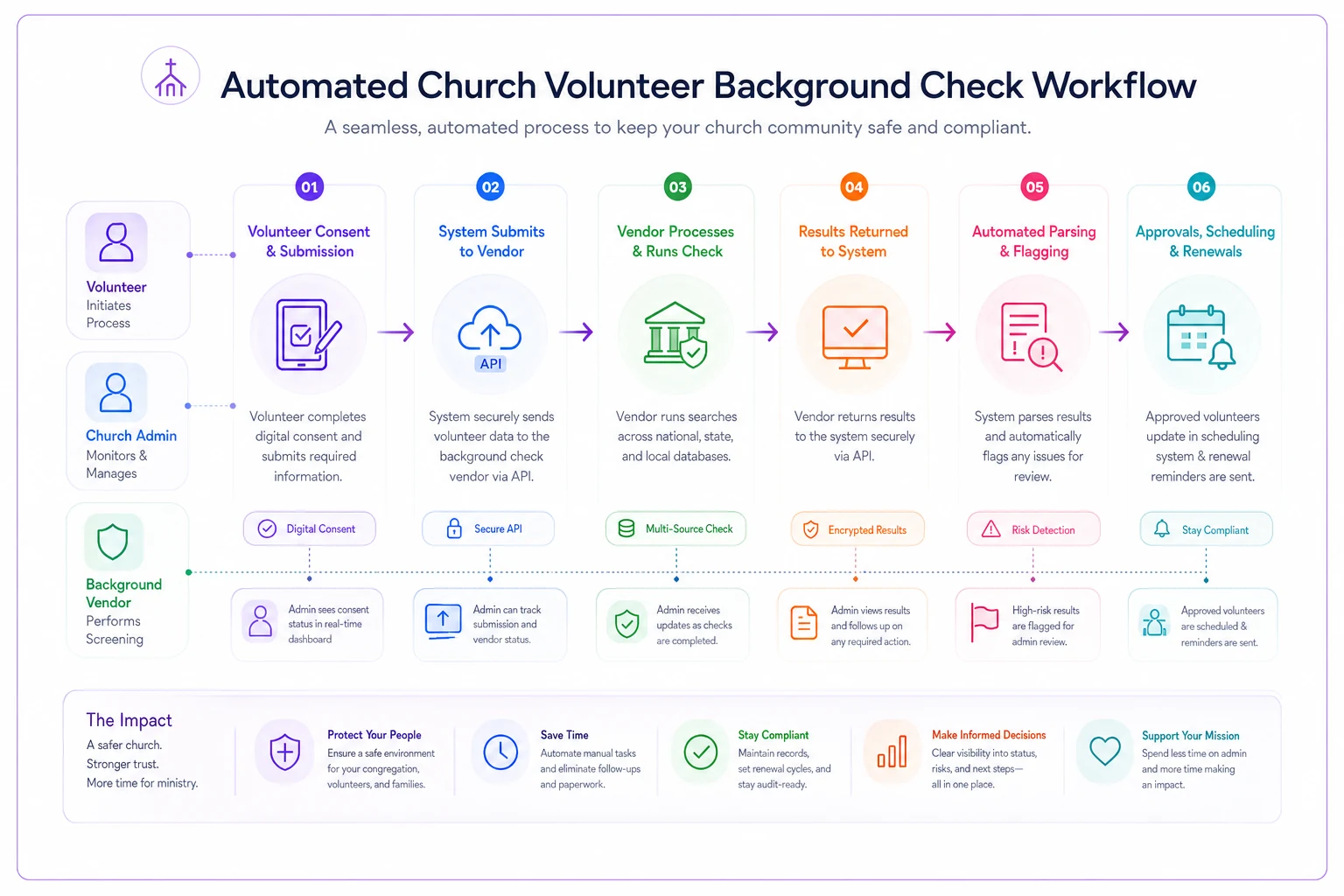
This shows the automated flow from consent to scheduling.
Churches running 30–50 background checks annually can save roughly $3,000–4,000 in staff time through basic automation. Larger churches processing 200+ checks annually can push that well past $15,000 in administrative savings.
The operational difference goes beyond cost. Volunteers experience a smoother onboarding process that keeps momentum going. Staff can focus on relationships rather than paperwork. Leadership gets consistent safety protocols without having to manually oversee every step. Modern church management platforms increasingly include these automation capabilities—most churches just haven't activated them yet.
Making the workflow sustainable
The best church volunteer background check workflow is one your team will actually follow long-term. Perfect compliance procedures mean nothing if they're abandoned after three months.
Start with the non-negotiables: background checks for anyone working with minors, clear consent documentation, secure record storage, and consistent renewal tracking. Everything else can evolve as your church grows.
Build buffers into your timeline. If insurance requires checks every three years, renew at 2.5 years. If state law mandates 30-day notice for adverse actions, give 45 days. These buffers prevent crisis moments when key volunteers suddenly can't serve.
Train multiple people on the process. When only one person knows the background check workflow, their vacation or resignation creates chaos. Document each step, share vendor login credentials securely, and cross-train at least two backup processors.
Most churches can implement this entire workflow framework for under $2,000 annually in direct costs, while saving thousands in staff time and potentially millions in risk exposure. The question isn't whether you can afford to screen volunteers properly—it's whether you can afford not to.
The church volunteer background check workflow isn't about creating barriers to service—it's about stewarding the trust your congregation places in leadership. A clear, efficient screening process protects vulnerable populations, reduces church liability, and actually helps volunteers feel confident in their service.
Most churches can implement this entire workflow framework for under $2,000 annually in direct costs, while saving thousands in staff time and potentially millions in risk exposure. The question isn't whether you can afford to screen volunteers properly—it's whether you can afford not to.
Ready to transform your church management?
Join 500+ churches using Parshly to enhance community engagement, streamline administration, and grow their ministries.